

Convert Text to PDF: Foliant
Elvira Latypova Productivity iPhoneiPadiPod touch
Convert Text to PDF: Foliant is a free Productivity app for iPhone and iPad by Elvira Latypova. Requires iOS 15.0. Updated August 26, 2026.
- Price
- Free
- on the App Store
- Size
- 28 MB
- Age 4+
- Updated
- Aug 26
- 2026 · v1.0.0
Screenshots

About Convert Text to PDF: Foliant
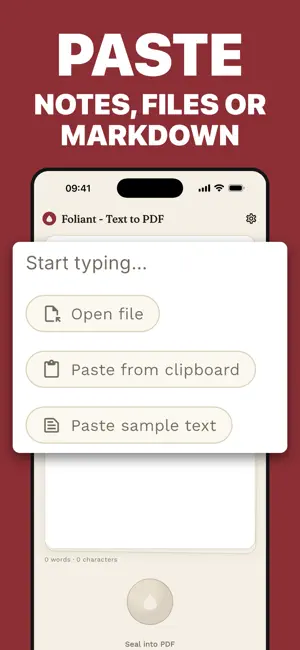
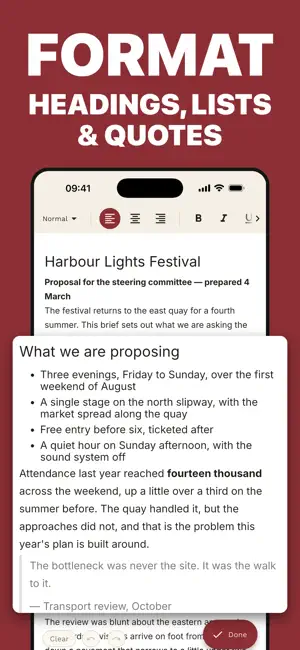
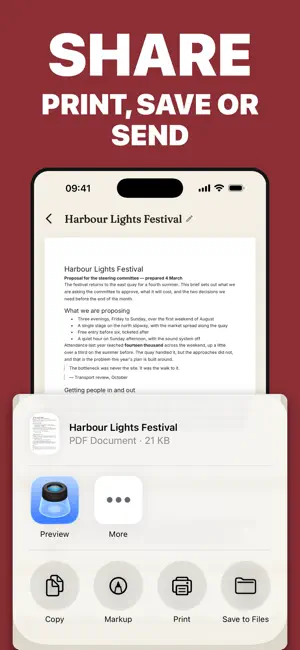
Foliant turns the text you already have into a PDF you would be happy to send. Paste a note, open a Markdown file, or write straight onto the page. Give it headings, lists, emphasis and alignment. Then tap the wax seal, and Foliant typesets it into a clean, properly laid out PDF you can preview, print, save or share. No account. No upload. No internet. Everything happens on your device, and your words stay there. WRITE, OR BRING TEXT IN • Type directly on the page, with undo and redo • Paste from the clipboard in one tap • Open .txt and .md files — Markdown is parsed into real formatting, not left as symbols • Your work is saved as you type, so the page is where you left it FORMAT AS YOU GO • Headings, bulleted and numbered lists, block quotes, dividers • Bold, italic, underline, strikethrough • Left, center and right alignment • The page on screen is laid out like the page in the PDF, so there are no surprises CHOOSE HOW IT PRINTS • Serif, sans or monospaced body typeface • A4 or US Letter • Body text from small to large • Ragged right or justified • Optional page numbers THEN DO SOMETHING WITH IT • Preview the finished document full screen • Print to any AirPrint printer • Save a copy into Files or iCloud Drive • Share it anywhere the share sheet reaches — Mail, Messages, Slack, anywhere KEPT FOR LATER Every document you seal is stored in History alongside the text it came from. Reopen it, rename it, edit the words and seal it again. Nothing is stranded in a format you can no longer edit. MADE TO BE READ Foliant is a quiet app: a parchment page, one accent color, and nothing standing between you and the words. Light and dark themes, and eight languages — English, German, Spanish, French, Italian, Japanese, Korean and Dutch. PRIVATE BY DESIGN There is no account, no sign-up, no analytics and no server. Foliant works fully offline, and nothing you write ever leaves your device. Good for essays, reports, meeting notes, letters, lecture notes, recipes, reading lists, contracts, invoices, lyrics — anything that reads better as a document than as a screenshot.
App privacy
The developer, Elvira Latypova, reported these privacy practices to Apple.
Data Not Collected
The developer does not collect any data from this app.
Alternatives to Convert Text to PDF: Foliant
Looking for apps like Convert Text to PDF: Foliant? Here are 6 similar apps on the App Store. The highest rated is Resume Expert: CV Maker (5.0/5), and all 6 are free to download.
-
 iScan Pro: PDF Scanner & OCR
-
 ScanMate: Scan, Convert, Edit
-
 Resume Expert: CV Maker
5.0
Resume Expert: CV Maker
5.0
-
 Text to PDF Converter - Text2P
4.8
Text to PDF Converter - Text2P
4.8
-
 The E-Diary
5.0
The E-Diary
5.0
-
 PDF Combiner – Merge Files
| App | Rating | Price | Last updated | Compare |
|---|---|---|---|---|
| Convert Text to PDF: Foliant | – | Free | August 26, 2026 | |
| iScan Pro: PDF Scanner & OCR | – | Free | Apr 4, 2026 | Compare |
| ScanMate: Scan, Convert, Edit | – | Free | Apr 24, 2025 | Compare |
| Resume Expert: CV Maker | 5.0 / 5 (3) | Free | Sep 24, 2025 | Compare |
| Text to PDF Converter - Text2P | 4.8 / 5 (20) | Free | Sep 7, 2026 | Compare |
| The E-Diary | 5.0 / 5 (1) | Free | Aug 9, 2026 | Compare |
| PDF Combiner – Merge Files | – | Free | Nov 7, 2025 | Compare |