

Wage Tracker Widgets
Winkpass Creations, Inc. Utilities iPhoneiPadiPod touch
Wage Tracker Widgets is a free Utilities app for iPhone and iPad by Winkpass Creations, Inc. Requires iOS 17.0. Updated October 18, 2026.
- Price
- Free
- on the App Store
- Size
- 9 MB
- Age 4+
- Updated
- Oct 18
- 2026 · v2.0
Screenshots


About Wage Tracker Widgets
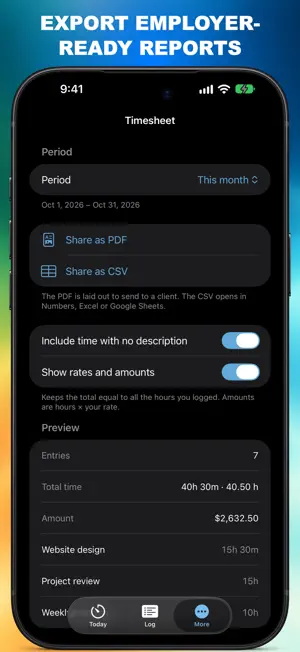
Wage Tracker Widgets is a calm, simple way to keep track of your work. Start a timer, say what you're working on, and stop when you're done. Your hours — and what they're worth — are kept for you. HOW IT WORKS • Start a timer with an optional note about what you're working on • Change what you're on without stopping the clock • Forgot the timer? Log past work in seconds • See today, this week and this month at a glance • Every entry is in one simple Log — tap to edit, swipe to delete FOR CLIENTS AND EMPLOYERS • Track time for each client or organization, each with its own hourly rate • Have a regular job? Add your employer and use the timer to clock in and out • Tax set-aside: see how much of what you earn to keep aside, at a percentage you choose ALWAYS WITHIN REACH • Home Screen and Lock Screen widgets with timer controls • Live Activity on the Lock Screen and Dynamic Island • Siri and Shortcuts: "Start the timer in Wage Tracker" SIMPLE AND PRIVATE • Your work data stays on your device — no account needed • Light and dark mode, English and Spanish FREE The timer, Log, widgets, Live Activity, Siri, tax set-aside and up to 2 clients — with ads. PREMIUM Remove all ads, plus: • Unlimited clients and organizations, each with its own rate • PDF and CSV timesheets, ready for your invoice • Reports: hours and earnings by week, month or year, by client and by activity • Backup and restore • Custom accent colors Premium is an auto-renewing subscription, available monthly or yearly. Payment is charged to your Apple Account at confirmation of purchase. The subscription renews automatically unless cancelled at least 24 hours before the end of the current period. Manage or cancel it anytime in your Apple Account settings. Privacy Policy: https://atkinsoninteractive.com/privacy/wage-tracker-widgets.html Terms of Use: https://www.apple.com/legal/internet-services/itunes/dev/stdeula/
What’s new
Version 2.0 · Updated October 18, 2026
Wage Tracker 2.0 — simpler, and built around how you work. • One simple app: Today to time your work, Log for every entry, More for settings • Note what you're working on, change it as you go, and log past work you forgot to time • Clients & Organizations: track clients you bill, or the employer you clock in for • New Reports show your hours and earnings by week, month or year (Premium) • Send PDF and CSV timesheets for billing (Premium) • Tax set-aside shows how much of what you earn to keep aside • Fresh design with a new icon and a calm blue theme • Fixed: logging work on a past date now saves the right hours • Fixed: a stray tap on the Lock Screen can no longer restart a paused timer
App privacy
The developer, Winkpass Creations, Inc., reported these privacy practices to Apple.
Data Used to Track You
The following data may be used to track you across apps and websites owned by other companies:
- Identifiers: Device ID
Data Not Linked to You
The following data, which may be collected but is not linked to your identity, may be used for the following purposes:
- Identifiers: Device ID
Used for: Third-Party Advertising
Alternatives to Wage Tracker Widgets
Looking for apps like Wage Tracker Widgets? Here are 6 similar apps on the App Store. The highest rated is Chronolog — Time Noter (5.0/5), and 5 of the 6 are free to download.
-
 Chronolog — Time Noter
5.0
Chronolog — Time Noter
5.0
-
 Tracking App for Trak-4 GPS
4.3
Tracking App for Trak-4 GPS
4.3
-
 Sable.
4.7
Sable.
4.7
-
 Next Car Dashboard
4.1
Next Car Dashboard
4.1
-
 Mission Critical Protocols
4.3
Mission Critical Protocols
4.3
-
 Work Hours Tracker: Time Clock
5.0
Work Hours Tracker: Time Clock
5.0
| App | Rating | Price | Last updated | Compare |
|---|---|---|---|---|
| Wage Tracker Widgets | – | Free | October 18, 2026 | |
| Chronolog — Time Noter | 5.0 / 5 (1) | Free | Mar 18, 2026 | Compare |
| Tracking App for Trak-4 GPS | 4.3 / 5 (868) | 3.99 USD | Nov 4, 2024 | Compare |
| Sable. | 4.7 / 5 (30) | Free | Apr 30, 2026 | Compare |
| Next Car Dashboard | 4.1 / 5 (37) | Free | Oct 26, 2026 | Compare |
| Mission Critical Protocols | 4.3 / 5 (15) | Free | Oct 6, 2026 | Compare |
| Work Hours Tracker: Time Clock | 5.0 / 5 (1) | Free | Oct 14, 2026 | Compare |