

ScanVidTop: Scan & Record
印 刘 Business iPhoneiPadiPod touch
ScanVidTop: Scan & Record is a free Business app for iPhone and iPad by 印 刘. Requires iOS 16.4. Updated October 23, 2026.
- Price
- Free
- on the App Store
- Size
- 61 MB
- Age 4+
- Updated
- Oct 23
- 2026 · v1.0.2
Screenshots


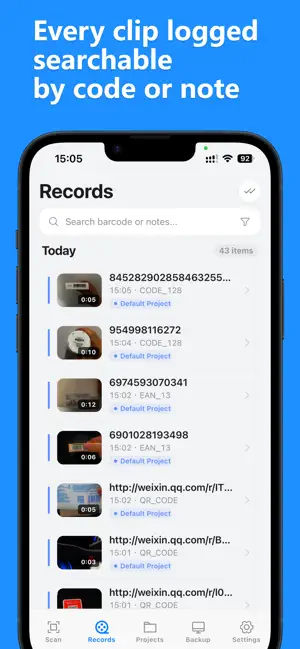

About ScanVidTop: Scan & Record
ScanVidTop turns your iPhone into a scan-triggered video recorder. Point at a barcode or QR code and recording starts automatically — perfect for proving what happened, when, and on which item. BUILT FOR REAL WORK Use it for warehouse operations, delivery handovers, retail audits, equipment inspections, quality checks, or any workflow where "scan + record" beats typing notes. KEY FEATURES • Scan to Record — Detect a barcode or QR code and recording begins instantly. No taps, no fumbling. • Continuous Mode — Scanning a new code automatically saves the current video and starts the next one. Work through a whole batch hands-free. • Single Item Mode — Pause scanning while you record, resume when you stop. • Smart Code Rules — Filter by code type, length, prefix/suffix or character set. Get alerts on duplicate scans instead of accidental re-records. • Projects & Industry Templates — Create projects for Express (Code 128), Retail (UPC/EAN), and more. Each project carries its own scan and recording rules. • Watermark Every Clip — Burn the scanned code and timestamp directly into the video, so footage speaks for itself. • Organized Records — Browse by timeline, session or project. Search by barcode or note, batch export, edit or delete. • Wireless Desktop Backup — Transfer recordings to ScanVidTop Desktop (free, macOS/Windows) over your local WiFi. Auto-backup, resumable transfers, safe cleanup. PRIVACY BY DESIGN All recordings are stored locally on your device and transferred only to your own computer over your local network. We don't upload, store, or see your videos. Ever. SCANVIDTOP PRO Free to use with core limits. Upgrade to ScanVidTop Pro for unlimited projects and recordings: • $1.99 / month • $11.99 / year • $27.99 one-time, lifetime access Payment is charged to your Apple ID account at confirmation of purchase. Subscriptions automatically renew unless cancelled at least 24 hours before the end of the current period. Your account is charged for renewal within 24 hours prior to the end of the current period. You can manage or cancel subscriptions in your App Store account settings at any time. No cancellation of the current subscription is allowed during the active period. Terms of Use: https://scanvid.top/en/terms Privacy Policy: https://scanvid.top/en/privacy
What’s new
Version 1.0.2 · Updated October 23, 2026
• New languages: Hindi, Spanish, Japanese, Korean, and Traditional Chinese — ScanVidTop now follows your device language automatically. • Bug fixes and performance improvements.
App privacy
The developer, 印 刘, reported these privacy practices to Apple.
Data Not Collected
The developer does not collect any data from this app.
Alternatives to ScanVidTop: Scan & Record
Looking for apps like ScanVidTop: Scan & Record? Here are 6 similar apps on the App Store. The highest rated is Stillfin: Focus & Fish (5.0/5), and all 6 are free to download.
-
 PackageProof Return Defender
-
 Parcel Proof – Evidence Log
-
 QRVideo
-
 CamBox : Shipping Recording
-
 Stillfin: Focus & Fish
5.0
Stillfin: Focus & Fish
5.0
-
 PIP Installation Assistant
| App | Rating | Price | Last updated | Compare |
|---|---|---|---|---|
| ScanVidTop: Scan & Record | – | Free | October 23, 2026 | |
| PackageProof Return Defender | – | Free | Feb 5, 2026 | Compare |
| Parcel Proof – Evidence Log | – | Free | Oct 21, 2026 | Compare |
| QRVideo | – | Free | Jun 7, 2026 | Compare |
| CamBox : Shipping Recording | – | Free | Oct 27, 2026 | Compare |
| Stillfin: Focus & Fish | 5.0 / 5 (1) | Free | Oct 10, 2026 | Compare |
| PIP Installation Assistant | – | Free | Sep 3, 2026 | Compare |