

WhoWorks
SCOT TRENTON WALLACE Utilities iPhoneiPadiPod touch
WhoWorks is a free Utilities app for iPhone and iPad by SCOT TRENTON WALLACE. Requires iOS 18.0. Updated August 18, 2026.
- Price
- Free
- on the App Store
- Size
- 1 MB
- Age 4+
- Updated
- Aug 18
- 2026 · v1.0
Screenshots


About WhoWorks
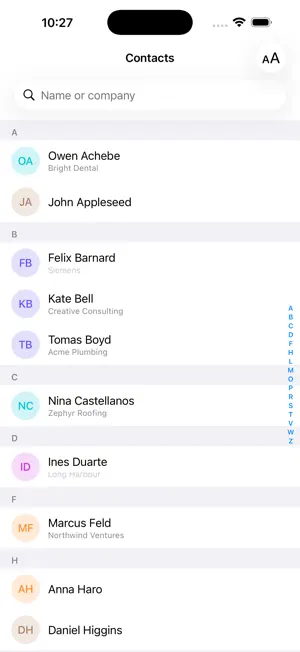
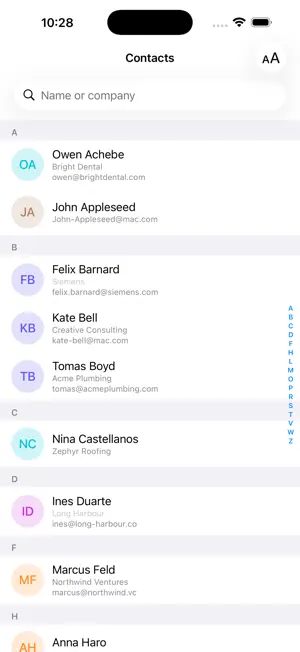
The built-in Contacts app gives you one line per person: their name. If you deal with people through their work, that's the wrong line — you end up scrolling a thousand names looking for the one who does your plumbing. WhoWorks adds a zoom gesture to your contact list. Pinch out and each row shows more. • Names — the standard list • Names and companies — the company in smaller type under each name • With email — add the email address underneath • By company — the list regroups under company headings instead of letters Contacts missing a field simply don't show that line. Nothing is padded out with blanks. Most people never fill in the Company field, so WhoWorks works it out from a work email address when one is there — [email protected] becomes Acme Tools. Inferred companies are shown in lighter type so you can always tell a guess from something you typed. Personal addresses like gmail and icloud are ignored. WhoWorks reads the same address book as Contacts and the Phone app. There's no import, no separate copy, and no syncing — edit a contact anywhere and it's current here. Tap anyone to open the standard iOS contact card with all the usual call, message and FaceTime options. Also included: • Search by company or job title, not just name • Swipe a row to call or message, or to add a favorite • Favorites pinned to the top of the list • Your contacts in Spotlight, searchable by company from the home screen WhoWorks works entirely on your device. It makes no network requests of any kind, has no account, and no analytics. Your address book never leaves your iPhone.
App privacy
The developer, SCOT TRENTON WALLACE, reported these privacy practices to Apple.
Data Not Collected
The developer does not collect any data from this app.
Alternatives to WhoWorks
Looking for apps like WhoWorks? Here are 6 similar apps on the App Store. The highest rated is PokupOK: Grocery Shopping List (5.0/5), and all 6 are free to download.
-
 Spreadsheet maker: view & edit
-
 Contact+ | Telegram Avatars
-
 PokupOK: Grocery Shopping List
5.0
PokupOK: Grocery Shopping List
5.0
-
 HamRadar
3.8
HamRadar
3.8
-
 CalculatorWidgy - Widget Calc
4.2
CalculatorWidgy - Widget Calc
4.2
-
 FBOlink - Messaging
3.5
FBOlink - Messaging
3.5
| App | Rating | Price | Last updated | Compare |
|---|---|---|---|---|
| WhoWorks | – | Free | August 18, 2026 | |
| Spreadsheet maker: view & edit | – | Free | Aug 27, 2026 | Compare |
| Contact+ | Telegram Avatars | – | Free | Feb 25, 2026 | Compare |
| PokupOK: Grocery Shopping List | 5.0 / 5 (3) | Free | Oct 6, 2026 | Compare |
| HamRadar | 3.8 / 5 (6) | Free | Dec 9, 2025 | Compare |
| CalculatorWidgy - Widget Calc | 4.2 / 5 (5) | Free | Nov 1, 2023 | Compare |
| FBOlink - Messaging | 3.5 / 5 (14) | Free | Nov 14, 2025 | Compare |
Compare WhoWorks with the top alternatives: ratings, updates, ASO score and keyword gaps →