

Lifelio: Photo to Calendar
XIAODONG LI Productivity iPhoneiPadiPod touchApple Watch
Lifelio: Photo to Calendar is a free Productivity app for iPhone and iPad by XIAODONG LI. Requires iOS 16.0. Updated October 24, 2026.
- Price
- Free
- on the App Store
- Size
- 93 MB
- Age 4+
- Updated
- Oct 24
- 2026 · v1.1.7
Screenshots


About Lifelio: Photo to Calendar
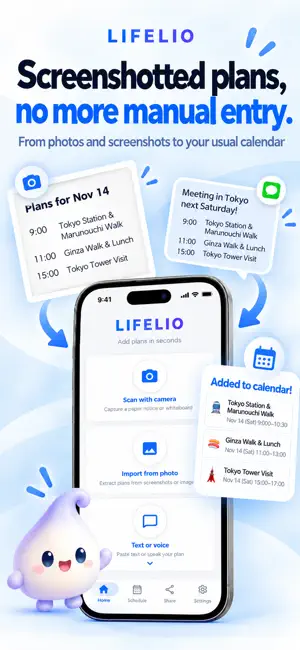
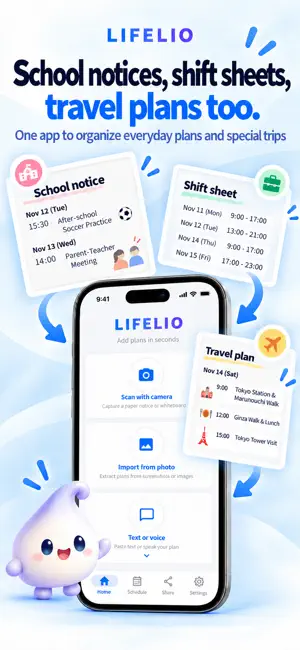
Spend less time retyping events. School notices, event flyers, messages, shift schedules, and travel plans often arrive outside your calendar. Lifelio uses AI to organize dates, times, and locations from photos, screenshots, text, and voice. Review and edit each result before adding it to your usual calendar. ■ Turn photos and screenshots into events Choose an image and let AI organize event titles, dates, times, and locations. Check and edit the details before adding them. ■ Add multiple and recurring events Lifelio separates events found in a school calendar or shift schedule so you can select what you need and add them together. Review and edit recurring events before adding them. ■ Import events from your calendar Bring events from your iPhone calendar into Lifelio. Review their details, choose the events you need, or add all loaded events together. ■ Create events with text or voice Enter “Meeting tomorrow at 3 PM,” or speak to create an event. ■ Reminder suggestions Review suggested notification times based on the event. ■ Share schedules Use Lifelio Card to share multiple events at once. Review schedules shared with you and use them in your own planning. For school events, activities, work, shifts, travel, bookings, family plans, and deadlines. See an event? Add it with Lifelio. Spend less time retyping plans and more time on what matters. PRIVACY POLICY https://lifelio.app/privacy/ TERMS OF USE https://lifelio.app/terms/ Apple Standard EULA https://www.apple.com/legal/internet-services/itunes/stdeula/ SUPPORT https://lifelio.app/support/ Contact: [email protected]
What’s new
Version 1.1.7 · Updated October 24, 2026
More reliable events, smoother voice input, and clearer schedule-card management. • Fixed an issue that could make all-day events span an extra day in your calendar when creating, editing or importing events. • Voice input now follows the app's display language: Japanese, English or Simplified Chinese. • Improved translations for Lio's weather, messages, preparation checklists and notifications. • Improved voice-input cancellation and app startup stability. • Improved deletion of schedule cards for one-off and recurring events, including bulk deletion. • Added clearer guidance when calendar events cannot be found and improved recovery when retrying an interrupted deletion.
App privacy
The developer, XIAODONG LI, reported these privacy practices to Apple.
Data Not Linked to You
The following data, which may be collected but is not linked to your identity, may be used for the following purposes:
- Purchases: Purchase History
- User Content: Photos or Videos, Other User Content
- Identifiers: User ID
Used for: App Functionality
Alternatives to Lifelio: Photo to Calendar
Looking for apps like Lifelio: Photo to Calendar? Here are 6 similar apps on the App Store.
-
 Otayori Post
-
 Polenest: Schedule Calendar
-
 おたよりAI - AIが自動で認識!おたよりから予定検知も!
-
 Prikan - School Paperwork Scan
-
 Score Calendar - Track Scores
-
 Kotomemo:AI Print Secretary
| App | Rating | Price | Last updated | Compare |
|---|---|---|---|---|
| Lifelio: Photo to Calendar | – | Free | October 24, 2026 | |
| Otayori Post | – | Free | Aug 21, 2026 | Compare |
| Polenest: Schedule Calendar | – | Free | Sep 14, 2026 | Compare |
| おたよりAI - AIが自動で認識!おたよりから予定検知も! | – | Free | Sep 2, 2024 | Compare |
| Prikan - School Paperwork Scan | – | Free | Sep 28, 2026 | Compare |
| Score Calendar - Track Scores | – | Free | Oct 15, 2026 | Compare |
| Kotomemo:AI Print Secretary | – | Free | Sep 22, 2026 | Compare |