

My Finance - Portfolio Monitor
Andrea Di Giacomo Finance iPhoneiPadiPod touch
My Finance - Portfolio Monitor is a free Finance app for iPhone and iPad by Andrea Di Giacomo. Requires iOS 15.0. Updated August 28, 2026.
- Price
- Free
- on the App Store
- Size
- 23 MB
- Age 4+
- Updated
- Aug 28
- 2026 · v1.0.2
Screenshots

About My Finance - Portfolio Monitor
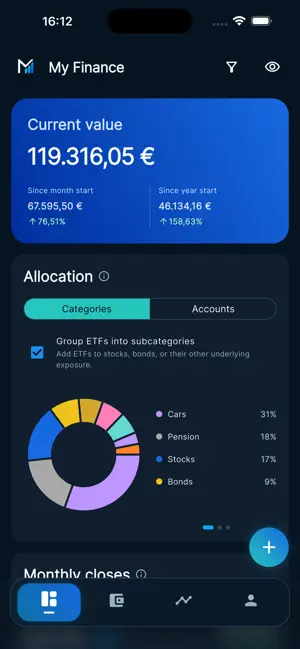
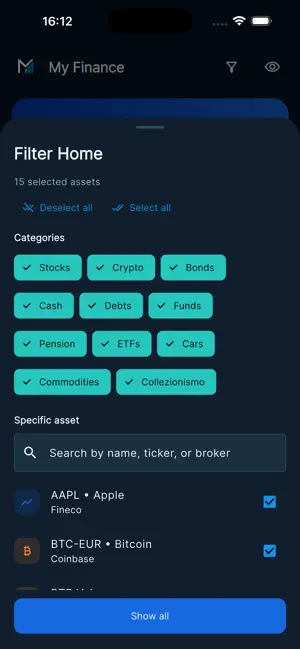
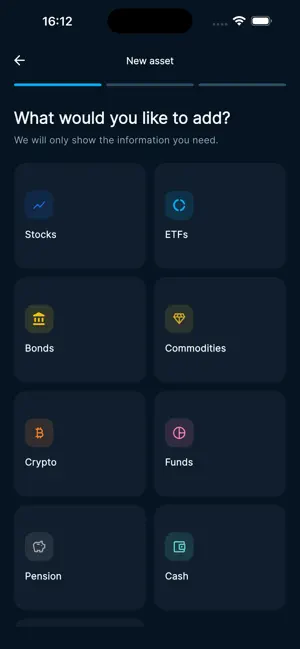
What is your wealth worth today? And how is it distributed? My Finance helps you answer these questions without complicated spreadsheets and without connecting your bank accounts. Add your assets, update their values occasionally, and let the app organize the information for you. In just a few moments, you can see your total wealth, understand its allocation, and follow how it changes over time. With My Finance, you can: • bring your assets and investments into one clear overview; • organize your wealth by category and broker; • update quantities and values whenever it suits you; • view portfolio composition and allocation; • compare measurements over time; • filter data to focus on specific parts of your wealth; • quickly hide values whenever you need more privacy. There is no need to update the app continuously. Use it periodically whenever you want a clear, up-to-date snapshot of your financial position. My Finance does not connect to your accounts, request banking credentials, or move money. Financial information is entered voluntarily by the user. My Finance is an informational tool for personal wealth monitoring. It is not a bank, broker, financial intermediary, or financial adviser. Quotes and calculations may be incomplete, delayed, or inaccurate and should not be the sole basis for investment decisions.
What’s new
Version 1.0.2 · Updated August 28, 2026
• Added Slovak language support; • Improved translations; • Improved keyboard behavior when creating assets, accounts, and brokers; • Bug fixes and general improvements.
App privacy
The developer, Andrea Di Giacomo, reported these privacy practices to Apple.
Data Linked to You
The following data, which may be collected and linked to your identity, may be used for the following purposes:
- Financial Info: Credit Info, Other Financial Info
- Contact Info: Email Address, Name
- Identifiers: User ID
Used for: Product Personalization, App Functionality
Data Not Linked to You
The following data, which may be collected but is not linked to your identity, may be used for the following purposes:
- Identifiers: Device ID
Used for: Product Personalization, App Functionality
Alternatives to My Finance - Portfolio Monitor
Looking for apps like My Finance - Portfolio Monitor? Here are 6 similar apps on the App Store. The highest rated is RMOUS (5.0/5), and all 6 are free to download.
-
 Assets - stock, fixed, etc
-
 LedgerVault
-
 StockAnalyzer
-
 Just Portfolio
-
 FinTrackPro - Expense Manager
-
 RMOUS
5.0
RMOUS
5.0
| App | Rating | Price | Last updated | Compare |
|---|---|---|---|---|
| My Finance - Portfolio Monitor | – | Free | August 28, 2026 | |
| Assets - stock, fixed, etc | – | Free | Aug 10, 2026 | Compare |
| LedgerVault | – | Free | Apr 7, 2026 | Compare |
| StockAnalyzer | – | Free | May 30, 2026 | Compare |
| Just Portfolio | – | Free | Jan 5, 2026 | Compare |
| FinTrackPro - Expense Manager | – | Free | Aug 14, 2024 | Compare |
| RMOUS | 5.0 / 5 (2) | Free | Oct 8, 2026 | Compare |