

Emodori: Shared Photo Albums
Seiki Hashimoto Photo & Video iPhoneiPadiPod touch
Emodori: Shared Photo Albums is a free Photo & Video app for iPhone and iPad by Seiki Hashimoto. Requires iOS 26.0. Updated October 12, 2026.
- Price
- Free
- on the App Store
- Size
- 27 MB
- Age 12+
- Updated
- Oct 12
- 2026 · v1.4
Screenshots
About Emodori: Shared Photo Albums
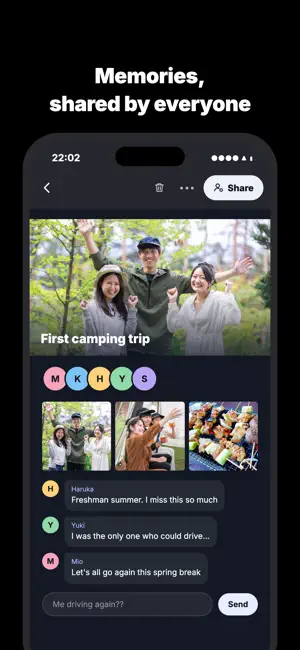
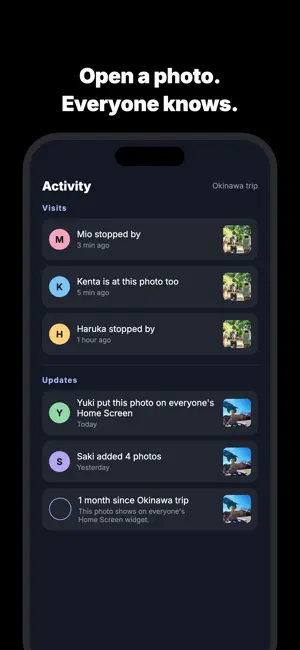
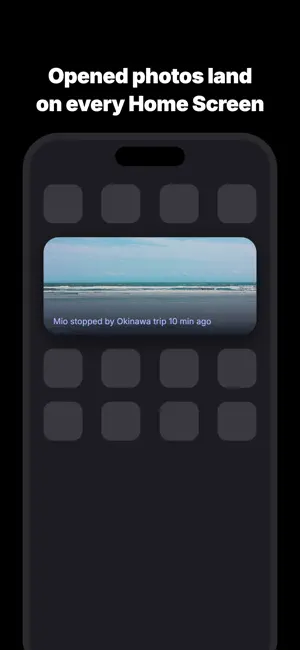
Nothing to send. Just open it — and the people who were there will know. "I'm probably the only one still looking at these trip photos." Emodori is for anyone who has ever thought that. Emodori is a photo album shared only with the people who were actually there. What makes it different from every other shared album: there is no send button. You put the photos in, and you open them. That's the whole action. ■ At 9 PM on an anniversary, the same photos reach everyone at once One month, 100 days, and one year from the day the photos were taken. Seven and fourteen days from the day they were brought into the album. On the evening of each milestone, at 9 PM, the photos from that day arrive for everyone who was there — at the same moment. Nobody sends them. The date calls them. ■ As the day gets closer, a number counts down From three days before a milestone, the home screen counts down the days. On the day itself it tells you one opens today. ■ Open it at 9 PM and someone is already there If someone else is looking at the same photo, you see "Haruka is here too." ■ What comes back is "here," not "seen" This is not a read receipt. The word "seen" never appears anywhere in the app. No reply is expected. You are not being asked to respond — you are being told you are not alone in there. ■ A word takes one tap "I remember this." "Miss this." "Let's go back." Tap one and it lands under the photo. You can also write your own. ■ Notifications you choose The milestone night, and a single summary of who walked through. If both fall on the same day, only the milestone rings. When someone adds photos, you get a short note with only the album name and the count. The summary and the photo notes can be turned off in Settings. = How it works = 1. Make an album and put that day's photos in it 2. Send one link to the people who were there 3. From then on, just open it There is no group to create. Signing up is just Sign in with Apple — no name, no email. The app asks for a display name only just before someone else can see you. = What it does not do = - Strangers never see it. No followers, no recommendations, no discovery feed - No like counts to compete over - The photos do not have to be good ones = Pricing = Free to start. Each album holds up to 30 photos. For your first week, every album you create holds up to 1,000 photos as it is. After that, one album becomes 1,000 photos for a one-time purchase. No subscription, no monthly billing. When one person pays for an album, the limit rises for everyone in that album. = Who it is for = - The four to six people who took one graduation trip together - The friends from school you still see once a year - Two people whose trip photos live half on one phone and half on the other You will not make new friends here. You will lose fewer old ones. —— LEMOSERA Support: [email protected] Privacy Policy: https://lemosera.com/emodori/privacy Terms of Use: https://lemosera.com/emodori/terms
What’s new
Version 1.4 · Updated October 12, 2026
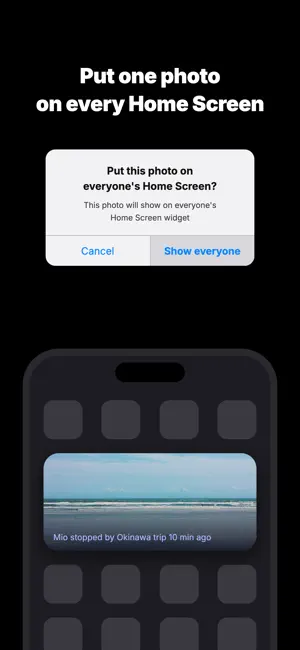
■ Photos on milestone notifications The 9 pm milestone notification now comes with the one photo everyone sees that day, even if you haven't opened the app for a while. - "Share" that photo from the milestone screen - When several albums reach a milestone on the same day, swipe the photo to see each of them ■ Easier invites - Show a QR code on the invite card - Shorter invite links, with the cover photo shown when you share - The invite message includes the month and the number of photos - When you join from an invite, the title and cover appear first and the photos follow - "Invited by a link? Tap here" on the first-launch screens ■ Save to Photos When viewing a single photo, tap "Save to Photos" to add it to the Photos app. ■ Sign in Sign in with Apple is now required. If you reinstall the app or switch iPhones, signing in brings back your albums and your name. ■ Also - An album created without a name is named after the month the photos were taken - We now ask for notification permission when it is first needed - Clearer messages when Activity is empty - Fixed the app sometimes freezing on first launch
App privacy
The developer, Seiki Hashimoto, reported these privacy practices to Apple.
Data Linked to You
The following data, which may be collected and linked to your identity, may be used for the following purposes:
- Purchases: Purchase History
- Contact Info: Name
- User Content: Photos or Videos, Other User Content
- Identifiers: User ID
Used for: App Functionality
Data Not Linked to You
The following data, which may be collected but is not linked to your identity, may be used for the following purposes:
- Usage Data: Product Interaction
Used for: Analytics
Alternatives to Emodori: Shared Photo Albums
Looking for apps like Emodori: Shared Photo Albums? Here are 6 similar apps on the App Store. The highest rated is Shuffle Photos (4.6/5), and all 6 are free to download.
-
 OneDay Memory: On This Day
-
 Swipe Photo Sorting - Albumate
-
 Pimorio - Shared Vlog Camera
-
 PicFile: Smart Album Maker
-
 Audrey: AI Camera & Filters
3.0
Audrey: AI Camera & Filters
3.0
-
 Shuffle Photos
4.6
Shuffle Photos
4.6
| App | Rating | Price | Last updated | Compare |
|---|---|---|---|---|
| Emodori: Shared Photo Albums | – | Free | October 12, 2026 | |
| OneDay Memory: On This Day | – | Free | Oct 24, 2026 | Compare |
| Swipe Photo Sorting - Albumate | – | Free | Sep 27, 2026 | Compare |
| Pimorio - Shared Vlog Camera | – | Free | Oct 25, 2026 | Compare |
| PicFile: Smart Album Maker | – | Free | Apr 16, 2026 | Compare |
| Audrey: AI Camera & Filters | 3.0 / 5 (1) | Free | Oct 2, 2026 | Compare |
| Shuffle Photos | 4.6 / 5 (347) | Free | Sep 27, 2026 | Compare |