

PinPath: Saved Places to Trips
Wenfeng Duan Travel iPhoneiPadiPod touch
PinPath: Saved Places to Trips is a free Travel app for iPhone and iPad by Wenfeng Duan. Requires iOS 15.0. Updated October 7, 2026.
- Price
- Free
- on the App Store
- Size
- 124 MB
- Age 9+
- Updated
- Oct 7
- 2026 · v2026.1012.0
Screenshots


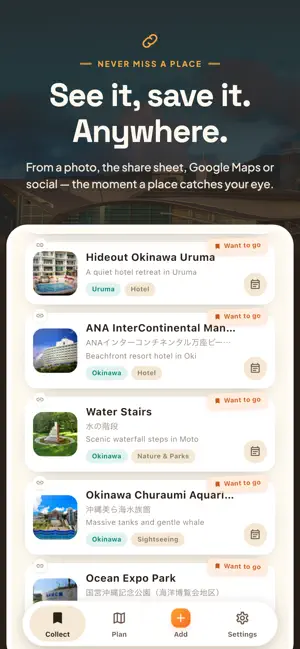

About PinPath: Saved Places to Trips
Still saving places you'll never find again? PinPath turns the places you're curious about into your next trip. Save anything in one tap - from social posts, articles, or your own photos - and get a timed itinerary that accounts for transit and stays. Plan it together with friends and family. COLLECT - one tap, the moment it catches your eye - From a photo: save a place from a picture or screenshot - From a link: paste a URL from social or an article - From the share button: send straight to PinPath from any app - By hand: jot it down in your own words For a travel blog or a "top 10" article, add every place in it, one after another. Switch between List and Map to see everything you've saved. PLAN - saved places become a timed itinerary Pick your places and get a timed itinerary that considers transit and stays. Reorder and fine-tune on the Board - drag to move stops or add new ones. Share the finished Plan as-is. TOGETHER - send, join, edit as one Share a plan with a link. Anyone can view it first, then join to edit together. Set who can edit and who can only view, so organizing takes far less effort. ON THE GO, OR LATER - One tap from stop to stop opens your route in Google Maps with your chosen travel mode - Filter saved places by tag - by area or category Basic features are free to use. For those who want more, you can unlock the following: - Unlimited automatic place extraction (the free plan has a monthly limit) - More automatic plan generations - Add unlimited custom categories Save any place - and make it your next trip. Start planning with PinPath. Terms of Use: https://pinpath-prod.web.app/legal/terms_en.html Privacy Policy: https://pinpath-prod.web.app/legal/privacy_en.html https://www.apple.com/legal/internet-services/itunes/dev/stdeula/
What’s new
Version 2026.1012.0 · Updated October 7, 2026
Collecting the places you want to go is now even easier. FOUR WAYS TO ADD, ON ONE CARD The first time you open Collect, a single card shows the four ways to add a place: Camera, Gallery, Share from another app, or Manually. Snap a sign or article, send a place from "Share" in Maps, or save it with just a name. SAVING IS INSTANT Tap Save and move on. The map location and one-line intro fill in on their own after saving. Plus smaller fixes and improvements. See you on the next trip.
App privacy
The developer, Wenfeng Duan, reported these privacy practices to Apple.
Data Not Linked to You
The following data, which may be collected but is not linked to your identity, may be used for the following purposes:
- Identifiers: Device ID
- Usage Data: Product Interaction, Other Usage Data
- Location: Coarse Location
- Contact Info: Email Address
- Diagnostics: Crash Data
Used for: Third-Party Advertising, Product Personalization, App Functionality
Alternatives to PinPath: Saved Places to Trips
Looking for apps like PinPath: Saved Places to Trips? Here are 6 similar apps on the App Store. The highest rated is tuctac · Travel Journal & Map (5.0/5), and all 6 are free to download.
-
 tuctac · Travel Journal & Map
5.0
-
 Traceory – AI Trip Planner
-
 Family & Friends - GPS Locator
-
 道の駅スタンプラリー・情報ポータル【日本全国対応】
-
 Now You Know Nashville
-
 Parkly Ph
| App | Rating | Price | Last updated | Compare |
|---|---|---|---|---|
| PinPath: Saved Places to Trips | – | Free | October 7, 2026 | |
| tuctac · Travel Journal & Map | 5.0 / 5 (1) | Free | Sep 7, 2026 | Compare |
| Traceory – AI Trip Planner | – | Free | Oct 6, 2026 | Compare |
| Family & Friends - GPS Locator | – | Free | May 16, 2025 | Compare |
| 道の駅スタンプラリー・情報ポータル【日本全国対応】 | – | Free | Oct 19, 2026 | Compare |
| Now You Know Nashville | – | Free | Oct 17, 2026 | Compare |
| Parkly Ph | – | Free | Oct 20, 2026 | Compare |