

Reelmo: Photo Slideshow
Yingtao Guo Photo & Video iPhoneiPadiPod touch
Reelmo: Photo Slideshow is a free Photo & Video app for iPhone and iPad by Yingtao Guo. Rated 5.0/5 from 1 ratings. Requires iOS 18.0.
- Rating
- 5.0
- 1 ratings
- Price
- Free
- on the App Store
- Size
- 103 MB
- Age 4+
- Updated
- Sep 15
- 2026 · v1.3
Screenshots



About Reelmo: Photo Slideshow
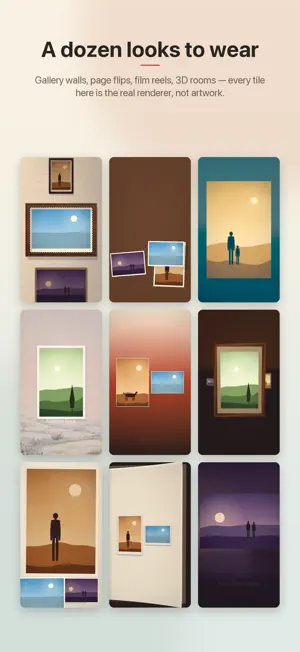
Reelmo helps you turn the moments already in your photo library into polished video stories. Start with a ready-made template, build a one-year story month by month, or choose your own photos and videos for a freeform reel. Reelmo can group a batch of memories into chapters by capture time, then lets you edit the title, captions, music, pacing, and visual style before export. Built for family albums, birthdays, travel recaps, weddings, graduations, memorial tributes, and everyday moments worth keeping. Features: - Guided templates for travel, birthdays, first-year memories, memorial stories, and more - Automatic chapter grouping from selected photos and videos - One Year Story flow that organizes memories month by month - Freeform creation from your photo library or imported files - Cinematic video styles including page flip, scrapbook, film reel, 3D galleries, and fade layouts - Built-in background music options - Editable story titles, chapter captions, and video text - Preview before saving or sharing - Export finished videos to Photos Reelmo is designed for people who want a finished story, not another complicated editing timeline. Pick your memories, choose the mood, preview the result, and save a video you can share with family and friends.
What’s new
Version 1.3 · Updated September 15, 2026
Every story now opens on one of its own photographs. The title and description sit over the picture instead of on a plain cream card, and that same frame is what Photos and the share sheet show for the exported video — so it looks like your story before anyone presses play. Travel stories say where the trip went, right on the cover: "Tokyo → Kyoto → Osaka · 5 days", written in one stop at a time. Chapter titles and end cards now stay on screen long enough to read. A page of words rests at least as long as a photograph does, plus the moment it takes to fade in. When you have no stories yet, the home screen plays a short sample of a template in motion, so you can see what you are about to make.
App privacy
The developer, Yingtao Guo, reported these privacy practices to Apple.
Data Not Collected
The developer does not collect any data from this app.