

Creatine Tank: Daily Tracker
kazunari aoki Health & Fitness iPhoneiPadiPod touchApple Watch
Creatine Tank: Daily Tracker is a free Health & Fitness app for iPhone and iPad by kazunari aoki. Requires iOS 18.0. Updated September 9, 2026.
- Price
- Free
- on the App Store
- Size
- 7 MB
- Age 4+
- Updated
- Sep 9
- 2026 · v1.0.2
Screenshots


About Creatine Tank: Daily Tracker
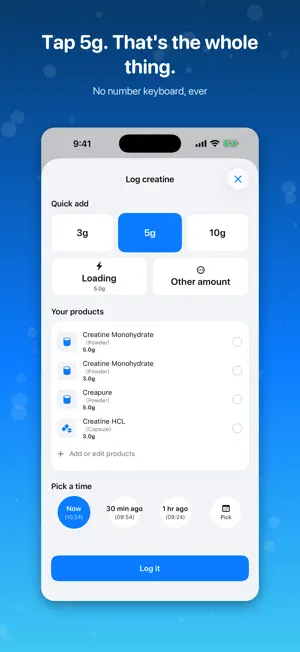
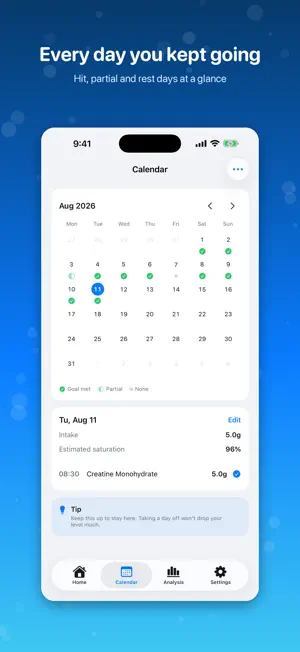
Creatine Tank turns your creatine habit into something you can see: a tank that fills up as you keep going. You take it every day, but you never really know how full you are. You skip one day and wonder if you've undone everything. Creatine Tank answers both with one number and one picture. ■ One or two taps to log Tap 5g, tap Log it. No number keyboard, ever. Save the products you use and pick them with a single tap. Took it a while ago? "30 min ago" and "1 hr ago" are right there. ■ See your estimated saturation as a tank From your logged intake, body weight, diet and the days since you started, Creatine Tank estimates how full your creatine stores are and shows it as a tank from 0 to 100%. The liquid rises a little every time you log. - Six phases: Starting, Building, Near Full, Saturated, Maintenance, Paused - "Estimated time to full" tells you what's ahead - Missing one day barely moves the needle. Take a break and it comes back gradually ■ Look back on what you've built The calendar shows at a glance which days you hit your goal, which were partial, and which you missed. Analysis charts your saturation trend and the breakdown of what you took. ■ Intake plans Switch between Standard, Loading and Maintenance and the suggested amount adjusts to your body weight. You always know which phase you're in and roughly when you'll reach full. ■ Widgets Keep your saturation and today's intake on your Home Screen and Lock Screen. [ Creatine Tank Pro (one-time purchase) ] Pay once and everything below unlocks. There is no subscription and nothing auto-renews. - Apple Watch app - log +3g or +5g from your wrist - Large widget, plus a widget with +3g / +5g buttons - 90-day analysis - Stats tab - this month's summary and how it lines up with your training - Set your own daily target - Save unlimited products - CSV export Logging, Home, Calendar and the 7- and 30-day analysis stay free forever. [ Before you start ] Creatine Tank is not a medical device. The "estimated saturation" it shows is calculated from what you log - it is not a measurement of the creatine in your body. If you have any concerns about supplements or your health, or if you have a medical condition or take medication, please talk to a doctor or pharmacist. What you log stays on your device. It is never sent to the developer or any third party. Health is only read for body weight and workouts - nothing is ever written back.
What’s new
Version 1.0.2 · Updated September 9, 2026
Two saving bugs fixed. - Fixed a case where a log could look saved even though saving had failed. You are now told right away, and what you entered stays so you can try again. - Fixed a case where editing a log could drop the product name if that product was no longer in your list. Requests and bug reports are always welcome.
App privacy
The developer, kazunari aoki, reported these privacy practices to Apple.
Data Not Collected
The developer does not collect any data from this app.
Alternatives to Creatine Tank: Daily Tracker
Looking for apps like Creatine Tank: Daily Tracker? Here are 6 similar apps on the App Store. The highest rated is My Creatine: Daily tracker (3.3/5), and all 6 are free to download.
-
 Brim: Creatine Tracker
-
 Box One Coach
-
 Creatine Jotter: Dose Tracker
-
 Satura: Creatine Tracker
-
 Growth Rings: Future Journal
-
 My Creatine: Daily tracker
3.3
My Creatine: Daily tracker
3.3
| App | Rating | Price | Last updated | Compare |
|---|---|---|---|---|
| Creatine Tank: Daily Tracker | – | Free | September 9, 2026 | |
| Brim: Creatine Tracker | – | Free | Oct 6, 2026 | Compare |
| Box One Coach | – | Free | Oct 16, 2026 | Compare |
| Creatine Jotter: Dose Tracker | – | Free | Oct 3, 2026 | Compare |
| Satura: Creatine Tracker | – | Free | Sep 13, 2026 | Compare |
| Growth Rings: Future Journal | – | Free | Jul 25, 2026 | Compare |
| My Creatine: Daily tracker | 3.3 / 5 (3) | Free | May 11, 2026 | Compare |