

Dalune: Shift Calendar & Alarm
gahyun lee Productivity iPhoneiPadiPod touch
Dalune: Shift Calendar & Alarm is a free Productivity app for iPhone and iPad by gahyun lee. Requires iOS 15.0. Updated October 5, 2026.
- Price
- Free
- on the App Store
- Size
- 63 MB
- Age 4+
- Updated
- Oct 5
- 2026 · v0.6.14
Screenshots


About Dalune: Shift Calendar & Alarm
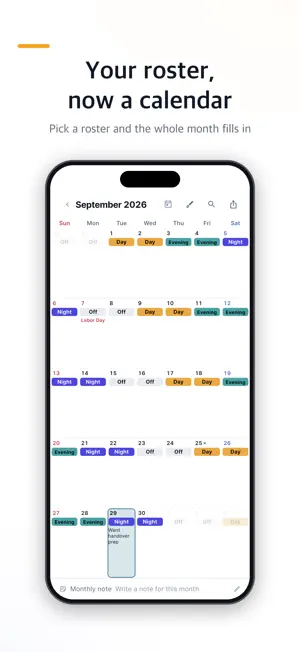
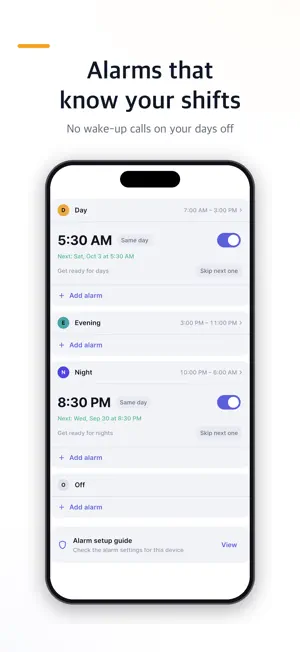
Pick a roster and this month's calendar fills itself in. Day, night and off shifts, color-coded at a glance. Shift calendar, duty roster, work rota — whatever you call it, what you need is one thing: when your next shift is. ■ Three ways to add your roster · Find a roster — built-in rosters by job, plus rosters coworkers have shared. Pick your crew and this month's calendar lines up with today · Find it from recent shifts — tap in a few days of shifts and Dalune works out the repeating cycle · Enter it yourself — with the shift names your team really uses, in cycles of up to 50 days ■ Built for every rotation · Two-shift and three-shift rotations, 4-crew and 5-crew patterns · Day, evening, night, off, on-call — named the way your team names them · Every other day, alternating weeks, schedules that change monthly — cycles of up to 50 days · Night shifts that end after midnight are clearly marked on screen ■ Add it once, everything follows Your calendar, home screen widgets, shift alarms and pay estimate all read the same roster. Change a shift and your widgets and alarms update right along with it. ■ Alarms that get you there on time · A different alarm for every shift — 5:30 a.m. for days, 8:30 p.m. for nights · On iOS 26 and later they ring as system alarms, right on time · No wake-up calls on your days off · Turn on automatic days off and shifts on public holidays become days off — your alarms rest too (Korean, Japanese and US holidays) ■ See this month's pay before payday · Hourly, daily, monthly, twice-monthly or biweekly pay · Night and overtime rates set per shift, such as 1.5× · Counts this month's attendance right from your calendar and turns it into pay · Annual leave at a glance in the report ■ Rosters you share · Groups — one invite code to see your team's roster together and trade shifts · Publish your team's roster — share your rotation once, and coworkers just pick their crew ■ Daily fortune (new) · See the day's energy from just your birth date — with the reasons, not only the result · Your birth date is stored only on this device and never sent anywhere · It isn't included in account backups either ■ Right on your home screen · Three widgets — today, this week and this month — in dark or light theme · A big or compact calendar view, whichever suits your eyes ■ Your shifts stay on your device · Every core feature works without signing in · Rosters, notes and pay stay on your device — back up to your Google account only if you want · No ad tracking — only anonymous usage statistics to improve the app ■ Who uses Dalune · Nurses and nursing assistants keeping track of ward duty rosters · Firefighters, police and corrections officers on rotating shifts · Shift crews in manufacturing, maintenance, quality control and warehouses · Security, facilities, call centers, airlines and hotels · Anyone whose work schedule changes every month ■ FAQ · Does it work offline? — Yes. Your roster and alarms run on your device · My company's roster isn't listed — Tap in a few days of shifts and Dalune finds the cycle · What if I change phones? — Back up to your Google account and everything comes with you · My crew changed — Just set a new start date and the rest of your calendar follows Two shifts or four crews on three shifts — set it up exactly the way your team rotates. ■ App permissions Dalune needs no required permissions. You can use everything except alarms without granting the optional ones below. · Notifications (optional) — to show shift alarms and event reminders · Alarms (optional, iOS 26 and later) — to ring system alarms that follow your shifts · Camera and photos (optional) — only when you attach a photo to an event or to feedback Location and contacts are never requested. Contact: [email protected]
What’s new
Version 0.6.14 · Updated October 5, 2026
Added Japanese. Minor bug fixes.
App privacy
The developer, gahyun lee, reported these privacy practices to Apple.
Data Linked to You
The following data, which may be collected and linked to your identity, may be used for the following purposes:
- Financial Info: Other Financial Info
- Contact Info: Email Address, Name
Used for: App Functionality
Data Not Linked to You
The following data, which may be collected but is not linked to your identity, may be used for the following purposes:
- Location: Coarse Location
- User Content: Other User Content
- Identifiers: User ID, Device ID
- Usage Data: Product Interaction
- Diagnostics: Other Diagnostic Data
- Other Data: Other Data Types
Used for: Third-Party Advertising, Analytics, App Functionality
Alternatives to Dalune: Shift Calendar & Alarm
Looking for apps like Dalune: Shift Calendar & Alarm? Here are 6 similar apps on the App Store. The highest rated is Ichimoku: Shift Planner (5.0/5), and all 6 are free to download.
-
 교대근무 일지(Shift Diary) / 근무표
-
 ShiftIt: Shift Duty Auto Alarm
-
 KBSHELL
1.0
KBSHELL
1.0
-
 출근 공유 캘린더 - 팀 근무표·교대근무 스케줄 달력
-
 Hours Tracker: Shift Schedule
-
 Ichimoku: Shift Planner
5.0
Ichimoku: Shift Planner
5.0
| App | Rating | Price | Last updated | Compare |
|---|---|---|---|---|
| Dalune: Shift Calendar & Alarm | – | Free | October 5, 2026 | |
| 교대근무 일지(Shift Diary) / 근무표 | – | Free | Jul 17, 2026 | Compare |
| ShiftIt: Shift Duty Auto Alarm | – | Free | Jul 12, 2026 | Compare |
| KBSHELL | 1.0 / 5 (1) | Free | Aug 12, 2026 | Compare |
| 출근 공유 캘린더 - 팀 근무표·교대근무 스케줄 달력 | – | Free | Oct 2, 2026 | Compare |
| Hours Tracker: Shift Schedule | – | Free | Oct 1, 2026 | Compare |
| Ichimoku: Shift Planner | 5.0 / 5 (1) | Free | Oct 9, 2026 | Compare |