

FretTutor: Guitar Practice
GJIRA Enterprises Ltd. Music iPhoneiPadiPod touch
FretTutor: Guitar Practice is a free Music app for iPhone and iPad by GJIRA Enterprises Ltd. Requires iOS 17.0. Updated August 26, 2026.
- Price
- Free
- on the App Store
- Size
- 7 MB
- Age 4+
- Updated
- Aug 26
- 2026 · v1.0
Screenshots



About FretTutor: Guitar Practice
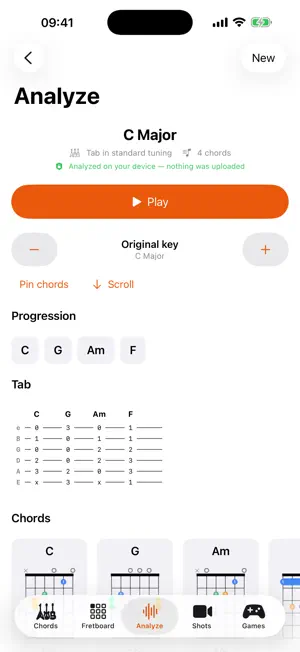
FretTutor is a guitar companion that does its thinking on your iPhone. It listens to you play, works out the chords in songs you bring it, and shows you every way to play what it finds, without accounts, ads, or analytics. TUNER Play a string and the screen fills with that note's colour, so you can read it from across the room. It tracks every string to within a couple of cents and holds steady while the note rings out. Nine tunings are built in: standard, drop D, drop C, half and full step down, open G, open D, DADGAD, and 12-string, where the six courses are treated as six things to tune. CHORDS A searchable library of 27 chord qualities across all 12 roots. Every chord shows its playable voicings, staff notation you can tap to hear, a map of its tones on the neck, and a parent scale guaranteed to contain every chord tone. The Circle of Fifths lives here too, with the diatonic chords of every major and minor key. FRETBOARD Pick a root and a chord or scale. Chord mode steps through every voicing on the neck (D major alone has 19). Scale mode boxes off numbered positions that tile the whole fretboard. Tap any fret to hear it, or press and slide along a string. ANALYZE Bring a song in from the Files app or your music library, capture one through the microphone, or try a built-in example. FretTutor finds the key, the chord progression on a synced timeline, the tempo and meter, a tab sketch, the song's structure, and a suggested capo position when one turns an awkward key into open shapes. Analysis runs entirely on the device, so it works in airplane mode. Save results and play along with them. METRONOME 40 to 240 bpm with tap tempo, time signatures from 2/4 to 12/8, and subdivisions down to sixteenths. The click is scheduled on the audio clock rather than a timer, so it does not drift over a long practice. SHOTS Record short video takes of your playing. Takes stay on your iPhone: keep the ones you're proud of, leave yourself a note about what to fix, share one through the share sheet, delete the rest. A sample feed previews what a shared feed will look like in a future update. GAMES A daily exercise graded live through the microphone. Play the chords and notes it asks for and hear whether they landed. Difficulty-aware keys keep beginners out of B-flat. Play Along runs you through a whole progression, chord by chord. Earn gold, silver and bronze awards and browse them in your trophy case. PRIVACY FIRST FretTutor has no account, no ads, no analytics, and no tracking. Your recordings, your music and your microphone are processed on your iPhone and never uploaded. The one optional feature that uses the internet, downloading experimental recognition models in Settings, asks you first and is off by default. Requires iOS 17. Designed for iPhone.
App privacy
The developer, GJIRA Enterprises Ltd., reported these privacy practices to Apple.
Data Not Collected
The developer does not collect any data from this app.
Alternatives to FretTutor: Guitar Practice
Looking for apps like FretTutor: Guitar Practice? Here are 6 similar apps on the App Store. The highest rated is Guitar Genius: Learn & Lessons (4.6/5), and all 6 are free to download.
-
 Guitar Progression Generator
-
 Guitar Genius: Learn & Lessons
4.6
-
 Ukulele Tuner : Lessons&Chord
3.7
-
 Sheet Music Maker & Scanner
2.6
-
 ChordIQ: Learn Music Notes
4.5
-
 Keys - Play Any Song on Piano
4.5
| App | Rating | Price | Last updated | Compare |
|---|---|---|---|---|
| FretTutor: Guitar Practice | – | Free | August 26, 2026 | |
| Guitar Progression Generator | – | Free | Jul 16, 2026 | Compare |
| Guitar Genius: Learn & Lessons | 4.6 / 5 (10) | Free | Oct 22, 2026 | Compare |
| Ukulele Tuner : Lessons&Chord | 3.7 / 5 (6) | Free | Oct 12, 2024 | Compare |
| Sheet Music Maker & Scanner | 2.6 / 5 (5) | Free | Oct 27, 2026 | Compare |
| ChordIQ: Learn Music Notes | 4.5 / 5 (222) | Free | Oct 11, 2026 | Compare |
| Keys - Play Any Song on Piano | 4.5 / 5 (174) | Free | Sep 16, 2026 | Compare |