

Scan Sign Send: PDF Signer
ADAK Ventures Productivity iPhoneiPadiPod touch
Scan Sign Send: PDF Signer is a free Productivity app for iPhone and iPad by ADAK Ventures. Rated 5.0/5 from 3 ratings. Requires iOS 15.0.
- Rating
- 5.0
- 3 ratings
- Price
- Free
- on the App Store
- Size
- 67 MB
- Age 4+
- Updated
- Oct 14
- 2026 · v1.2.0
Screenshots


About Scan Sign Send: PDF Signer
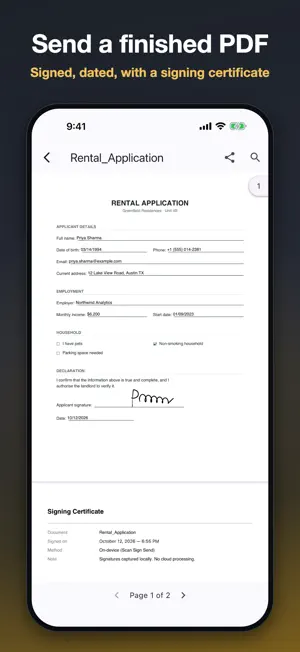
Scan Sign Send turns paper into signed PDFs — entirely on your phone. Scan any document with your camera or import a PDF, let the app find the blanks, fill them in, sign with your finger, and share the finished PDF. No account, no subscription, and nothing is ever uploaded. Your documents stay on your device. SCAN • Clear scans with automatic edge detection, several pages at a time • Import existing PDFs and photos • Reorder, rotate and clean up pages before you sign FILL & SIGN • Finds the blanks for you — lines, gaps, signature and date spots — and learns from your corrections • Text, dates, checkboxes, radio buttons, initials and signatures • Drag to move, pinch to resize — fields fit your form exactly • Draw your signature once and reuse it • PreFill: save your details once in My Details, then fill matching fields in one tap • Signing fills in today's date where the form asks for it SEND • A flattened, signed PDF with a signing certificate page • Or a fillable PDF others can complete in any PDF reader • Share by email, messaging or any app • Save any form as a template to reuse it PRIVATE BY DESIGN • Nothing is uploaded — all processing happens on your device • Optional fingerprint / face unlock that re-locks when you leave the app • Deleting a document really deletes its files WORKS IN YOUR LANGUAGE English, Français, Español, Português, हिन्दी, தமிழ், తెలుగు — including Hindi, Tamil and Telugu text in your finished PDFs. TRY IT FREE Finish 2 documents (up to 2 pages each) free. Unlimited is a one-time purchase for as many documents as you like, of any length — own it forever, no subscription. Built by ADAK Ventures.
What’s new
Version 1.2.0 · Updated October 14, 2026
New: PreFill. Save your details once in My Details, then fill the matching fields on a form with one tap. Saved only on this device. Save a scan as a plain PDF straight after scanning — no fields needed. Tap a field in “Review & Finish” to go back and fill it. Fields stay in place while you fill; move or resize them in “Edit Fields”. Settings switches now update straight away.
App privacy
The developer, ADAK Ventures, reported these privacy practices to Apple.
Data Not Collected
The developer does not collect any data from this app.
Alternatives to Scan Sign Send: PDF Signer
Looking for apps like Scan Sign Send: PDF Signer? Here are 6 similar apps on the App Store. The highest rated is Verbally: Voice Memo to Notes (5.0/5), and 5 of the 6 are free to download.
-
 TODO for AI
-
 VoiceFold: AI Voice Notes
4.9
VoiceFold: AI Voice Notes
4.9
-
 Synchro: Smart Transcriber
-
 Verbally: Voice Memo to Notes
5.0
Verbally: Voice Memo to Notes
5.0
-
 Scriba.AI
5.0
Scriba.AI
5.0
-
 PDFOne
| App | Rating | Price | Last updated | Compare |
|---|---|---|---|---|
| Scan Sign Send: PDF Signer | 5.0 / 5 (3 ratings) | Free | October 14, 2026 | |
| TODO for AI | – | Free | Oct 26, 2026 | Compare |
| VoiceFold: AI Voice Notes | 4.9 / 5 (7) | Free | Oct 26, 2026 | Compare |
| Synchro: Smart Transcriber | – | Free | Aug 27, 2025 | Compare |
| Verbally: Voice Memo to Notes | 5.0 / 5 (3) | Free | Apr 7, 2026 | Compare |
| Scriba.AI | 5.0 / 5 (3) | Free | Apr 9, 2026 | Compare |
| PDFOne | – | 2.99 USD | Oct 18, 2026 | Compare |