

Kalenda – All Your Calendars
Mendel Minkowicz Productivity iPhoneiPadiPod touch
Kalenda – All Your Calendars is a free Productivity app for iPhone and iPad by Mendel Minkowicz. Rated 5.0/5 from 1 ratings. Requires iOS 16.4.
- Rating
- 5.0
- 1 ratings
- Price
- Free
- on the App Store
- Size
- 49 MB
- Age 4+
- Updated
- Aug 26
- 2026 · v1.1.0.
Screenshots

About Kalenda – All Your Calendars
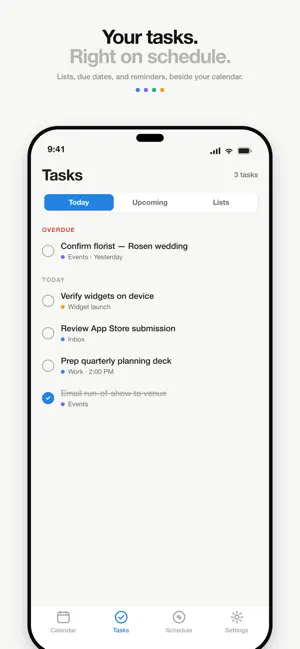
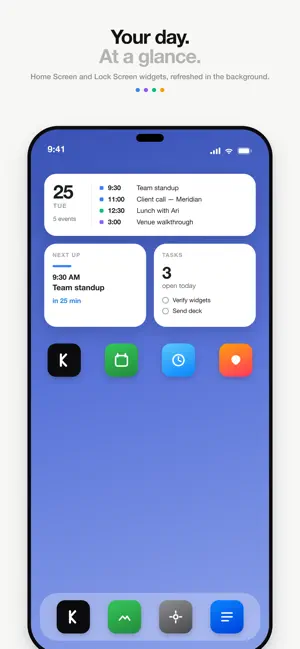
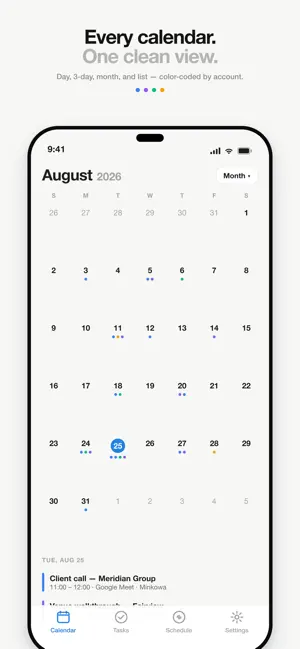
Kalenda brings all of your calendars together — every account, one view. Connect your Google and Microsoft accounts: your businesses, your personal life, appointments, portals. Kalenda merges everything into one unified day, 3-day, month, or list view, so you always know what is actually on your plate. WIDGETS THAT KEEP UP Next Up, Up Next, and Day Grid widgets for your Home Screen, plus Lock Screen widgets — colour-coded by account and refreshed in the background. Any widget can show your tasks instead. SCHEDULE WITHOUT DOUBLE-BOOKING Kalenda checks every new event against every connected calendar — even hidden ones — and warns you before you book over an appointment on a different account. SEND FROM THE RIGHT IDENTITY Create an event and choose which account sends the invitation. Contacts of one business get invites (and Google Meet links) from that business — never from your personal email. TASKS AND REMINDERS Multiple task lists, due dates, Today and Upcoming, reminders you can complete or snooze from the notification, and your own default alerts for events. EVERYTHING YOU EXPECT - Day, 3-day, month, and list views with color-coded calendars - Booking links and incoming bookings in the Schedule tab - Attendee autocomplete from your contacts - Google Meet links created on the sending account - Show or hide calendars — hidden calendars can still block availability - Dark mode KALENDA PRO Kalenda is free with up to 2 connected accounts. Kalenda Pro unlocks unlimited accounts: - Monthly — $2.99 per month - Annual — $19.99 per year Payment is charged to your Apple Account. Subscriptions renew automatically unless canceled at least 24 hours before the end of the current period; manage or cancel anytime in your Apple Account settings. Privacy Policy: https://kalenda.day/privacy Terms of Use: https://kalenda.day/terms Built for people with more than one life on their calendar.
What’s new
Version 1.1.0. · Updated August 26, 2026
Kalenda 1.1 is the biggest update yet: widgets, tasks, notifications, booking links, and a free plan. WIDGETS FOR YOUR HOME SCREEN AND LOCK SCREEN • Next Up — your next event at a glance, with a live countdown and a warning when it overlaps another • Up Next — today's events, then tomorrow and the days after • Day Grid — an hourly timeline that follows the clock and lays overlapping events side by side • Lock Screen widgets: next event, events left today, or a one-line inline view • Any widget can show your tasks instead of events (Edit Widget on iOS 17 and later) • Widgets refresh in the background — you don't have to open the app • Colour-coded by account A NEW APP AROUND THEM • Calendar tab with Day, 3 Days, List, and Month views • Tasks tab: multiple lists, due dates, Today and Upcoming, and tasks placed around your next meeting • Task reminders you can complete or snooze right from the notification • Event notifications with your own default alert times for timed and all-day events • Schedule tab: your booking links and incoming bookings • Settings: connected calendars, notification controls, refresh widgets, and delete your account KALENDA PRO Kalenda is now free to download with up to 2 connected accounts. Kalenda Pro (monthly or annual) unlocks unlimited Google and Microsoft accounts. Bought Kalenda before this update? Pro is yours permanently — nothing to do.
App privacy
The developer, Mendel Minkowicz, reported these privacy practices to Apple.
Data Linked to You
The following data, which may be collected and linked to your identity, may be used for the following purposes:
- Purchases: Purchase History
- Contact Info: Email Address, Name
- User Content: Other User Content
- Identifiers: User ID
Used for: App Functionality
Alternatives to Kalenda – All Your Calendars
Looking for apps like Kalenda – All Your Calendars? Here are 6 similar apps on the App Store. The highest rated is Parent Checklist (5.0/5), and all 6 are free to download.
-
 Wisper:Speech to Text AI Notes
-
 Parent Checklist
5.0
Parent Checklist
5.0
-
 MaxScan: Receipt & PDF Scanner
-
 Screenshot Cleaner +
-
 Carbon - Calendar Mirror
-
 Recto Notes
| App | Rating | Price | Last updated | Compare |
|---|---|---|---|---|
| Kalenda – All Your Calendars | 5.0 / 5 (1 rating) | Free | August 26, 2026 | |
| Wisper:Speech to Text AI Notes | – | Free | Aug 25, 2026 | Compare |
| Parent Checklist | 5.0 / 5 (1) | Free | Sep 3, 2026 | Compare |
| MaxScan: Receipt & PDF Scanner | – | Free | Aug 28, 2026 | Compare |
| Screenshot Cleaner + | – | Free | Apr 15, 2026 | Compare |
| Carbon - Calendar Mirror | – | Free | Sep 18, 2026 | Compare |
| Recto Notes | – | Free | Sep 24, 2026 | Compare |