

Cellar: Wine Cellar Manager
klaus jakobsen Food & Drink iPhoneiPadiPod touch
Cellar: Wine Cellar Manager is a free Food & Drink app for iPhone and iPad by klaus jakobsen. Requires iOS 15.0. Updated October 12, 2026.
- Price
- Free
- on the App Store
- Size
- 28 MB
- Age 17+
- Updated
- Oct 12
- 2026 · v1.1.3
Screenshots


About Cellar: Wine Cellar Manager
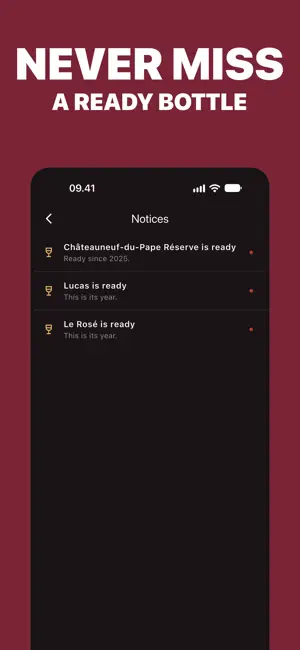
Point your camera at a wine label. Cellar reads the name, vintage, producer, region and grape by itself, so a new bottle takes one photo, not a form. Your cellar looks the way a real one does: bottles standing on wooden racks. Pinch out to see every rack at once, pinch in to read a label off the glass. Swipe between racks the way you'd walk along them. Open a bottle and it moves to what's still breathing. Finish it and rate it, the one thing about a bottle only you can say. Search finds any word on any label, not just the fields you filled in, so a producer or region you half remember still turns up the bottle. Rack, case or box: organize your cellar however it actually sits, not however an app assumes it should. Everything stays on your phone. Nothing about your cellar goes anywhere else. WHAT'S INSIDE - Camera scan reads label details automatically - Visual racks you pinch to zoom, exactly like standing in front of them - Search across every word on every label - Track what's open, what's finished, and your own rating - Multiple racks, including cases and boxes - Notices when a vintage turns a year older Privacy Policy: https://mywinecorner.com/privacy
What’s new
Version 1.1.3 · Updated October 12, 2026
Your first 20 bottles are now free, up from 12. Scan labels more accurately with Apple Intelligence on supported iPhones. Add sub-rows for front and back bottles or stacked layers. Long press a bottle to drag it anywhere in your cellar. Bottles on your racks now look like real glass. Enjoy smoother overviews, remove notes from the new options menu, and open bottles only when you press Done.
App privacy
The developer, klaus jakobsen, reported these privacy practices to Apple.
Data Linked to You
The following data, which may be collected and linked to your identity, may be used for the following purposes:
- User Content: Customer Support
Used for: App Functionality
Data Not Linked to You
The following data, which may be collected but is not linked to your identity, may be used for the following purposes:
- Purchases: Purchase History
- Location: Coarse Location
- Identifiers: Device ID
- Usage Data: Product Interaction, Other Usage Data
- Diagnostics: Crash Data, Other Diagnostic Data
Used for: Analytics, App Functionality
Alternatives to Cellar: Wine Cellar Manager
Looking for apps like Cellar: Wine Cellar Manager? Here are 6 similar apps on the App Store. The highest rated is Wine Scanner App: Weino (5.0/5), and all 6 are free to download.
-
 Toscanaguy
-
 Wine Journal: Tasting Notes
-
 SommeLens: Wine Scanner
2.0
-
 WineID: AI Wine Scanner
-
 Wine Label Scanner · Pour
-
 Wine Scanner App: Weino
5.0
| App | Rating | Price | Last updated | Compare |
|---|---|---|---|---|
| Cellar: Wine Cellar Manager | – | Free | October 12, 2026 | |
| Toscanaguy | – | Free | Aug 14, 2026 | Compare |
| Wine Journal: Tasting Notes | – | Free | Oct 4, 2026 | Compare |
| SommeLens: Wine Scanner | 2.0 / 5 (1) | Free | Sep 24, 2026 | Compare |
| WineID: AI Wine Scanner | – | Free | Apr 14, 2026 | Compare |
| Wine Label Scanner · Pour | – | Free | Sep 30, 2026 | Compare |
| Wine Scanner App: Weino | 5.0 / 5 (1) | Free | Jul 1, 2026 | Compare |