

Modbus 40001
PHILIP JULIAN ROBINSON Utilities iPhoneiPadiPod touch
Modbus 40001 is a free Utilities app for iPhone and iPad by PHILIP JULIAN ROBINSON. Requires iOS 15.1. Updated October 6, 2026.
- Price
- Free
- on the App Store
- Size
- 58 MB
- Age 4+
- Updated
- Oct 6
- 2026 · v3.0.02
Screenshots


About Modbus 40001
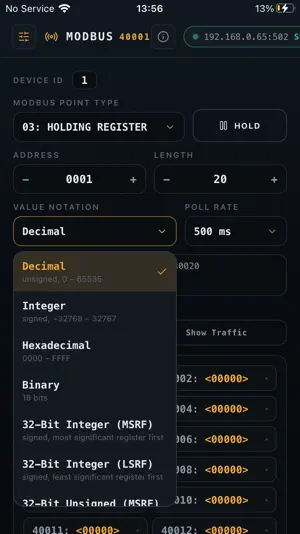
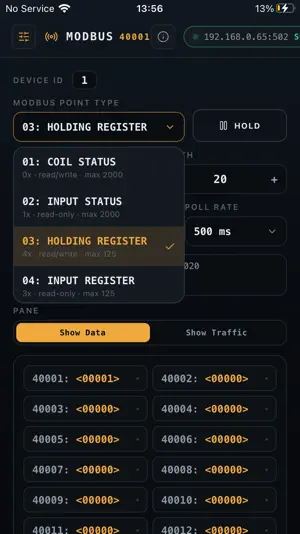
Modbus 40001 is a Modbus/TCP master & slave for testing and commissioning industrial equipment — PLCs, drives, meters, and controllers — from an iPhone or iPad. Enter a device's IP address and port, choose a function code, and continuously poll a block of coils or registers of any size. Values update live, changed cells flash as they move, and holding registers and coils can be written back with a tap. FEATURES:- • Function codes 01–04 — Coil Status, Input Status, Holding Register, Input Register • Any block size — set the start address and length, checked against the protocol limits for each function • Poll rates from 100 ms to 5 seconds • Value notations — unsigned and signed decimal, hex, binary, 32-bit long, Float32 and 64-bit double in both word orders • Character notations — ASCII in either byte order, plus a low-byte form, with a joined readout so device names and serial numbers read as text • Writes — tap a cell to send Preset Single Register (06) or Force Single Coil (05) • Multiple scan documents — save several register blocks per device and switch between them • Addressing toggle — 1-based (PLC style) or 0-based (raw protocol), so off-by-one confusion is a single tap away from being resolved • Traffic view — every frame in and out as bracketed hex, with capture and clear • Status strip — polls, valid responses, errors, success rate, latency, and last update time • Built-in demo device — try every screen without hardware on the bench • Designed for both orientations — iPad keeps a two-column layout, iPhone scrolls the whole page No accounts, no analytics, no advertising. Device addresses and scan settings are stored only on your device. Intended for general testing of the Modbus/TCP protocol. Not certified for safety-critical use.
What’s new
Version 3.0.02 · Updated October 6, 2026
• Built-in Demo Mode: explore every feature with a simulated Modbus device running right on your iPhone or iPad. No hardware, server or network needed. • TCP Slave mode: share the Demo Mode device on your network so other Modbus masters can connect to it. Pick which network (Wi-Fi or other) to use. • Better diagnostics: new tools to help find connection problems with slaves and servers. • Bigger on-screen keypads: easier and more accurate data entry on iPhone and iPad. • Better drop-down lists: choices now open neatly under their field on every device. Slave mode serves all point types: One scan window can now serve coils, discrete inputs, input registers and holding registers at the same time. Set a block for each by changing the point type. • Stricter slave register limits: A master that reads or writes outside the blocks you've set up now gets a proper Modbus "Illegal Data Address" error. This matches how real PLCs behave. • Wired Ethernet support: Works with USB-C Ethernet adapters, so you can connect to Modbus devices over a wired network. • General stability improvements.
App privacy
The developer, PHILIP JULIAN ROBINSON, reported these privacy practices to Apple.
Data Not Collected
The developer does not collect any data from this app.
Alternatives to Modbus 40001
Looking for apps like Modbus 40001? Here are 6 similar apps on the App Store.


| App | Rating | Price | Last updated | Compare |
|---|---|---|---|---|
| Modbus 40001 | – | Free | October 6, 2026 | |
| LineKeeper | – | Free | Oct 8, 2026 | Compare |
| Modbus Connect | – | Free | May 7, 2026 | Compare |
| EasyX2 | – | Free | Jun 23, 2026 | Compare |
| Pyxis Cloud | – | Free | Oct 6, 2026 | Compare |
| Modbus TCP Tools | – | Free | Jul 22, 2026 | Compare |
| Modbus Explorer | – | Free | Jul 19, 2026 | Compare |
Compare Modbus 40001 with the top alternatives: ratings, updates, ASO score and keyword gaps →