

HexaConverter
ROSHAN GHANSHYAMBHAI HIRAPARA Utilities iPhoneiPadiPod touch
HexaConverter is a free Utilities app for iPhone and iPad by ROSHAN GHANSHYAMBHAI HIRAPARA. Requires iOS 15.0. Updated September 2, 2026.
- Price
- Free
- on the App Store
- Size
- 70 MB
- Age 4+
- Updated
- Sep 2
- 2026 · v1.0.2
Screenshots


About HexaConverter
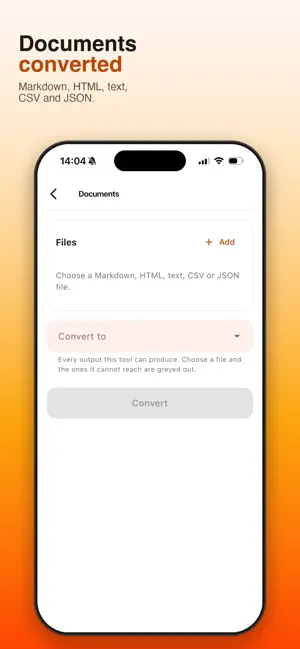
HexaConverter converts your files entirely on your device. Nothing is uploaded, nothing touches a server, and there is no account to create. The app declares no internet permission at all — so it is not technically capable of sending your files anywhere. That is not a promise, it is a property you can check. WHAT IT CONVERTS Images — PNG, JPG, BMP, GIF and TIFF, with WebP read as input. Resize to a bound, crop to a shape, and set JPEG quality. PDF — merge several documents, split into single pages, rotate, compress, and extract the text layer to a file. Documents — Markdown, HTML, plain text, CSV and JSON, in the pairs that convert faithfully. Plus text to PDF. Audio — MP3, AAC, FLAC, WAV and OGG, at a bitrate you choose. Convert a batch and it keeps going while you use the rest of the app. Video — change the container, trim without re-encoding, compress, or pull out the audio track. Archives — create and extract ZIP, TAR and GZ. Protect a ZIP with AES-256, which opens in 7-Zip, WinZip and Keka. Scan — photograph pages one after another and bind them into a single PDF. Reorder by dragging, and add a line of text under any page. Erase metadata — strip EXIF, XMP and IPTC from a JPEG or PNG without recompressing the picture. The pixels are copied across untouched. FREE, AND THAT IS ALL Every feature is free. No ads, no subscriptions, no in-app purchases, no trial. GOOD TO KNOW Some limits are real, and we would rather you read them here than discover them after installing: • Office formats — DOCX, XLSX and PPTX — are not supported. There is no faithful way to convert them on a phone, and doing it properly would mean uploading your file to a server. That would break the one thing this app is for. • Video re-encoding produces WebM. HexaConverter links an LGPL build of FFmpeg, which carries no H.264 encoder, so "compress to MP4" is not something it can honestly offer. • Changing a video container copies the existing streams rather than re-encoding them, so it works only where the target format can carry those codecs. • Trimming a video cuts on keyframes, so the cut may land slightly before the point you set. • Text exported to PDF uses a standard font covering Latin characters only. Files stay on your phone. Convert them there.
What’s new
Version 1.0.2 · Updated September 2, 2026
Metadata Removal now takes pictures straight from your gallery or camera, not just your files. The photo you want stripped is usually the one still in your camera roll, and it was awkward to find by path. New in the PDF tool: extract pages. Type a range like "1-3, 7" and get just those pages as a new document. They come out in the order you write them, so it reorders as well as extracts. Fixed: pages that had been rotated came back upright when merged, split or extracted. They now keep the orientation you gave them. HexaConverter is now supported by ads, which is how every feature stays free with nothing locked behind a payment. Your files are still converted entirely on your device and are never uploaded.
App privacy
The developer, ROSHAN GHANSHYAMBHAI HIRAPARA, reported these privacy practices to Apple.
Data Used to Track You
The following data may be used to track you across apps and websites owned by other companies:
- Location: Coarse Location
- Identifiers: Device ID
- Usage Data: Product Interaction, Advertising Data
Data Not Linked to You
The following data, which may be collected but is not linked to your identity, may be used for the following purposes:
- Location: Coarse Location
- Identifiers: Device ID
- Usage Data: Product Interaction, Advertising Data
- Diagnostics: Crash Data, Performance Data
Used for: Third-Party Advertising, Analytics
Alternatives to HexaConverter
Looking for apps like HexaConverter? Here are 6 similar apps on the App Store. The highest rated is iReface – AI Face Swap Maker (4.5/5), and all 6 are free to download.
-
 FormatBox: File Converter
-
 TS File Explorer
-
 Picket - Bulk Image Downloader
4.4
Picket - Bulk Image Downloader
4.4
-
 iReface – AI Face Swap Maker
4.5
iReface – AI Face Swap Maker
4.5
-
 Swipe & Delete - Photo Cleaner
4.4
Swipe & Delete - Photo Cleaner
4.4
-
 Pol-App(Kerala Police)
4.3
Pol-App(Kerala Police)
4.3
| App | Rating | Price | Last updated | Compare |
|---|---|---|---|---|
| HexaConverter | – | Free | September 2, 2026 | |
| FormatBox: File Converter | – | Free | Oct 17, 2026 | Compare |
| TS File Explorer | – | Free | Oct 5, 2026 | Compare |
| Picket - Bulk Image Downloader | 4.4 / 5 (61) | Free | Oct 23, 2026 | Compare |
| iReface – AI Face Swap Maker | 4.5 / 5 (28) | Free | Mar 18, 2026 | Compare |
| Swipe & Delete - Photo Cleaner | 4.4 / 5 (73) | Free | Sep 28, 2026 | Compare |
| Pol-App(Kerala Police) | 4.3 / 5 (10) | Free | Oct 27, 2026 | Compare |
Compare HexaConverter with the top alternatives: ratings, updates, ASO score and keyword gaps →