

Chord ON: Guitar Chords, Tuner
Woosoo Kim Music iPhoneiPadiPod touch
Chord ON: Guitar Chords, Tuner is a free Music app for iPhone and iPad by Woosoo Kim. Requires iOS 17.0. Updated October 10, 2026.
- Price
- Free
- on the App Store
- Size
- 3 MB
- Age 4+
- Updated
- Oct 10
- 2026 · v1.11
Screenshots

About Chord ON: Guitar Chords, Tuner
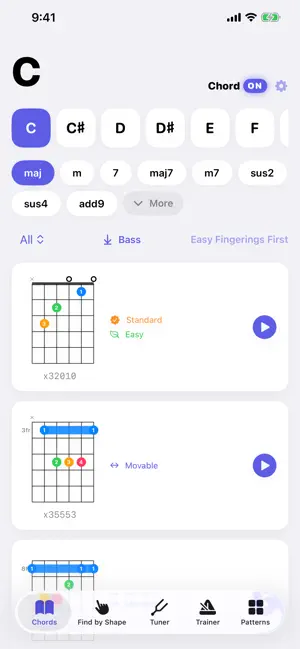
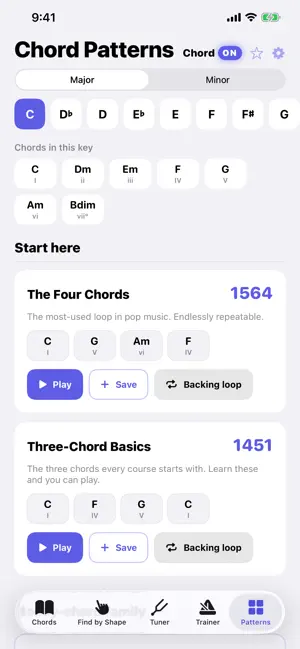
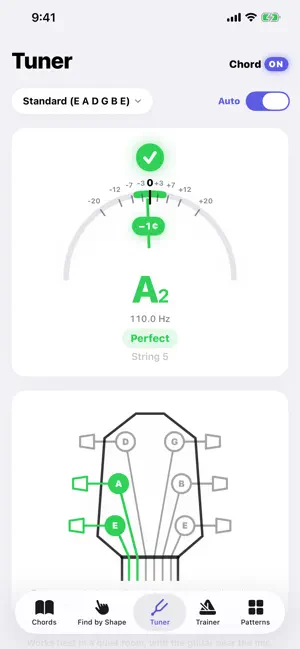
Find, hear, and practice guitar chords. No ads, no subscription. 4536, canon, twelve-bar blues - twenty progressions people actually play, in any key. Don't know a chord's name? Tap the shape you are holding and Chord ON tells you. Tuner and chord-change practice are in the same app, and all of it works offline. Every shape is automatically verified: that its notes spell the chord, that the root is in the bass, and that the stretch is within reach. ■ WHAT MAKES THIS DIFFERENT · No subscription — buy once, keep it. No recurring charges. · No ads — not even in the free version. · Offline — chord lookup, playback, shape search, tuning and practice all work without a connection. (Purchasing or restoring Pro needs the App Store.) · No auto-renewal — Chord ON Pro is a one-time purchase. ■ CHORD PATTERNS (all free) The progressions you reach for when writing or backing a song, in any key. · The 4536 money chords — all four variants: plain, 2-5-1, III7, 4531 · Canon, the fifties progression, turnarounds, twelve-bar blues · Jazz, gospel, rock and Andalusian progressions — twenty in all · Change the key and every chord follows: twelve keys, major and minor · The seven diatonic chords of the key stay pinned at the top · Hear it, or save it as one of your own ■ CHORD DICTIONARY · 12 roots x 22 chord qualities · Multiple ways to play each chord, from open position up the neck · A common standard fingering is shown first · Color-coded fingers, numbered too, so they read for colorblind players · Hear it — strum or arpeggio · Interval labels (R, 3, b7) to understand how a chord is built · Chord names explained — why this chord is called what it is called ■ FIND BY SHAPE Tap the strings the way you are holding them and Chord ON names the chord. Strings are drawn as strings — the 6th thick, the 1st thin — with position markers where a real fretboard has them. That chord you can play but can't name — now you can look it up. ■ TUNER (every tuning, free) · Detects which string you played through the microphone · A headstock diagram shows which peg to turn, and which way · Supports both 3+3 (acoustic) and 6-in-line (electric) headstocks — they turn in opposite directions · Standard, Drop D, Half-Step Down, Whole-Step Down, Open G, Open D, DADGAD — all seven tunings are free ■ PRACTICE TOOLS · Build and save chord progressions · Chord transition trainer — change chords in time with a metronome · One Minute Changes — sixty seconds, counted by ear through the mic · Tap the tempo — tap along with a song to find its BPM · Backing loop — the progression keeps playing so you can play over it · Capo support — the shape you hold and the chord that sounds, side by side · Left-handed mode — diagrams mirrored ■ FREE, FOREVER · The whole chord dictionary — 12 roots, 22 qualities, every included shape · All twenty chord patterns, transposed to any of the twelve keys · Find by shape · Chord playback · The whole tuner — all seven tunings · Capo · Left-handed mode · Interval labels · Up to 2 saved chord progressions · Tap the tempo — find a song's BPM by tapping along · Listening to a progression once ■ CHORD ON PRO (one-time purchase) · Chord transition trainer — change chords in time with a metronome · One Minute Changes — the app counts your chord changes by ear · Backing loop — a progression looped with five strum patterns · Unlimited saved progressions · Alternate-tuning fingerings in the chord dictionary · Family Sharing supported All seven tuner modes are free. Pro adds alternate-tuning fingerings to the chord dictionary. Buy it once. It is not a subscription. ■ A PROMISE Everything that is free today stays free. It will not move behind the paywall later. Available in English, Korean and Spanish. Contact: [email protected]
What’s new
Version 1.11 · Updated October 10, 2026
A Home Screen widget. "Chord of the Day" puts one chord on your Home Screen and changes it once a day. Tap it and the fingering opens straight away. It works without opening the app, and without an internet connection or an account.
App privacy
The developer, Woosoo Kim, reported these privacy practices to Apple.
Data Not Collected
The developer does not collect any data from this app.
Alternatives to Chord ON: Guitar Chords, Tuner
Looking for apps like Chord ON: Guitar Chords, Tuner? Here are 6 similar apps on the App Store. The highest rated is Guitar Chord Identifier (5.0/5), and 4 of the 6 are free to download.
-
 ChordLeadR: Guitar Chords
-
 PeAk Fretboard Studio
-
 GuitarFlow: Guitar Chords
-
 Guitar Chord Identifier
5.0
Guitar Chord Identifier
5.0
-
 ContiNote: Scores & Setlists
-
 IndieBiome
5.0
IndieBiome
5.0
| App | Rating | Price | Last updated | Compare |
|---|---|---|---|---|
| Chord ON: Guitar Chords, Tuner | – | Free | October 10, 2026 | |
| ChordLeadR: Guitar Chords | – | Free | Sep 17, 2026 | Compare |
| PeAk Fretboard Studio | – | 5.99 USD | Aug 6, 2026 | Compare |
| GuitarFlow: Guitar Chords | – | Free | Sep 10, 2026 | Compare |
| Guitar Chord Identifier | 5.0 / 5 (3) | 2.99 USD | Jun 30, 2026 | Compare |
| ContiNote: Scores & Setlists | – | Free | Oct 18, 2026 | Compare |
| IndieBiome | 5.0 / 5 (1) | Free | Oct 12, 2026 | Compare |