

My Cloud Phone Backup
iBRO.ia LTDA Photo & Video iPhoneiPadiPod touch
My Cloud Phone Backup is a free Photo & Video app for iPhone and iPad by iBRO.ia LTDA. Requires iOS 17.0. Updated August 28, 2026.
- Price
- Free
- on the App Store
- Size
- 2 MB
- Age 4+
- Updated
- Aug 28
- 2026 · v1.5.1
Screenshots
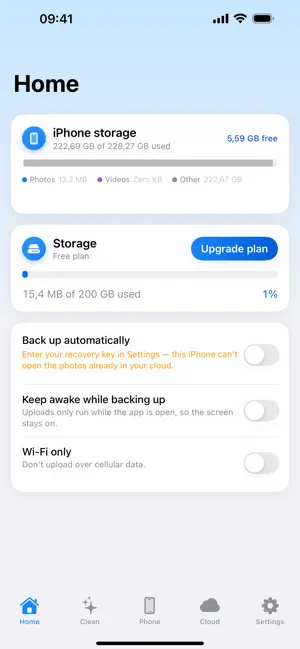
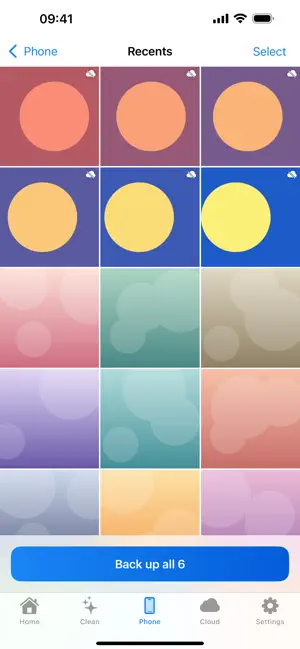


About My Cloud Phone Backup
My Cloud backs up the photos and videos on your iPhone to your own private cloud — encrypted on the device, before they leave it — and then helps you clear the copies filling up your storage. ENCRYPTED BEFORE IT LEAVES Every photo and video is sealed on your iPhone with a key created on the device. The server stores files it cannot read. Only you can open them. AUTOMATIC BACKUP Turn it on once and every new photo uploads by itself. Albums you choose, originals untouched, progress you can watch. FREE UP SPACE Once a photo is safely in your cloud, remove the local copy with one tap and get your storage back. Nothing is deleted unless it is already backed up. YOUR RECOVERY KEY Your encryption key never leaves the device, so the app writes it out once for you to keep. Enter it on a new iPhone and your whole library unlocks — without it, nobody can read your files, including us. SIGN IN WITHOUT PASSWORDS Your account is your email address plus a one-time code. No passwords to invent, reuse or leak. SUBSCRIPTIONS The free tier is enough to try everything. More storage comes as an auto-renewable subscription — one month or one year of the plan you pick. These are the Brazilian base prices; the App Store shows the corresponding price in your local currency before you confirm. 50 GB — R$3.00 per month or R$28.50 per year 100 GB — R$5.00 per month or R$48.00 per year 200 GB — R$10.00 per month or R$95.90 per year 300 GB — R$15.00 per month or R$143.90 per year 1 TB — R$25.00 per month or R$239.90 per year 2 TB — R$49.00 per month or R$469.90 per year 3 TB — R$69.00 per month or R$659.90 per year Payment is charged to your Apple Account when the purchase is confirmed. A subscription renews automatically for the same period and price unless it is cancelled at least 24 hours before the current period ends, and your Apple Account is charged again at each renewal. Manage or cancel a subscription in Settings → Apple Account → Subscriptions; cancelling stops the next renewal and the plan stays active until the paid period runs out. Terms of Use (EULA): https://www.apple.com/legal/internet-services/itunes/dev/stdeula/ Service Terms: https://ibro.ai/mycloud/terms.html Privacy Policy: https://ibro.ai/mycloud/privacy.html
What’s new
Version 1.5.1 · Updated August 28, 2026
Added 1 TB, 2 TB, and 3 TB storage plans with local App Store pricing.
App privacy
The developer, iBRO.ia LTDA, reported these privacy practices to Apple.
Data Linked to You
The following data, which may be collected and linked to your identity, may be used for the following purposes:
- Contact Info: Email Address
- User Content: Photos or Videos
Used for: App Functionality
Alternatives to My Cloud Phone Backup
Looking for apps like My Cloud Phone Backup? Here are 6 similar apps on the App Store. The highest rated is privatePhotos - keep secured (5.0/5), and all 6 are free to download.
-
 MatchPic · Best Photo Cleaner
-
 ShotSift Photo & Video Cleaner
-
 privatePhotos - keep secured
5.0
privatePhotos - keep secured
5.0
-
 Culpix - Photo Cleaner & Cull
5.0
Culpix - Photo Cleaner & Cull
5.0
-
 PhotoMesh: Cloud Photo Gallery
5.0
PhotoMesh: Cloud Photo Gallery
5.0
-
 Stingle Photos
3.3
Stingle Photos
3.3
| App | Rating | Price | Last updated | Compare |
|---|---|---|---|---|
| My Cloud Phone Backup | – | Free | August 28, 2026 | |
| MatchPic · Best Photo Cleaner | – | Free | Dec 14, 2025 | Compare |
| ShotSift Photo & Video Cleaner | – | Free | Oct 20, 2026 | Compare |
| privatePhotos - keep secured | 5.0 / 5 (1) | Free | Aug 16, 2024 | Compare |
| Culpix - Photo Cleaner & Cull | 5.0 / 5 (1) | Free | Oct 11, 2026 | Compare |
| PhotoMesh: Cloud Photo Gallery | 5.0 / 5 (6) | Free | Oct 10, 2026 | Compare |
| Stingle Photos | 3.3 / 5 (9) | Free | Jul 9, 2026 | Compare |