

DuoQueue: Find a Gaming Duo
CAMERON SHAW STALLINGS Social Networking iPhoneiPadiPod touch
DuoQueue: Find a Gaming Duo is a free Social Networking app for iPhone and iPad by CAMERON SHAW STALLINGS. Rated 5.0/5 from 10 ratings. Requires iOS 16.4.
- Rating
- 5.0
- 10 ratings
- Price
- Free
- on the App Store
- Size
- 67 MB
- Age 17+
- Updated
- Oct 22
- 2026 · v1.0.3
Screenshots


About DuoQueue: Find a Gaming Duo
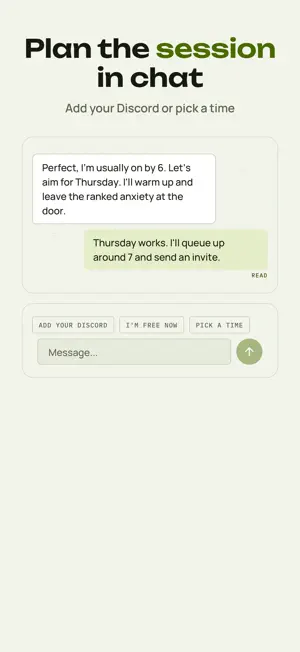
DuoQueue is how you find people to duo queue with: a teammate for ranked, a third for your party, someone who plays the same games at the same hours. Just teammates. One optional picture, no gender filters. Games come first. YOUR DECK Your deck puts players in your region first and favors people who have been on lately and what you have in common: games you both play (at the same skill level), shows and anime you both watch, a language you share, and the hours you usually play. Every card shows one picture if they added one, their League rank or main game, and how many games you share, then their prompts. Swipe to say you'd duo. When you both swipe, you match and the chat opens. Missing your game? Add it. QUEUE UP Ready to play? Tap Queue up and pick a game. For the next hour, or until you find a duo, you show up in Online Now, and your matches may get a heads-up that you're free. In North America, up to 6 players in that game who have Duo Pops on get one. Duo Pops are on until you turn them off in Settings, come at most 3 a day, and never arrive between 1 am and 10 am. Each Queue up also gives you an LFG post with your own code, ready to share where you look for teammates. One duo per Queue up: the first to answer, by a Duo Pop or your code, is your duo. Your code stops working once you find a duo or stop queueing, or 15 minutes after your hour ends. LEAGUE OF LEGENDS: CAN DUO Play League of Legends in North America? Add your rank, and players whose rank can queue Ranked Solo/Duo with yours light up with Can duo and sit nearer the top of your deck. It's based on the ranks you both listed and League's published duo rules, and the League client has the final say. PARTY MODE Want a third? Tap Invite a third in a chat. You and your match swipe on the same players, and when you both say yes, that player gets an invite. Or share an LFG post whose code works for 2 hours: the first to join with it takes the last seat, and either of you can stop it. Parties hold three, invites stay open for 7 days, and your party gets its own group chat. PLAY NOW OR PLAN IT In a chat, buttons above the message box say you're free now, pick a time to play, or share your Discord username. Rate the session afterwards: good comms, chill after losses, and showed up on time appear on a player's profile once enough players say so. Link your Steam account in Settings and your profile shows Verified: Steam. SAFETY, FOR REAL DuoQueue is 18+ only. Every account confirms a date of birth of 18 or older to sign up. Every profile photo is automatically screened before anyone else sees it. Report or block from a card in your deck, from a Duo Pop, or from a chat. Blocking is immediate: a blocked user can't see your profile again. A hidden-word filter hides messages containing words you pick. A Safety Center covers meeting up safely, scams, and crisis support. DUOQUEUE+ DuoQueue+ is optional. It lifts the 25-swipes-a-day cap, adds filters for a specific game or show, platform, skill level, playstyle, and recent activity, shows everyone who wants to duo with you at once instead of 3 a day, adds unlimited active conversations, and gives you a Super Ping a day that tells someone directly you want to duo. Weekly, monthly, 3-month, and 6-month plans, all auto-renewing until you cancel in your App Store account settings. Power-Ups are a separate one-time purchase that puts you near the top of other people's decks for 30 minutes. Everything else (matching, Queue up and Duo Pops, Online Now, Highlights, party mode, and chatting in your 10 most recently active matches) is free. DuoQueue isn't endorsed by Riot Games and doesn't reflect the views or opinions of Riot Games or anyone officially involved in producing or managing Riot Games properties. Riot Games, and all associated properties are trademarks or registered trademarks of Riot Games, Inc. Terms of Use (EULA): https://duoqueue.io/terms Privacy Policy: https://duoqueue.io/privacy
Ratings & reviews
5.0
10 ratings
What’s new
Version 1.0.3 · Updated October 22, 2026
Ready for iPhone Duo: DuoQueue now uses the whole screen, open or closed. Duo Pops are now on by default in North America. The app tells you when it turns them on, and you can turn them off right there or in Settings. You can now leave a party: tap the three dots at the top of the party, or press and hold it in Your parties. Prompt answers on cards have a new look.
App privacy
The developer, CAMERON SHAW STALLINGS, reported these privacy practices to Apple.
Data Linked to You
The following data, which may be collected and linked to your identity, may be used for the following purposes:
- Purchases: Purchase History
- Contact Info: Email Address, Name
- User Content: Photos or Videos, Other User Content
- Identifiers: User ID, Device ID
- Diagnostics: Other Diagnostic Data
- Other Data: Other Data Types
Used for: App Functionality
Alternatives to DuoQueue: Find a Gaming Duo
Looking for apps like DuoQueue: Find a Gaming Duo? Here are 6 similar apps on the App Store. The highest rated is TapTeam (5.0/5), and all 6 are free to download.
-
 Beanbag Chat
-
 GGR: Gamer Match & Duo Finder
-
 HangOn - Unified Gaming Hub
-
 TapTeam
5.0
TapTeam
5.0
-
 Jynx: Find Teammates & LFG
-
 Friends-Zone
5.0
Friends-Zone
5.0
| App | Rating | Price | Last updated | Compare |
|---|---|---|---|---|
| DuoQueue: Find a Gaming Duo | 5.0 / 5 (10 ratings) | Free | October 22, 2026 | |
| Beanbag Chat | – | Free | Apr 29, 2026 | Compare |
| GGR: Gamer Match & Duo Finder | – | Free | Sep 28, 2026 | Compare |
| HangOn - Unified Gaming Hub | – | Free | Oct 3, 2026 | Compare |
| TapTeam | 5.0 / 5 (4) | Free | Oct 5, 2026 | Compare |
| Jynx: Find Teammates & LFG | – | Free | Oct 21, 2026 | Compare |
| Friends-Zone | 5.0 / 5 (1) | Free | Aug 17, 2026 | Compare |