

Mixing Desk: Audio DAW & Mixer
Neil Baigent Music iPhoneiPadiPod touch
Mixing Desk: Audio DAW & Mixer is a free Music app for iPhone and iPad by Neil Baigent. Rated 5.0/5 from 1 ratings. Requires iOS 18.0.
- Rating
- 5.0
- 1 ratings
- Price
- Free
- on the App Store
- Size
- 17 MB
- Age 4+
- Updated
- Nov 2
- 2026 · v1.1.1
Screenshots



About Mixing Desk: Audio DAW & Mixer
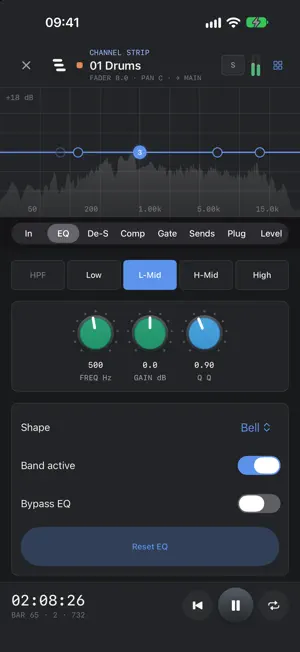
Mixing Desk is a multitrack mixing console designed for iPhone (Although it works great on iPad too!). Bring in the stems or record a band, a podcast or yourself, and mix on a desk that works the way a real one does. No account, no ads, no subscription, nothing leaves your phone. FREE TO MIX. PAY ONCE, MIX DOWN FOREVER Everything on the desk is free and unlimited: every channel, processor, bus, plugin slot and effect, plus recording and editing. Mix a whole song before you spend a penny. Saving mixes to files (Mix Down) is one single purchase: pay once, then mix down as often as you like. No subscription, no charge per mix. THE CHANNEL STRIP Every channel has trim and polarity, a noise gate, a five-band parametric EQ, a de-esser, a compressor with adjustable knee, hold and external sidechain, stereo width, pan and a fader. The signal runs in console order, and the taps between the stages are where the sends and the listen bus come from. Link two mono channels as a stereo pair and their faders, mutes and solos move together. Assignable knobs on every strip put the controls you reach for most on the desk. BUSES AND ROUTING Route channels to subgroups carrying EQ and compression on the sum, the thing a control group cannot do. Feed effects buses from pre- or post-fader sends so several sources share one room. Control groups (VCA) ride a set of faders without touching anyone's signal path. Matrix outputs build independent mixes of the groups, ready to bounce as stems or alternate versions. Solo in place, PFL or AFL, with solo safe. MASTER AND MONITORING Master EQ, glue compression, and a true-peak limiter that detects on a 4x oversampled copy, because true peak is what survives an encode. Mono sum, dim and monitor trim sit after the meters and can never reach your file. Correlation and LUFS loudness metering, LED-style level meters, and a real-time spectrum analyser. SEVENTEEN EFFECTS INCLUDED Reverb with room, chamber, hall, plate and ambient modes, echo, ducker, multiband compressor, transient shaper, tremolo, auto-pan, chorus, flanger, phaser, saturator, exciter, Bit Crunch, resonant filter, stereo widener, sub emulator and vocoder. Each has presets and a display that shows what it is doing. PLUGINS Host AUv3 audio effects, four per strip, in series, on channels, groups, effects returns and the master. Order is the feature: a compressor into a saturator is not a saturator into a compressor, so the rack runs front to back. A plugin on a channel is fed the channel's sidechain, so ducking and vocoding work with other people's plugins too. The included effects are Audio Units, so other hosts on your device can use them. RECORDING Arm a channel, choose your input, set the gain, and monitor through headphones. Record several inputs at once from a multi-channel interface. Takes land on the timeline at the moment you pressed record, with the round trip compensated. EDITING Split, fade, normalise, rename and move clips, and crossfade a whole run of seams in one step for comping. Cut a range out of every track or just one, closing the gap or leaving silence. Ride the fader to write automation. Loop a section. Save snapshots of the whole desk and recall them. Undo anything. FOR PODCASTS Recorded a call where everyone captured their own side? Line up a guest's local recording against the call recording, drift corrected, in one tap. Then cut the stumbles with ripple delete. Podcast Mode sets every channel up for speech with a leveller, de-esser and compression, and mixes down in mono at podcast loudness. MIX DOWN (ONE-TIME PURCHASE) Bounce to WAV, AIFF or M4A, stereo or mono, at 44.1, 48 or 96 kHz through the same render path you were just listening to, so the file is what you heard. Optional loudness normalisation to a LUFS target, measured in two passes and clamped so the true-peak ceiling always wins. Every import is transcoded once to 32-bit float at the project rate, so playback never decodes or resamples.
What’s new
Version 1.1.1 · Updated November 2, 2026
NEW: - Mixing Desk now runs on iOS 18 and later. - iPhone Duo: the transport and the Arrange/Mixer switch sit in the side strip, and the mixer and timeline use the full height of both screens. ARRANGE VIEW: - Waveforms now drawn post normalisation FIXED: - A crash when importing some audio formats. Files the device can't decode are now refused with a message, and AC-3 files import.
App privacy
The developer, Neil Baigent, reported these privacy practices to Apple.
Data Not Collected
The developer does not collect any data from this app.
Alternatives to Mixing Desk: Audio DAW & Mixer
Looking for apps like Mixing Desk: Audio DAW & Mixer? Here are 6 similar apps on the App Store. The highest rated is Midiary: MIDI File Studio (5.0/5), and 3 of the 6 are free to download.
-
 Midiary: MIDI File Studio
5.0
-
 AU EngineCore
-
 Illuminated - Music Library
-
 Music Processing to Lossless
5.0
-
 ClockBridge
-
 MojoDeck
3.0
| App | Rating | Price | Last updated | Compare |
|---|---|---|---|---|
| Mixing Desk: Audio DAW & Mixer | 5.0 / 5 (1 rating) | Free | November 2, 2026 | |
| Midiary: MIDI File Studio | 5.0 / 5 (2) | 3.99 USD | Nov 4, 2026 | Compare |
| AU EngineCore | – | 22.99 USD | Jun 2, 2026 | Compare |
| Illuminated - Music Library | – | Free | Oct 30, 2026 | Compare |
| Music Processing to Lossless | 5.0 / 5 (1) | Free | Oct 22, 2026 | Compare |
| ClockBridge | – | 3.99 USD | Nov 2, 2026 | Compare |
| MojoDeck | 3.0 / 5 (1) | Free | May 15, 2026 | Compare |