

Vidmoat: AI Video Editor
Buzz Innovations Ltd. Photo & Video iPhoneiPadiPod touch
Vidmoat: AI Video Editor is a free Photo & Video app for iPhone and iPad by Buzz Innovations Ltd. Requires iOS 16.4. Updated September 30, 2026.
- Price
- Free
- on the App Store
- Size
- 96 MB
- Age 4+
- Updated
- Sep 30
- 2026 · v1.0.2
Screenshots

About Vidmoat: AI Video Editor
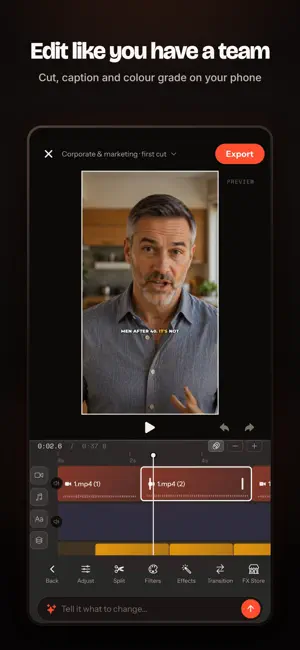
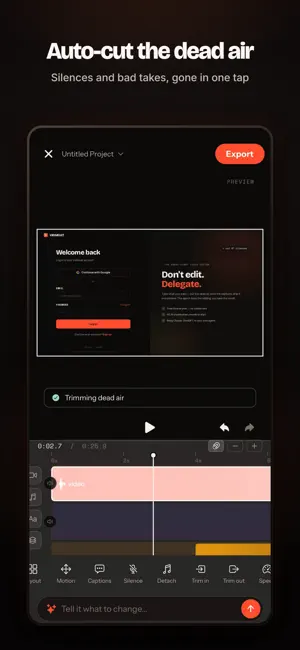
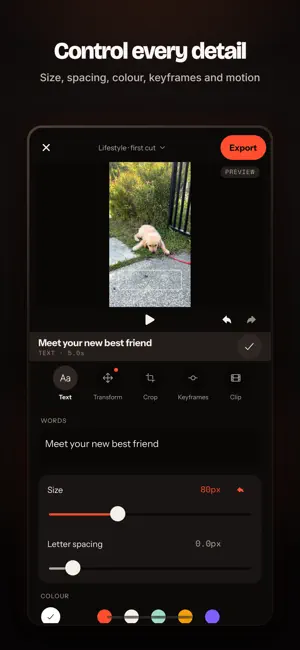
Vidmoat is a real video editor with an AI agent sitting next to it. Tell it what you want in plain words — "cut the dead air, add captions, make it punchy" — and it does the work on your timeline. Then take over and finish by hand. EVERYTHING IS ON A REAL TIMELINE Multi-track editing with trim, split, roll, slip and slide. Keyframes with easing curves. Colour grading, LUTs, masks, blend modes, transitions, speed ramps and freeze frames. Nothing is baked until you export. THE AGENT ACTUALLY EDITS It reads your footage — the speech, the silences, what is in frame — and makes real cuts. Ask it to trim filler words, tighten pacing, match a look across clips, or build the whole first pass. Every change lands as an editable clip, never a flattened render. CAPTIONS THAT LAND ON THE WORD Automatic transcription with word-level timing, then styled captions that sit where you want them — outline, glow, karaoke highlight, your fonts and colours. SOUND, PROPERLY Record voiceover, import music, detach audio from video. EQ, compression, limiting, noise reduction and auto-ducking that pulls the music under the voice instead of fighting it. AI THAT EARNS ITS PLACE Background removal without a green screen. Generate images, video and voiceover from a prompt. Smart reframe for vertical. Object tracking. Stock footage and music search built in. VIDMOAT SOCIAL Post finished videos to a feed built for people who make things. Every post carries a "How it was made" breakdown of the real edit behind it — and one tap opens that edit as a template in your own editor, with the clips swapped for placeholders you fill with your footage. EXPORT ANYWHERE Render in the cloud or on device, in any aspect ratio, and save straight to your library. WORKS WITH THE WEB APP Projects sync. Start on your phone, finish on a laptop, or the other way round. One subscription covers both. SUBSCRIPTIONS Vidmoat is free to try. Creator and Studio plans unlock higher render limits, longer exports, AI generation and the full toolkit. Subscriptions renew automatically unless cancelled at least 24 hours before the period ends; manage or cancel in your App Store settings. A plan bought anywhere works everywhere in Vidmoat. Terms: https://www.vidmoat.com/terms Privacy: https://www.vidmoat.com/privacy
What’s new
Version 1.0.2 · Updated September 30, 2026
The AI editor now keeps working when you lock your phone or switch apps (Creator and Studio). Plus playback and editing fixes.
App privacy
The developer, Buzz Innovations Ltd., reported these privacy practices to Apple.
Data Not Linked to You
The following data, which may be collected but is not linked to your identity, may be used for the following purposes:
- Contact Info: Email Address, Name
- Purchases: Purchase History
- Location: Coarse Location
- Identifiers: User ID, Device ID
- Usage Data: Product Interaction
- User Content: Photos or Videos, Audio Data, Customer Support, Other User Content
Used for: Developer’s Advertising or Marketing, Analytics, Product Personalization, App Functionality
Alternatives to Vidmoat: AI Video Editor
Looking for apps like Vidmoat: AI Video Editor? Here are 6 similar apps on the App Store. The highest rated is SHARP Memories (5.0/5), and all 6 are free to download.
-
 Profilmo
-
 Vaultify Secure: Photo Vault
-
 CueEdit - AI Video Editor
-
 Plate Blur AI: Cars & Homes
-
 SHARP Memories
5.0
SHARP Memories
5.0
-
 Pixor AI
| App | Rating | Price | Last updated | Compare |
|---|---|---|---|---|
| Vidmoat: AI Video Editor | – | Free | September 30, 2026 | |
| Profilmo | – | Free | Sep 12, 2024 | Compare |
| Vaultify Secure: Photo Vault | – | Free | Jan 7, 2026 | Compare |
| CueEdit - AI Video Editor | – | Free | Apr 7, 2026 | Compare |
| Plate Blur AI: Cars & Homes | – | Free | Oct 20, 2026 | Compare |
| SHARP Memories | 5.0 / 5 (2) | Free | Jan 23, 2026 | Compare |
| Pixor AI | – | Free | Apr 7, 2025 | Compare |