

Layoutz: Photo Grid Collage
GONZALO SERRANO REVUELTA Photo & Video iPhoneiPadiPod touch
Layoutz: Photo Grid Collage is a free Photo & Video app for iPhone and iPad by GONZALO SERRANO REVUELTA. Rated 5.0/5 from 1 ratings. Requires iOS 17.0.
- Rating
- 5.0
- 1 ratings
- Price
- Free
- on the App Store
- Size
- 6 MB
- Age 4+
- Updated
- Oct 6
- 2026 · v2.5
Screenshots


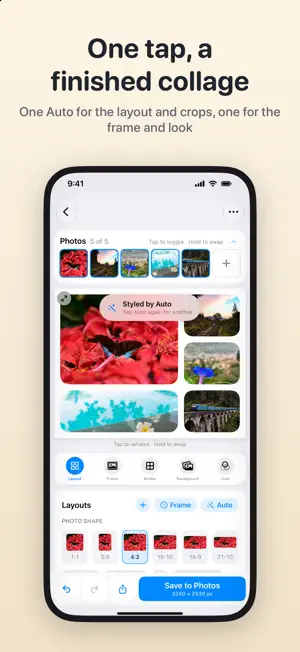

About Layoutz: Photo Grid Collage
Turn your photos into a collage worth keeping: a clean grid, an instant print, a film strip or a travel-journal page. No watermark, no ads, no subscription, no sign-up. JOURNAL - A travel-journal page beside your photos: a map with a dot for every place, the country and region, and the dates, days and distance of your trip, all read from the photos - With one photo, its day, time and altitude AUTO - One tap picks the layout, photo shape, order and crops that suit your photos, and suggests a look and a caption. Tap again for another idea LAYOUTS - Every layout that fits your photos: grids, strips, and feature layouts where one photo leads - Drag the lines between photos to resize, and keep the result as your own layout - Hold a photo to swap it; pinch to zoom and drag with two fingers to reframe, right in the preview - Photo shapes from square to 21:10, and canvas sizes for posts and stories: 1:1, 4:5, 9:16 and 16:9 FRAMES AND LOOKS - Instant prints, mini and wide, with a handwritten-style caption - A 35 mm film strip, black or amber, with perforations and frame numbers - Backdrops under any frame: a color, a gradient or one of your photos - Color looks and nine film stocks, each with a strength slider - Borders in soft pastels or any color, and rounded corners all the way to circles TEXT - A caption on any photo: size, font, color, position, and the fade behind it - A date stamp like film, in any corner and any color Undo any change, check it fullscreen, and save to Photos at full resolution. In 26 languages. Everything happens on your device. Your photos never leave your phone, and nothing tracks you.
What’s new
Version 2.5 · Updated October 6, 2026
2.5 keeps every collage you make, frames your subjects in one tap and lets you draw your own layouts. - Home: all your collages in one place, newest first. Start a new one without losing the last; long-press a collage to delete it. - Frame: a switch beside Auto zooms each photo with people or a clear subject onto them. Turn it off and every photo goes back to its own crop. - Draw your own layout: merge cells on a grid up to four by four, and find it under Yours. - Mirror flips any layout left to right. - A redesigned photo screen: a caption can add the photo's date and place, sit on a shade or a shadow, and pass its style to every photo in one tap. A thirds grid helps you frame. - Exports keep your photos' wide color and open as 300 dpi prints. - Settings: pick the export size, up to 8192 px for print, and add your name, the capture date and the location to the file. - Saved collages are dated like your newest photo, so Photos files them beside it; shared files are named after the collage's title. - Picking photos opens the editor straight away, and a pinch on the preview opens it fullscreen. No ads, and your photos never leave your phone.
App privacy
The developer, GONZALO SERRANO REVUELTA, reported these privacy practices to Apple.
Data Not Collected
The developer does not collect any data from this app.
Alternatives to Layoutz: Photo Grid Collage
Looking for apps like Layoutz: Photo Grid Collage? Here are 6 similar apps on the App Store. The highest rated is SasCollage: Photo Collage (4.5/5), and all 6 are free to download.
-
 Simple Collage - No Ads
-
 Duopress: Photo Collage Maker
-
 SasCollage: Photo Collage
4.5
SasCollage: Photo Collage
4.5
-
 Slow Down a Video
-
 Pairly: Side by Side Photos
-
 7rats: No Crop Photo Border
| App | Rating | Price | Last updated | Compare |
|---|---|---|---|---|
| Layoutz: Photo Grid Collage | 5.0 / 5 (1 rating) | Free | October 6, 2026 | |
| Simple Collage - No Ads | – | Free | Oct 19, 2026 | Compare |
| Duopress: Photo Collage Maker | – | Free | Oct 9, 2026 | Compare |
| SasCollage: Photo Collage | 4.5 / 5 (2) | Free | Oct 19, 2026 | Compare |
| Slow Down a Video | – | Free | Oct 6, 2026 | Compare |
| Pairly: Side by Side Photos | – | Free | Sep 26, 2026 | Compare |
| 7rats: No Crop Photo Border | – | Free | Sep 25, 2026 | Compare |