

KiroPhotos: Relive Your Story
萌 张 Photo & Video iPhoneiPadiPod touch
KiroPhotos: Relive Your Story is a free Photo & Video app for iPhone and iPad by 萌 张. Requires iOS 17.0. Updated October 21, 2026.
- Price
- Free
- on the App Store
- Size
- 386 MB
- Age 4+
- Updated
- Oct 21
- 2026 · v1.2.5
Screenshots
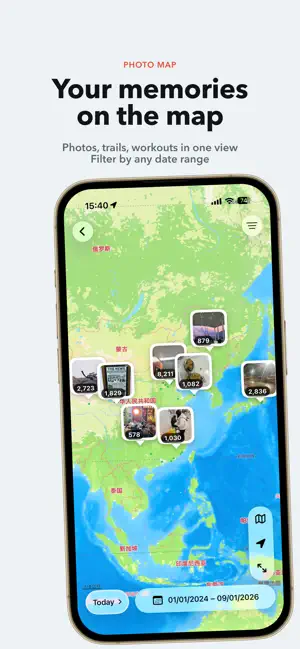


About KiroPhotos: Relive Your Story
Photos capture your life and the places you have been. KiroPhotos connects your photos, people, places, and memories. Rediscover meaningful moments through search, maps, and the routes you have traveled. 【Revisit Your Journeys on the Map】 Explore photos, recorded trails, and workout routes together on the map. Choose a custom date range to revisit a trip or a chapter of everyday life, connecting the moments you captured with the places you visited. 【Cherish Every Milestone】 Create a timeline from a birthday, anniversary, or meaningful date. Automatically gather photos of selected people, add notes, and revisit moments of growth and togetherness. 【Make Every Photo Look Its Best】 Adjust composition, light and color with styles, LUTs and .cube imports. Edit RAW/JPEG separately. View HDR; export JPEG or SDR/HDR HEIC. Layer smart, gradient and range masks; feather or invert. Track Live Photo subjects with masks. Set key photos, trim, mute and preview frame by frame. Use history, undo and redo. Save to Photos; revert to the original. 【Record the Paths You Travel】 Keep a record of everyday outings and adventures with automatic background recording or manual precise recording. Start, pause, resume, and end a recording, then revisit your routes, distance, and speed. With Always location access and recording enabled, trails can continue recording in the background or while your device is locked, subject to system limits. Trails stay on your device and do not require Apple Health access. 【Recover Photo Locations from Routes】 Give photos without location data a place on the map. Match their capture times to locally recorded trails or, with your permission, workouts and workout routes read through Apple HealthKit. Preview the matches and confirm before applying locations to your photos. Locations are estimated from timestamps and available route points and may not reflect the exact capture spot. KiroPhotos does not modify the original workouts or routes in Apple Health. 【Find Photos with Natural Language】 Describe what you are looking for, such as “sunset by the sea” or “hiking in the mountains.” Combine people, time, and place to narrow your search. Create Smart Categories with natural-language rules to automatically bring matching photos together. 【Rediscover the People in Your Photos】 Recognize and group people directly on your device. Add names, choose cover photos, merge duplicates, hide people, and quickly browse photos of someone special. 【Turn Photos into Memories】 Create personal memories with selected photos, titles, descriptions, locations, tags, and covers. Bring a trip, a gathering, or everyday family moments together into a story. 【Manage Your Library More Efficiently】 • Browse large libraries with a smooth, zoomable grid • Sort by capture date or recently added date • Filter by media type, favorites, albums, and location status • Create and manage system photo albums • Select multiple photos with a continuous drag gesture • Favorite, delete, adjust dates, or edit locations in batches • View camera, lens, exposure settings, EXIF, and other metadata • Rediscover moments with Daily Highlights and On This Day 【Create Frames with a Photographic Signature】 Add photography frames featuring capture time, location, camera, lens, and exposure settings. Customize layouts, colors, and text for photos ready to save and share. 【Local First, Built for Privacy】 Photo analysis, search, Smart Categories, trail recording, route matching, memories, and editing are processed primarily on your device. Your original photos, face features, local indexes, trails, and health data are not uploaded to developer-operated servers. Location and Apple Health access are optional and authorized separately. Map loading and iCloud photo downloads use Apple services. Time never stands still, but every moment deserves to be remembered. Terms of Use (EULA): https://www.apple.com/legal/internet-services/itunes/dev/stdeula/
What’s new
Version 1.2.5 · Updated October 21, 2026
What’s New: • Upgraded photo frames: Enjoy a redesigned editor with more intuitive controls. Discover new Instagram, Moments, Map Imprint, Stamp, and Travel Stamp templates, and customize text, fonts, textures, aspect ratios, logos, and maps to create your own look. • RAW editing: Edit RAW and JPEG independently with a wide range of professional adjustment tools. Export as JPEG, HEIC SDR, or HEIC HDR. • Landscape browsing and editing: Photo details, editing tools, and Live Photo controls now adapt to landscape orientation for more comfortable viewing and editing. • Easier photo management: Select multiple albums, add or remove photos in batches, and create albums directly. Drag to reorder people. • Improved “Recently Added” sorting for more accurate photo ordering. • Fixed image jitter when opening a photo from the grid for smoother viewing transitions. • New user onboarding: Clear guidance on photo and location permissions, on-device analysis, and your first photo library scan. • Animated loading placeholders on the Home and Memories pages provide smoother transitions as content appears.
App privacy
The developer, 萌 张, reported these privacy practices to Apple.
Data Not Collected
The developer does not collect any data from this app.
Alternatives to KiroPhotos: Relive Your Story
Looking for apps like KiroPhotos: Relive Your Story? Here are 6 similar apps on the App Store. The highest rated is PhotoSway: Swipe Photo Cleaner (5.0/5), and all 6 are free to download.
-
 Glimmer: AI Photo Video Maker
3.7
Glimmer: AI Photo Video Maker
3.7
-
 Pvt Album - TT Album、
-
 TimeCap
-
 Fynd: moments
-
 PhotoSway: Swipe Photo Cleaner
5.0
PhotoSway: Swipe Photo Cleaner
5.0
-
 Flickback · Photo Organizer
| App | Rating | Price | Last updated | Compare |
|---|---|---|---|---|
| KiroPhotos: Relive Your Story | – | Free | October 21, 2026 | |
| Glimmer: AI Photo Video Maker | 3.7 / 5 (3) | Free | Aug 31, 2026 | Compare |
| Pvt Album - TT Album、 | – | Free | Feb 19, 2026 | Compare |
| TimeCap | – | Free | Oct 23, 2026 | Compare |
| Fynd: moments | – | Free | Oct 3, 2026 | Compare |
| PhotoSway: Swipe Photo Cleaner | 5.0 / 5 (2) | Free | Oct 26, 2026 | Compare |
| Flickback · Photo Organizer | – | Free | Sep 3, 2026 | Compare |