

YaYDraw
Zentura Labs LLC Graphics & Design iPhoneiPadiPod touch
YaYDraw is a free Graphics & Design app for iPhone and iPad by Zentura Labs LLC. Requires iOS 17.0. Updated October 27, 2026.
- Price
- Free
- on the App Store
- Size
- 27 MB
- Age 4+
- Updated
- Oct 27
- 2026 · v1.4
Screenshots



About YaYDraw
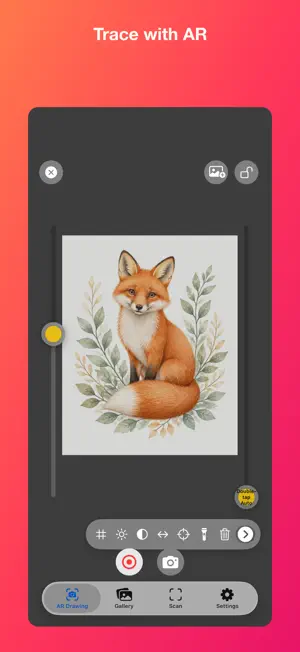
PHOTO AND VIDEO STORAGE Choose a folder on this device, an external drive or a cloud service. Videos record to the selected folder. Keep external drives connected until saving finishes. Changes apply to the next capture. • Retry or export pending local captures if saving fails Cloud folders such as iCloud may fail to save or sync due to network conditions. Writing a file does not confirm cloud sync; cloud services may still use device storage. Applies to AR photos and videos. Scan exports keep their existing save location. Turn your iPhone or iPad into a practical drawing companion. YaYDraw helps drawing enthusiasts place a reference image over the live camera view, adjust it to fit the page, keep it locked while drawing, and return to an unfinished artwork after moving the phone. You can also import your own photos, explore built-in references, and scan finished artwork into a clean digital copy. STUDY LIGHT AND SHADOW • Switch between the original reference and 2, 3, 5 or 7 grayscale levels • Simplify fine details to see the main light and dark shapes • Adjust with compact controls while keeping your artwork visible • Keep the original reference, position and scale when switching effects DRAW AT A COMFORTABLE ANGLE • Position the phone between you and the paper • The phone does not need to be perfectly vertical above the canvas • Adjust the reference to match the page from your working angle FIT, ADJUST, AND LOCK • Move, rotate, and scale the reference image • Adjust opacity, brightness, grid, and line-art tools • Lock the reference to prevent accidental movement while drawing PAUSE AND CONTINUE LATER • Before moving the phone, tap the photo button to save a local recovery point • When you return, first align the reference manually with the lines already on the paper • If a small difference remains, use Fine-Tune for a final correction • Recovery information stays on your device USE YOUR OWN REFERENCES • Import from Photos or Files • Take a new photo and use it as a drawing reference • Browse the built-in reference gallery SCAN FINISHED ARTWORK • Capture drawings and paintings directly in the app • Detect artwork edges and correct perspective • Crop the surrounding background • Choose from 15 frame styles, including 5 without the YaYDraw logo, or keep the scan unframed. • Add an optional personal signature, created in Settings by drawing or importing one • Adjust the signature’s position, size, and angle before saving • Save a framed image and optionally save the original corrected scan to Photos SUBSCRIPTION YaYDraw requires an auto-renewable subscription after the introductory trial. Monthly and yearly options unlock all app features. Payment is charged to your Apple ID after confirmation. Subscriptions renew automatically unless canceled at least 24 hours before the end of the current period. You can manage or cancel your subscription in your Apple ID subscription settings. Privacy Policy: https://yaydraw.app/privacy Terms of Use: https://yaydraw.app/terms
What’s new
Version 1.4 · Updated October 27, 2026
New in 1.4: • New Painter Camera: choose your canvas, compose your shot, and import the photo into AR Drawing. • Photo filters and adjustments, plus Color Simplification, Oil Paint, Watercolor, Ink Wash and Sketch styles, with strength control and original/effect comparison. • Canvas and paper textures for your photo references. • Zoom, tap-to-focus, independent exposure lock, Portrait and Manual controls. Photo formats, resolutions and controls adapt to the device and lens. • Choose original or perspective-corrected camera images for AR photos and videos; AR recording can include microphone audio. • Refined portrait and landscape controls, optimized aperture preview, and a Skip All option in every new-feature tip.
App privacy
The developer, Zentura Labs LLC, reported these privacy practices to Apple.
Data Not Collected
The developer does not collect any data from this app.
Alternatives to YaYDraw
Looking for apps like YaYDraw? Here are 6 similar apps on the App Store. The highest rated is Color Study: Simplify Painting (4.9/5), and all 6 are free to download.
-
 AR Draw: Trace & Sketch Master
4.4
AR Draw: Trace & Sketch Master
4.4
-
 Color Study: Simplify Painting
4.9
Color Study: Simplify Painting
4.9
-
 Sketch Steps: AI Loomis Draw
4.1
Sketch Steps: AI Loomis Draw
4.1
-
 AR Drawing: Easy Sketch & Draw
4.6
AR Drawing: Easy Sketch & Draw
4.6
-
 ArtCoach:Learn to Draw & Paint
4.7
ArtCoach:Learn to Draw & Paint
4.7
-
 Photo to Sketch Drawing Maker
4.5
Photo to Sketch Drawing Maker
4.5
| App | Rating | Price | Last updated | Compare |
|---|---|---|---|---|
| YaYDraw | – | Free | October 27, 2026 | |
| AR Draw: Trace & Sketch Master | 4.4 / 5 (17) | Free | Oct 17, 2026 | Compare |
| Color Study: Simplify Painting | 4.9 / 5 (542) | Free | Oct 29, 2026 | Compare |
| Sketch Steps: AI Loomis Draw | 4.1 / 5 (168) | Free | Oct 20, 2026 | Compare |
| AR Drawing: Easy Sketch & Draw | 4.6 / 5 (1,370) | Free | Oct 29, 2026 | Compare |
| ArtCoach:Learn to Draw & Paint | 4.7 / 5 (1,820) | Free | Oct 17, 2026 | Compare |
| Photo to Sketch Drawing Maker | 4.5 / 5 (6,005) | Free | Oct 3, 2026 | Compare |
Compare YaYDraw with the top alternatives: ratings, updates, ASO score and keyword gaps →