

TouchGeek
Jae Lee Sports iPhoneiPadiPod touch
TouchGeek is a free Sports app for iPhone and iPad by Jae Lee. Rated 5.0/5 from 1 ratings. Requires iOS 18.0. Updated September 24, 2026.
- Rating
- 5.0
- 1 ratings
- Price
- Free
- on the App Store
- Size
- 24 MB
- Age 4+
- Updated
- Sep 24
- 2026 · v2.0.0
Screenshots

About TouchGeek
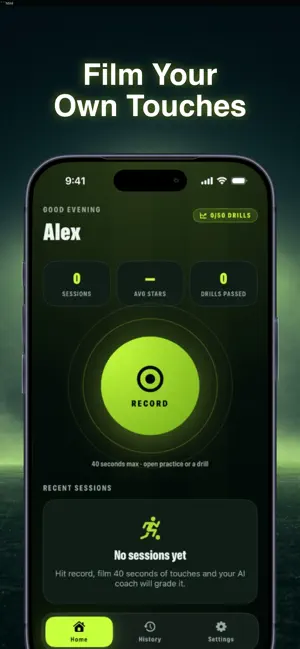
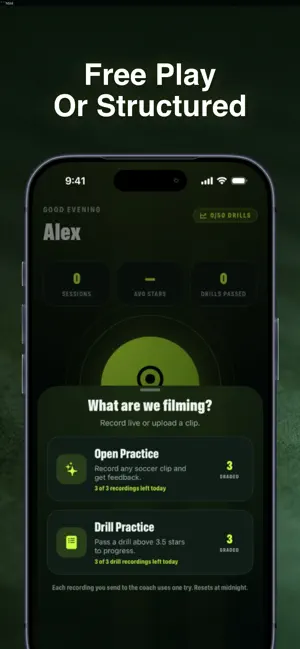
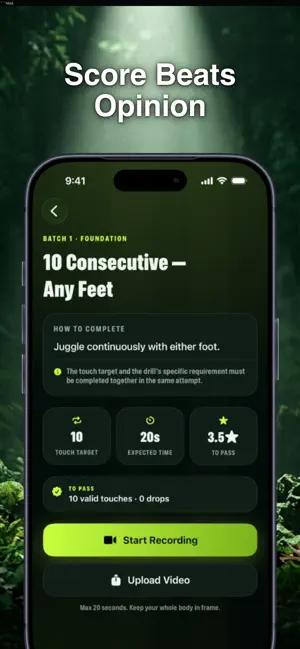
Nobody's watching you train. TouchGeek is. Film your touches, let the AI coach grade the clip, fix the one thing it flags, then run it back. That's the whole loop, and it's built for players who train alone with no coach and no teammates around to tell them what's actually happening with the ball. Record up to 40 seconds, either free-form practice or a set drill from the ladder. The AI coach scores every clip out of five stars against a written pass line for that drill, so you're not guessing whether it counted. Feedback isn't vague hype. It splits into 'Nailed it' and 'Missed it', with the real touch counts behind each call, so you know exactly what needs work before you film again. Progress through a single 50-drill ladder across 10 batches. Passing a drill takes two things at once: hitting the pass line and scoring above 3.5 stars. Clear it, the next one unlocks. No shortcuts, no skipping ahead. Every session gets logged, average stars and total drills passed, so your grind actually shows up somewhere. Free tier gives you 3 open practice clips and 3 drill attempts a day. Pro doubles that to 10. And if a grading fails, it never burns an attempt, so retries are always free. TouchGeek won't replace a real coach standing next to you. What it does is give solo players something they've never had: a way to know if their touch is actually good enough, right now, on their phone. Film it. Get graded. Fix one thing. Run it back. TouchGeek Pro is $9.99 per month with a 7-day free trial. Billed through your Apple Account and renews until cancelled; cancel any time in Settings at least 24 hours before the period ends. Terms of Use: https://north-galley-04c.notion.site/TouchGeek-Terms-of-Use-3b0818cec2c9801d8f87ee0b31a113d0 Privacy Policy: https://north-galley-04c.notion.site/TouchGeek-Privacy-Policy-3b0818cec2c98005bb42e0f84711c551
What’s new
Version 2.0.0 · Updated September 24, 2026
- Replays got smarter: highlights, commentary and effects now only appear when something actually happened — quiet clips play clean, no more invented moments. - Juggling replays are more fun: sparkles on every touch, extra showers on high ones, and "5 IN A ROW / 10 IN A ROW / TARGET HIT!" celebrations on the exact touch. - Touch counting is more reliable: the tracker now zooms in to follow the ball and finishes the whole clip, even on slower phones — so your count shows up more often. - Cleaner session report and Grow screens.
App privacy
The developer, Jae Lee, reported these privacy practices to Apple.
Data Linked to You
The following data, which may be collected and linked to your identity, may be used for the following purposes:
- Contact Info: Email Address
- Identifiers: User ID
Used for: Analytics, App Functionality
Data Not Linked to You
The following data, which may be collected but is not linked to your identity, may be used for the following purposes:
- User Content: Photos or Videos
- Surroundings: Environment Scanning
- Body: Head
Used for: Analytics, App Functionality
Alternatives to TouchGeek
Looking for apps like TouchGeek? Here are 6 similar apps on the App Store. The highest rated is AIOmni (5.0/5), and all 6 are free to download.
-
 AIOmni
5.0
AIOmni
5.0
-
 MatchdayIQ: AI Soccer Coach
5.0
MatchdayIQ: AI Soccer Coach
5.0
-
 FotDraft
-
 SoccerSmart:AI Motion Analysis
-
 Soccer Pro AI
-
 Fair Footy
| App | Rating | Price | Last updated | Compare |
|---|---|---|---|---|
| TouchGeek | 5.0 / 5 (1 rating) | Free | September 24, 2026 | |
| AIOmni | 5.0 / 5 (1) | Free | Sep 4, 2026 | Compare |
| MatchdayIQ: AI Soccer Coach | 5.0 / 5 (1) | Free | May 12, 2026 | Compare |
| FotDraft | – | Free | Jun 28, 2026 | Compare |
| SoccerSmart:AI Motion Analysis | – | Free | Jul 4, 2026 | Compare |
| Soccer Pro AI | – | Free | Sep 9, 2026 | Compare |
| Fair Footy | – | Free | Jun 2, 2025 | Compare |
Compare TouchGeek with the top alternatives: ratings, updates, ASO score and keyword gaps →