

LightDrop - QR Transfer
杨 高 Utilities iPhoneiPadiPod touchMac
LightDrop - QR Transfer is a free Utilities app for iPhone and iPad by 杨 高. Requires iOS 16.0. Updated October 25, 2026.
- Price
- Free
- on the App Store
- Size
- 11 MB
- Age 4+
- Updated
- Oct 25
- 2026 · v1.2.0
Screenshots


About LightDrop - QR Transfer
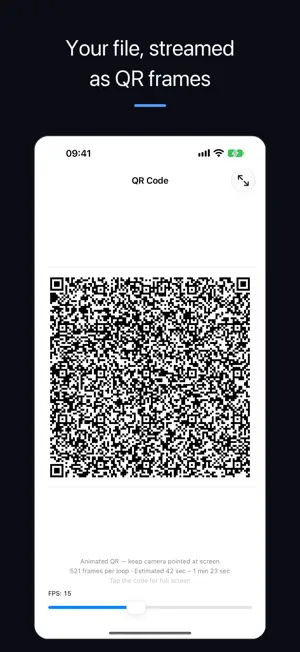
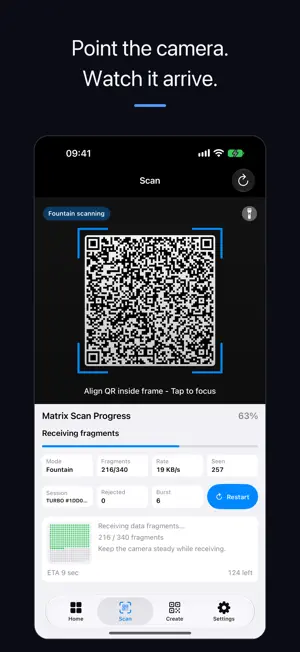
LightDrop transfers files by QR between two devices running LightDrop. One screen displays QR frames and the other device’s camera reads them. File transfer needs no shared network, Bluetooth, cable or app account. WHEN YOU NEED IT • An air-gapped or locked-down machine that will never join your network. • A work computer where USB ports are disabled and cloud drives are blocked. • Guest Wi-Fi that isolates every client, or a hotel network you would rather not trust. • A second screen nearby when email, cloud drives, and cables are not an option. • Anywhere a file has to cross an air gap and email is not an option. HOW IT WORKS • Pick text or a file on the sending device. LightDrop turns it into an animated QR stream. • Point the receiving device's camera at that screen. Fragments land continuously and the progress grid fills in. • Fountain coding means order does not matter and a dropped frame never restarts the transfer — keep the camera pointed and it completes. TURBO TRANSFER (PRO) • A binary QR fountain carries file bytes directly, without text encoding. • Adjustable playback up to 30 frames per second. Actual speed depends on the screen and camera. • LightDrop to LightDrop. Standard mode stays on as a compatible fallback, and the receiver recognises both automatically with nothing to configure. PASSWORD ENCRYPTION (PRO) • Encrypt the payload with a password before it ever reaches the screen. • Use a strong password and share it separately; it is not included in the QR stream. • Standard AES-GCM. Nothing leaves your device to make it work. IMAGES, HANDLED • Selected files are transferred as their original bytes, without automatic photo recompression. • Preview received images. Save to Photos on iPhone and iPad, or save a file on Mac. • Images are detected by file content, not by file extension. LIGHTDROP PRO Sending and receiving require LightDrop Pro, available as an in-app purchase. GOOD TO KNOW • Transfer speed depends on the sending screen's size and brightness, the receiving camera, and how steady you hold the device. Keep both screens clean and reasonably close. • Large files take real time. LightDrop estimates the duration before you start, so the decision is yours. — Privacy Policy: https://yangworks.dev/lightdrop/privacy Terms of Use: https://www.apple.com/legal/internet-services/itunes/dev/stdeula/
What’s new
Version 1.2.0 · Updated October 25, 2026
iPhone Duo supported
App privacy
The developer, 杨 高, reported these privacy practices to Apple.
Data Not Linked to You
The following data, which may be collected but is not linked to your identity, may be used for the following purposes:
- Purchases: Purchase History
- Identifiers: User ID
Used for: App Functionality
Alternatives to LightDrop - QR Transfer
Looking for apps like LightDrop - QR Transfer? Here are 6 similar apps on the App Store. The highest rated is USB Connection Information (5.0/5), and 5 of the 6 are free to download.
-
 Air Gap Transfer
-
 USB Connection Information
5.0
USB Connection Information
5.0
-
 Light Share: File Sharing App
-
 Photo Folders Tag Organizer
5.0
Photo Folders Tag Organizer
5.0
-
 QRDrop: QR Code File Transfer
-
 YoooTek
5.0
YoooTek
5.0
| App | Rating | Price | Last updated | Compare |
|---|---|---|---|---|
| LightDrop - QR Transfer | – | Free | October 25, 2026 | |
| Air Gap Transfer | – | Free | Aug 26, 2026 | Compare |
| USB Connection Information | 5.0 / 5 (3) | 9.99 USD | Sep 25, 2026 | Compare |
| Light Share: File Sharing App | – | Free | Oct 28, 2026 | Compare |
| Photo Folders Tag Organizer | 5.0 / 5 (1) | Free | May 19, 2026 | Compare |
| QRDrop: QR Code File Transfer | – | Free | Sep 16, 2026 | Compare |
| YoooTek | 5.0 / 5 (1) | Free | Feb 12, 2026 | Compare |