

Prizma: App Blocker & Timer
Asset Kudaibergenov Productivity iPhoneiPadiPod touch
Prizma: App Blocker & Timer is a free Productivity app for iPhone and iPad by Asset Kudaibergenov. Requires iOS 17.0. Updated August 23, 2026.
- Price
- Free
- on the App Store
- Size
- 46 MB
- Age 4+
- Updated
- Aug 23
- 2026 · v2.0.0
Screenshots



About Prizma: App Blocker & Timer
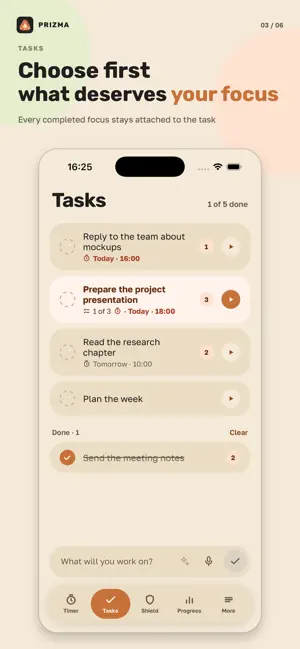
You sit down to work, and forty minutes later you're deep in a feed. Prizma closes the apps that distract you while the timer runs. Set 25 minutes and social media, video and games won't open. Time's up — they open again on their own. HOW IT WORKS 1. Pick the apps that pull you away — websites too, if you like. Once, on the first screen. 2. Set the time and start the timer. 3. Work. If your hand goes for one of them, iOS shows a Prizma screen with the time it opens again. Nothing is deleted, and you're not signed out of anything. The apps stay right where they are. They just don't open until the time is up. WHAT'S FREE - Closing apps twice a day - The timer itself, as often as you like - Stats, with no limit - Tasks, with due dates and steps - Dictating a task, three times a day - The Home Screen widget WHAT PRO ADDS - Closing apps with no daily limit - Strict mode: once the countdown starts, the only way out is a crystal you've earned - A schedule by weekday and by hour, so it starts on its own - Task breakdown: a language model turns what you said into a title, a due date and steps - Apps close automatically every time you start the timer TASKS, VOICE AND CRYSTALS You can dictate a task instead of typing it: your iPhone does the listening, and the audio never leaves it. The task you pick sits above the timer ring, and every countdown you finish counts toward it. You earn a crystal by letting one strict countdown run to the end, and it pays for one emergency exit — for when you really do need your phone. Crystals can't be bought: the price of leaving is measured in countdowns you finished, not in money. ALSO IN THE APP - Time left on the Lock Screen, in a Live Activity - A widget with your task list: check things off without opening the app - Ticking seconds, if you want to hear them - Dark and light themes - Stats by week and by month - Six languages PERMISSIONS AND PRIVACY Prizma works through Apple's Screen Time (Family Controls). On first launch, iOS asks you to allow it, because no app can close another app without that permission. You can take it back in Settings whenever you want. There is no account. The apps you picked and the hours you worked stay on this iPhone. For each app you choose, Apple hands Prizma an anonymous token instead of the app's name — so even Prizma doesn't know which apps you closed. The only thing that leaves the device is the text of a task, and only if you turn task breakdown on: it's off by default and it comes with Pro. Your voice never leaves your iPhone. The details are in the privacy policy. WHAT PRIZMA DOESN'T HAVE No account, no sync between devices. No iPad or Mac version. Nothing for teams or families. It can't read anyone else's Screen Time. Start with 25 minutes. Terms of Use (EULA): https://www.apple.com/legal/internet-services/itunes/dev/stdeula/ Prizma terms: https://asset1759.github.io/prizma-legal/terms-en.html Privacy Policy: https://asset1759.github.io/prizma-legal/privacy-en.html
What’s new
Version 2.0.0 · Updated August 23, 2026
Prizma 2.0 — the whole app has been rebuilt. TASKS A to-do list inside the timer: due dates, steps, a checkmark when it's done. The task you pick sits above the timer ring, and every countdown you finish counts toward it. BY VOICE You can dictate a task instead of typing it. Your iPhone does the listening, and the audio never leaves it. Three dictated tasks a day are free. TASK BREAKDOWN With Pro, a language model turns what you said into a title, a due date and steps, and shows it as a card before anything is saved. Keep it or discard it — the call is yours. HOME SCREEN WIDGET Your upcoming tasks sit right on the Home Screen — no need to open the app. You can check one off right from the widget. CRYSTALS A strict countdown you let run to the end earns a crystal, and a crystal pays for one emergency exit out of strict mode — for when you really do need your phone. They can't be bought: the price of leaving is measured in countdowns you finished, not in money. PROGRESS Today's summary, a weekly chart and your recent countdowns — each one marked honestly, finished or cut short. LOOK AND FEEL New colors, a new icon, new screens. On first launch, a short walkthrough of the app's real buttons, not pictures of them. The timer and the stats are still completely free. Closing apps is still free twice a day.
App privacy
The developer, Asset Kudaibergenov, reported these privacy practices to Apple.
Data Linked to You
The following data, which may be collected and linked to your identity, may be used for the following purposes:
- User Content: Other User Content
- Identifiers: User ID, Device ID
Used for: App Functionality
Data Not Linked to You
The following data, which may be collected but is not linked to your identity, may be used for the following purposes:
- Purchases: Purchase History
Used for: Analytics, App Functionality
Alternatives to Prizma: App Blocker & Timer
Looking for apps like Prizma: App Blocker & Timer? Here are 6 similar apps on the App Store. The highest rated is Limit screen time, apps locker (5.0/5), and all 6 are free to download.
-
 Блок - Блокировка отвлечений
-
 Limit screen time, apps locker
5.0
Limit screen time, apps locker
5.0
-
 Budli: Screen Time Pet
5.0
Budli: Screen Time Pet
5.0
-
 Barrier: Screen Time Blocker
3.0
Barrier: Screen Time Blocker
3.0
-
 Focus: твой Pomodoro
-
 App Blocker - Focus & Detox
5.0
App Blocker - Focus & Detox
5.0
| App | Rating | Price | Last updated | Compare |
|---|---|---|---|---|
| Prizma: App Blocker & Timer | – | Free | August 23, 2026 | |
| Блок - Блокировка отвлечений | – | Free | May 20, 2026 | Compare |
| Limit screen time, apps locker | 5.0 / 5 (1) | Free | Sep 25, 2026 | Compare |
| Budli: Screen Time Pet | 5.0 / 5 (1) | Free | Oct 12, 2026 | Compare |
| Barrier: Screen Time Blocker | 3.0 / 5 (2) | Free | Mar 24, 2026 | Compare |
| Focus: твой Pomodoro | – | Free | Jul 1, 2026 | Compare |
| App Blocker - Focus & Detox | 5.0 / 5 (1) | Free | Sep 25, 2026 | Compare |