

Finished: Done List & Wins
Farzin Tavakoli Productivity iPhoneiPadiPod touchMacApple Watch
Finished: Done List & Wins is a paid Productivity app for iPhone and iPad by Farzin Tavakoli. Rated 5.0/5 from 1 ratings. Requires iOS 18.0.
- Rating
- 5.0
- 1 ratings
- Price
- 0.99 USD
- on the App Store
- Size
- 18 MB
- Age 4+
- Updated
- Oct 22
- 2026 · v1.4
Screenshots



About Finished: Done List & Wins
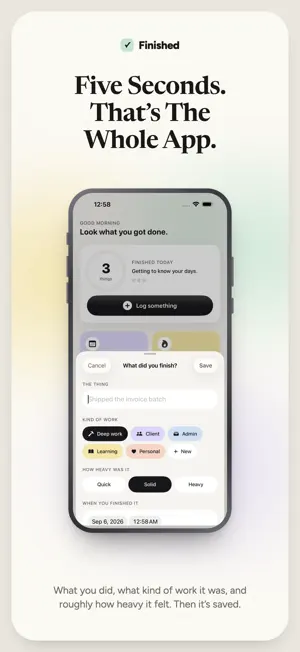
A done list, not a to-do list, and a brag doc that writes itself. Log what you finished in five seconds, then hand your manager or your client the proof. You got a lot done today. So why does it feel like you didn't? Because a to-do list only ever shows you what's left. You can finish eleven things and still end the day staring at the four you didn't get to. The list never says well done. It just gets longer. Finished works the other way round. You log what you've completed — not what's pending. There is no pending in here. No overdue. No red badges counting your failures. Just a growing record of things you actually did. By the end of the day, you can see it. By the end of the year, you can prove it. WHO THIS IS FOR • Freelancers who finish a dozen things a day and can't remember one of them by Friday • Anyone who feels unproductive despite working constantly • Anyone who keeps meaning to start a brag doc before their performance review, and never writes anything down • People with a standup or a client update to fill in HOW IT WORKS Finish something. Log it. That's the entire app. Each entry takes about five seconds: what you did, what kind of work it was, and roughly how heavy it felt. Categories are colour-coded, and they're yours — rename them, recolour them, or add your own, so your week reads in the words you actually use. WITHOUT EVEN OPENING THE APP A Home Screen widget, a Lock Screen widget, a Control Centre button, the Action Button — or just tell Siri "Log something finished" and it's saved. On Apple Watch, log a win from your wrist and keep today's count and your streak on your watch face. WHAT YOU GET Today — an honest count of what you finished, and everything behind it. No targets to miss. Timeline — every day, in order. Search the title and the note, and narrow by kind of work and by date, for the evening before you invoice: "what did I do for Acme in March?" Review — the last week, month, quarter or year, with a plain-English summary of where the effort really went. Weighted by how hard things were, not just how many boxes got ticked, with charts for how the work actually landed. Your year, finished — in December, a card of the whole thing: how much, how many days you showed up, your longest run, and your best month. Export — four ways a period leaves the app. A PDF report for a client, a CSV for invoicing, a square card to post, or plain text for a standup. Streaks — for the days you showed up, not the days you cleared a list. Reminders — one gentle nudge in the evening to log what you got done. Optional, capped at one a day, and never at night. BUILT TO BE KIND No nagging. No guilt. No productivity score judging you. Finished never shows you a number you failed to hit, because the whole point is that you already did the work. YOURS, ON EVERY DEVICE Your wins sync through your own private iCloud, with no account to make and no switch to find — your iPhone, iPad and widgets all show the same history, and your Apple Watch keeps in step through your iPhone. There's no server of ours holding your entries, we can't read what you log, and signed out of iCloud the app works exactly as it did. ONE PRICE, EVERYTHING INCLUDED Buy Finished once and it's yours. No subscription, no in-app purchases, no locked features, and nothing to upgrade to later. That means, from the moment you open it: • Unlimited history — every day you've ever logged, kept for good • Week, month, quarter and year reviews, with all three charts • PDF, CSV, share card and plain-text export • Timeline search by text, kind of work and date • Widgets, Control Centre, the Action Button and Siri • The Apple Watch app and its complications • Syncs across your devices through your own iCloud No ads. No account. No upsell. Stop measuring your day by what's left. Start seeing what you finished. Privacy Policy: https://finished.devera.app/privacy Terms of Use: https://www.apple.com/legal/internet-services/itunes/dev/stdeula/
What’s new
Version 1.4 · Updated October 22, 2026
New: Finished on Apple Watch. Log a win from your wrist, and keep today's count and your streak on your watch face. Plus small fixes and polish. Still one price, everything included.
App privacy
The developer, Farzin Tavakoli, reported these privacy practices to Apple.
Data Used to Track You
The following data may be used to track you across apps and websites owned by other companies:
- Purchases: Purchase History
- Identifiers: Device ID
Data Linked to You
The following data, which may be collected and linked to your identity, may be used for the following purposes:
- Purchases: Purchase History
- Identifiers: Device ID
Used for: Third-Party Advertising, Analytics
Data Not Linked to You
The following data, which may be collected but is not linked to your identity, may be used for the following purposes:
- Usage Data: Product Interaction
Used for: Analytics
Alternatives to Finished: Done List & Wins
Looking for apps like Finished: Done List & Wins? Here are 6 similar apps on the App Store. The highest rated is And Many More: Birthday Alerts (5.0/5), and all 6 are free to download.
-
 Zen: Habits & Accountability
-
 FocusFlip: Flip to Focus
-
 outtimer - On-Time Voice Timer
-
 And Many More: Birthday Alerts
5.0
And Many More: Birthday Alerts
5.0
-
 PaceTimer: Speech Timer
-
 Kendoshi
| App | Rating | Price | Last updated | Compare |
|---|---|---|---|---|
| Finished: Done List & Wins | 5.0 / 5 (1 rating) | 0.99 USD | October 22, 2026 | |
| Zen: Habits & Accountability | – | Free | Oct 13, 2026 | Compare |
| FocusFlip: Flip to Focus | – | Free | Oct 14, 2026 | Compare |
| outtimer - On-Time Voice Timer | – | Free | Oct 19, 2026 | Compare |
| And Many More: Birthday Alerts | 5.0 / 5 (2) | Free | Oct 24, 2026 | Compare |
| PaceTimer: Speech Timer | – | Free | Oct 8, 2026 | Compare |
| Kendoshi | – | Free | Oct 6, 2026 | Compare |