

LabelDeck
BMP Research LLC Utilities iPhoneiPadiPod touch
LabelDeck is a free Utilities app for iPhone and iPad by BMP Research LLC. Rated 5.0/5 from 2 ratings. Requires iOS 18.0. Updated August 17, 2026.
- Rating
- 5.0
- 2 ratings
- Price
- Free
- on the App Store
- Size
- 2 MB
- Age 4+
- Updated
- Aug 17
- 2026 · v1.0
Screenshots


About LabelDeck
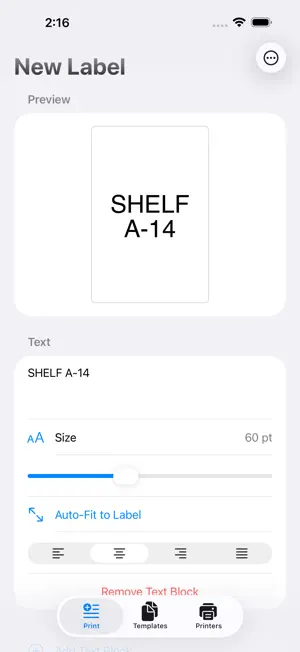
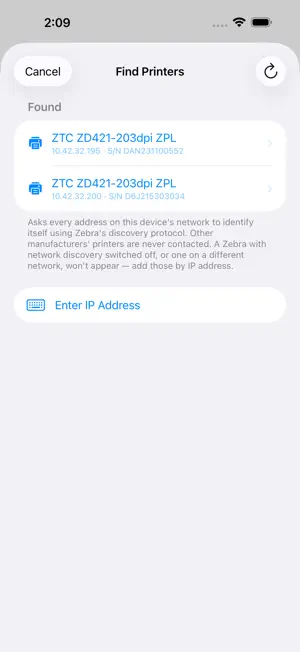
Print labels straight from your iPhone to the label printer on your network. LabelDeck speaks ZPL directly to your printer over Wi-Fi. There is no cloud service in the middle, no account to create, and nothing to install on a computer. FIND YOUR PRINTER • Sweep your network and list every label printer that answers • Or enter an IP address directly — for a printer on another subnet, or with network discovery switched off • Detect Settings asks the printer to describe itself and fills in the form, marking which values are measured facts and which are only settings • Live status: ready, out of media, head open, paused, labels remaining • Mark one printer as the default and it is preselected everywhere COMPOSE A LABEL • Multi-line text, wrapped to the printable width • Font size in points, converted against each printer's own print density — the same saved label comes out the same physical size on a 203 and a 300 dpi unit • Auto-Fit picks the largest size that still fits, allowing for a barcode • Left, center, right and justified alignment • Rotate 0°, 90°, 180° or 270° • Code 128 and QR barcodes, sized to fit automatically • 1 to 99 copies • Live preview, and the exact command stream on request before anything is sent SAVE AND REUSE Keep any label you compose and reopen it later to edit. Import labels designed elsewhere — from the printer's own storage, from a file, from the clipboard, or through the share sheet. FILL-IN-THE-BLANK FIELDS Label design software bakes the sample text you typed at design time into the export as fixed data. Normally the fix is opening the file in a text editor. LabelDeck lists every text and barcode value it finds, and you tap the ones that should be variable and name them. Printing then shows a short form of just those fields, remembers the values you used last time, and previews the filled label before sending. Labels pulled from the printer's own storage arrive with their variable fields already declared and named, so there is nothing to mark by hand. Text that no longer fits is shrunk to fit, and the app tells you which field it shrank — rather than letting a long value run off the edge of the label. PRIVACY Your labels, templates and printer list stay on your device. There is no account, no sign-in, and nothing you create is uploaded anywhere. COMPATIBILITY Requires a label printer that accepts ZPL over a raw TCP connection on your local network — including Zebra® ZD and ZT series. Bluetooth and USB-only printers are not supported. LabelDeck is an independent app and is not affiliated with, endorsed by, or sponsored by Zebra Technologies Corporation. Zebra and ZPL are trademarks of Zebra Technologies Corporation.
App privacy
The developer, BMP Research LLC, reported these privacy practices to Apple.
Data Not Collected
The developer does not collect any data from this app.
Alternatives to LabelDeck
Looking for apps like LabelDeck? Here are 6 similar apps on the App Store. The highest rated is Backfeed (5.0/5), and all 6 are free to download.


| App | Rating | Price | Last updated | Compare |
|---|---|---|---|---|
| LabelDeck | 5.0 / 5 (2 ratings) | Free | August 17, 2026 | |
| Backfeed | 5.0 / 5 (1) | Free | Sep 26, 2026 | Compare |
| EasyLabel Print | – | Free | Oct 20, 2026 | Compare |
| ZPLora: ZPL Viewer & Preflight | – | Free | Oct 19, 2026 | Compare |
| EasyUnit | – | Free | May 16, 2026 | Compare |
| ZPL Viewer | – | Free | Aug 27, 2026 | Compare |
| e-chain | – | Free | May 26, 2026 | Compare |
Compare LabelDeck with the top alternatives: ratings, updates, ASO score and keyword gaps →