

Sessagesimale – Calculator
Vittorio Spinelli Utilities iPhoneiPadiPod touchApple Watch
Sessagesimale – Calculator is a free Utilities app for iPhone and iPad by Vittorio Spinelli. Requires iOS 16.6. Updated November 13, 2026.
- Price
- Free
- on the App Store
- Size
- 3 MB
- Age 4+
- Updated
- Nov 13
- 2026 · v1.8.0
Screenshots


About Sessagesimale – Calculator
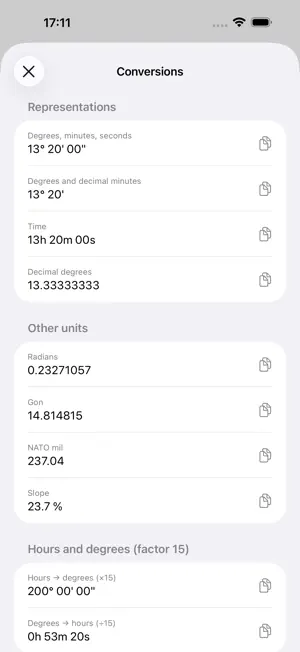
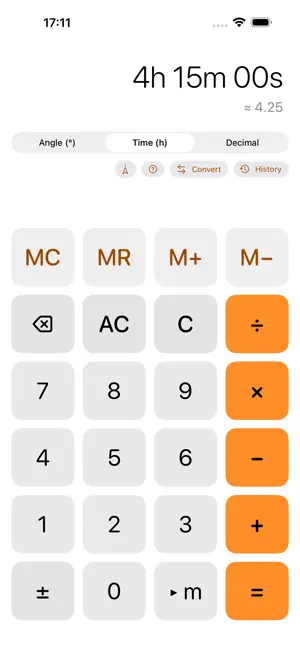
Sessagesimale is a calculator built for anyone working with base-60 values — angles, time, geographic coordinates, surveying, astronomy, and navigation. No more manual conversions between decimal and degrees/minutes/seconds: enter values exactly as you read them on a map, a measuring instrument or a stopwatch, and get the normalized result instantly. FREE, WITH AN OPTIONAL UNLOCK Download it free and get 15 calculations a day, in every mode. One purchase, no subscription, unlocks the full version: unlimited calculations, scientific functions, themes, the compass, the Apple Watch app and Shortcuts actions. If you already bought the paid app, everything is already unlocked. THREE MODES IN ONE APP • Angle (° ' ") — with two sub-formats: DMS (degrees, minutes, seconds, e.g. 40° 42' 46") and DDM (degrees and decimal minutes, e.g. 40° 42.7667'), the standard used by many GPS receivers and in maritime/aeronautical navigation. • Time (h m s) — for hours, minutes and seconds. • Decimal — for a classic calculator experience. The value converts automatically when you switch modes. Mode, DMS/DDM sub-format and memory are remembered on relaunch. NATURAL FIELD-BY-FIELD ENTRY A contextual key guides your input: tap • ' to move from degrees to minutes, • " for seconds. On seconds (or minutes in DDM) it becomes your language's decimal separator — a period in English, a comma in many other languages. The active field is always highlighted. FULL ARITHMETIC Addition and subtraction between sexagesimal values with automatic carrying (45' + 30' = 1° 15'), multiplication and division by a scalar, chained operations, repeat the last calculation with "=". Dividing by zero shows an explicit error instead of a silent, wrong result. SCIENTIFIC FUNCTIONS — FULL VERSION Sine, cosine and tangent of an angle in degrees, minutes and seconds; arcsine, arccosine and arctangent give the angle straight back in DMS or DDM (arcsine of 0.6 = 36° 52' 11.63"). Plus π, square root, square, reciprocal and haversine. CONVERSIONS PANEL One tap to see the current value in every format at once — DMS, DDM, time, decimal degrees, radians, gon, and the hours↔degrees (×15) conversion used in right ascension and time zones. Tap any row to copy it. COMPASS (IPHONE) — FULL VERSION Read the magnetic heading from your iPhone's magnetometer: a dial with the cardinal point (N, NE, E…) and the value to a tenth of a degree. Tap Use to bring it into the calculator as an angle. No permission required. NORMALIZE AND RECIPROCAL BEARING Press and hold the display in Angle mode: Normalize brings the angle into 0°–360° (−30° → 330°) and Reciprocal bearing adds 180°. MEMORY & HISTORY MC, MR, M+, M– keys with an always-visible indicator. Every calculation is added to a persistent history: tap an entry to reuse its result, swipe to delete it. Share it as text or, in the full version, as a PDF receipt, even to print, with a preview. THEMES & APPEARANCE — FULL VERSION Five colour themes in light and dark, a light/dark appearance of your choice and a seven-segment digital display, all with a live preview. Also: copy and paste (even 12:34:56), iPhone and iPad in any orientation, VoiceOver, haptics, three alternative icons. APPLE WATCH — FULL VERSION On your wrist, even without your iPhone: a calculator with all three modes (Angle, Time, Decimal), the four operations, DMS/DDM format, a history of recent calculations and a conversions panel. A compact keypad designed for the small display, with haptic feedback. The watch's history and settings are independent from those on your iPhone. SHORTCUTS — FULL VERSION Two actions for the Shortcuts app, Spotlight and Siri: Convert angle and Calculate. They run in the background, without opening the app. PRIVACY Works offline. No account, no data collection. The only connection is to the App Store, for the unlock purchase. History and memory stay on your device only.
What’s new
Version 1.8.0 · Updated November 13, 2026
New: themes and appearance in the full version. Five colour themes (Ocean, Forest, Sunset, Lavender, Graphite), each in light and dark, the choice of System/Light/Dark appearance and a seven-segment digital display: find them in the (?) menu → Themes and appearance, with a live preview. History now has a Text/Receipt/Print switch: the preview shows the paper with the calculations in columns, or two-column pages to print, and Share creates the PDF. If you already have the full version, you get everything right away, with nothing to do.
App privacy
The developer, Vittorio Spinelli, reported these privacy practices to Apple.
Data Not Collected
The developer does not collect any data from this app.
Alternatives to Sessagesimale – Calculator
Looking for apps like Sessagesimale – Calculator? Here are 6 similar apps on the App Store. The highest rated is NetPeek: WiFi Scanner (5.0/5), and all 6 are free to download.
-
 Lock Screen Calculator
-
 Pairy: Connecting Devices
-
 NetPeek: WiFi Scanner
5.0
-
 CRuler - A beautiful ruler
-
 ExPlora4D
-
 AI Real-Time Counter
5.0
| App | Rating | Price | Last updated | Compare |
|---|---|---|---|---|
| Sessagesimale – Calculator | – | Free | November 13, 2026 | |
| Lock Screen Calculator | – | Free | Nov 5, 2026 | Compare |
| Pairy: Connecting Devices | – | Free | Nov 9, 2026 | Compare |
| NetPeek: WiFi Scanner | 5.0 / 5 (2) | Free | Jul 8, 2026 | Compare |
| CRuler - A beautiful ruler | – | Free | Nov 3, 2026 | Compare |
| ExPlora4D | – | Free | Nov 9, 2026 | Compare |
| AI Real-Time Counter | 5.0 / 5 (1) | Free | Nov 8, 2026 | Compare |