

Cue Cards: AI Speech Notes
Cuer Productivity iPhoneiPadiPod touch
Cue Cards: AI Speech Notes is a free Productivity app for iPhone and iPad by Cuer. Rated 4.7/5 from 3 ratings. Requires iOS 17.0. Updated October 15, 2026.
- Rating
- 4.7
- 3 ratings
- Price
- Free
- on the App Store
- Size
- 4 MB
- Age 4+
- Updated
- Oct 15
- 2026 · v1.4.1
Screenshots


About Cue Cards: AI Speech Notes
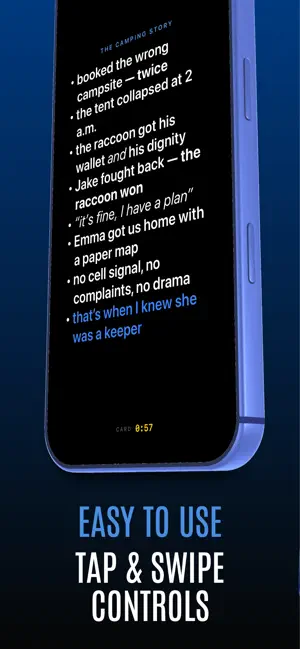
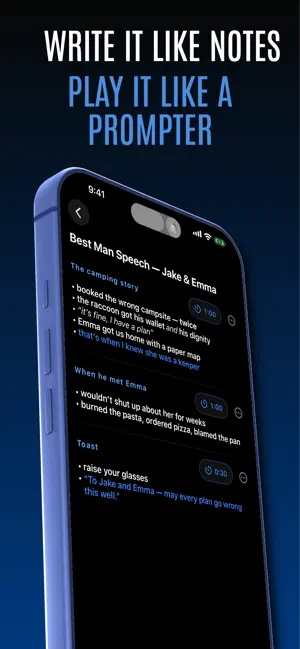
Notes apps weren't built for speaking. Cue Cards is. Free to write. Build as many decks as you like, use every editor tool, and let the on-device AI turn your notes into cards. Unlock Play once, and you can run any deck at full length forever. Write your talk as a deck of cards - one beat per card - then hit Play. Your talking points appear huge and glanceable on a black screen built for stages, podiums, and studios. Tap or swipe to move between cards. No scrolling, no losing your place, no squinting at a Google Doc. MADE FOR SPEAKING - Podcast episodes and interviews - Wedding toasts and best-man speeches - Conference talks, sermons, lectures, pitches - Anywhere you'd rather glance at beats than read a script TIMERS THAT KEEP YOU ON PACE - One continuous deck timer - count up, or count down from your time slot - Per-card timers ("this story gets 90 seconds") - Auto-time cards from your script length - The screen flashes when a card's time is up - silent, unmissable - Timer colors shift green to yellow to red as time runs down AN EDITOR THAT GETS OUT OF THE WAY - Write like a notes app; bold, italics, colors, and bullets - Paste a speech from any app and split it into cards in one tap - Reorder cards with a touch and hold - Set text size from S to XL - or pinch, mid-speech WRITE IT WITH AI, ON YOUR DEVICE - Talk it through out loud and it writes your cards for you - Paste a brief, run of show, or notes and have them formatted into cards - Or just describe the talk and get a starting deck with the timings set - Runs on your iPhone using Apple Intelligence. Nothing is sent to a server. BUILT FOR THE MOMENT - Screen stays awake while you speak - Works in portrait and landscape, iPhone and iPad - Your decks stay yours - synced through your own iCloud, never our servers. No account, no tracking, nothing to sign up for One payment unlocks Play for good. No subscription, no account, nothing to sign up for. From the team behind Cuer, the rundown software broadcast teams run their live shows on.
What’s new
Version 1.4.1 · Updated October 15, 2026
Cards can now move on by themselves. Turn on “Next card when its timer ends” under Deck timer, and any card with its own timer moves to the next card when that timer runs out. Long words no longer split across two lines on a card.
App privacy
The developer, Cuer, reported these privacy practices to Apple.
Data Not Collected
The developer does not collect any data from this app.
Alternatives to Cue Cards: AI Speech Notes
Looking for apps like Cue Cards: AI Speech Notes? Here are 6 similar apps on the App Store. The highest rated is Speaker Notes: Cue Cards (5.0/5), and all 6 are free to download.
-
 Speaker Notes: Cue Cards
5.0
Speaker Notes: Cue Cards
5.0
-
 CueBinder Notes
-
 PalmCards: Speech Cue Cards
5.0
PalmCards: Speech Cue Cards
5.0
-
 ORATI
ORATI
-
 Podium Notes
-
 Speech Writer AI: Your Words
| App | Rating | Price | Last updated | Compare |
|---|---|---|---|---|
| Cue Cards: AI Speech Notes | 4.7 / 5 (3 ratings) | Free | October 15, 2026 | |
| Speaker Notes: Cue Cards | 5.0 / 5 (1) | Free | Oct 19, 2026 | Compare |
| CueBinder Notes | – | Free | Aug 24, 2026 | Compare |
| PalmCards: Speech Cue Cards | 5.0 / 5 (1) | Free | Oct 22, 2026 | Compare |
| ORATI | – | Free | Sep 23, 2026 | Compare |
| Podium Notes | – | Free | Oct 8, 2026 | Compare |
| Speech Writer AI: Your Words | – | Free | Sep 22, 2026 | Compare |