

Stock Stats: Portfolio Tracker
Viacheslav Mukha Finance iPhoneiPadiPod touch
Stock Stats: Portfolio Tracker is a free Finance app for iPhone and iPad by Viacheslav Mukha. Requires iOS 17.0. Updated November 14, 2026.
- Price
- Free
- on the App Store
- Size
- 13 MB
- Age 4+
- Updated
- Nov 14
- 2026 · v1.0.3
Screenshots
Save to Pinterest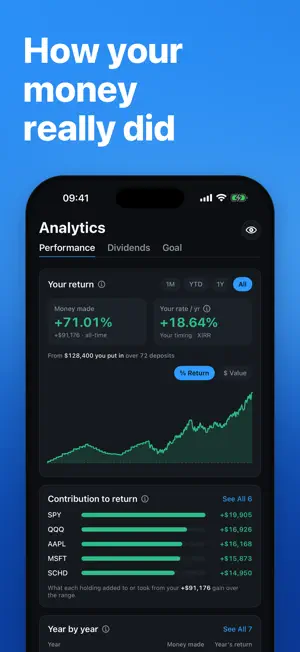


About Stock Stats: Portfolio Tracker
See how your own money really did. Stock Stats shows your profit in money and in percent and your rate per year, worked out from your own buys, sells and deposits: a deposit never counts as a gain, and the timing of every one is taken into account. Sync from Interactive Brokers or import a CSV, then see your allocation, your dividends and how close you are to your goal. No account, no ads, no AI. Your holdings stay on your iPhone. YOUR REAL PROFIT • Money made over any period, in your own currency and in percent • Your rate per year (XIRR): a money-weighted return that counts when you added cash • Contribution to return: what each holding added or took away, including positions you have closed • Year by year: money made and return for every calendar year ALLOCATION AND YOUR GOAL • Allocation by holding, by asset class or by invested capital • Goal planning: progress toward your target, projected value, an estimate of the time to get there, and what it could pay you VS THE MARKET AND RISK • Compare with the S&P 500, Nasdaq 100 or an All-World index, run through your own cash flows (same amounts, same dates), so your timing is matched like for like (Pro) • Risk in plain words: your worst drop, a typical month's swing, how far below your peak you are, and how much of your gain is locked in (Pro) DIVIDENDS • Dividends received, income per year and per month, yield, yield on cost and growth, by holding and over time • A next-12-months dividend projection built from your own payment history (Pro) GET YOUR DATA IN • Add buys, sells, dividends, deposits, withdrawals, splits and fees by hand, with ticker search • Import a CSV with guided presets for Interactive Brokers, Schwab and Fidelity, or map any other broker's file column by column • Sync from Interactive Brokers with a read-only Flex token. Statements go straight to your device, never through our servers • Holdings in different currencies, converted to your base currency with daily exchange rates • Export your transactions as CSV at any time BUILT FOR iPHONE • Home Screen and Lock Screen widgets for portfolio value and goal progress (Pro) • Face ID or Touch ID app lock (Pro) • Hide values with one tap when someone is looking over your shoulder • Dark, light or automatic appearance PRIVATE BY DESIGN • No account and no sign-in: the app works from the first launch • Your portfolio is stored on your device. Optional backup goes to your own iCloud, which we can't read • Price lookups send ticker symbols only, never amounts, portfolio contents or an account ID • Anonymous usage analytics never include your holdings, amounts or portfolio names, and you can switch them off in Settings FREE AND PRO Core tracking is free and stays complete: holdings, transactions, CSV import, Interactive Brokers sync, money made, your rate per year, dividends, goal planning and up to two portfolios. Stock Stats Pro adds the market comparison, risk insights, the dividend projection, widgets with your numbers, automatic iCloud backup, Face ID app lock, the 1-day intraday chart, earlier years in Year by year, unlimited portfolios with an all-portfolios view, and a full JSON backup export. Try every Pro feature free for 14 days. The trial starts when you first open the app and needs no payment details. After that, Pro is an auto-renewing monthly or yearly subscription that you can cancel at any time in your App Store account settings. Terms of Use: https://stockstats.pro/terms Privacy Policy: https://stockstats.pro/privacy Stock Stats is a tracking and analytics tool, not investment advice. Questions or ideas? Write to [email protected]. Every message is read by the developer.
What’s new
Version 1.0.3 · Updated November 14, 2026
• Contact Support in Settings is now Write to the Developer. Every message is read by the person who builds the app.
App privacy
The developer, Viacheslav Mukha, reported these privacy practices to Apple.
Data Linked to You
The following data, which may be collected and linked to your identity, may be used for the following purposes:
- Purchases: Purchase History
- Identifiers: Device ID
- Usage Data: Product Interaction
- Diagnostics: Other Diagnostic Data
Used for: Analytics, App Functionality
Alternatives to Stock Stats: Portfolio Tracker
Looking for apps like Stock Stats: Portfolio Tracker? Here are 6 similar apps on the App Store. The highest rated is Alpha: Wealth Tracker (5.0/5), and all 6 are free to download.
-
 Valora: Investment Log
-
 Alpha: Wealth Tracker
5.0
-
 Wealthly: Net Worth Tracker
5.0
-
 Hi Monday: Portfolio Dashboard
-
 Portfolio Journal: Tracker
-
 AI Trading Signal Profit Chart
3.3
| App | Rating | Price | Last updated | Compare |
|---|---|---|---|---|
| Stock Stats: Portfolio Tracker | – | Free | November 14, 2026 | |
| Valora: Investment Log | – | Free | Nov 3, 2026 | Compare |
| Alpha: Wealth Tracker | 5.0 / 5 (1) | Free | Sep 30, 2026 | Compare |
| Wealthly: Net Worth Tracker | 5.0 / 5 (3) | Free | Jun 29, 2026 | Compare |
| Hi Monday: Portfolio Dashboard | – | Free | Oct 29, 2026 | Compare |
| Portfolio Journal: Tracker | – | Free | Nov 12, 2026 | Compare |
| AI Trading Signal Profit Chart | 3.3 / 5 (6) | Free | Jun 9, 2026 | Compare |