

총무수첩 - Group Expense Split
Frolicsoft Corp. Finance iPhoneiPadiPod touch
총무수첩 - Group Expense Split is a free Finance app for iPhone and iPad by Frolicsoft Corp. Requires iOS 15.0. Updated October 24, 2026.
- Price
- Free
- on the App Store
- Size
- 51 MB
- Age 4+
- Updated
- Oct 24
- 2026 · v1.5.4
Screenshots

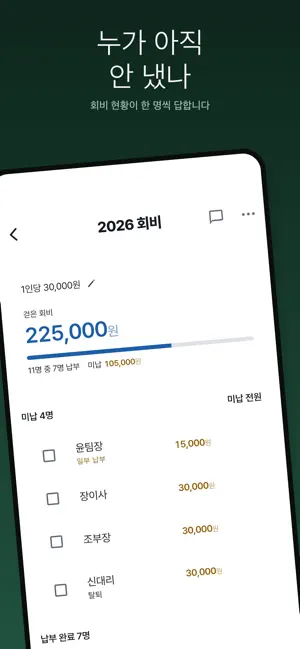


About 총무수첩 - Group Expense Split
Does the spreadsheet work, so the group's organizer doesn't have to. Golf trips, travel, team dinners, clubs — every group has one person who ends up sorting out who paid what and who owes whom. 얼마야? (How Much?) is built for that one person. ■ Participants don't need the app No one else has to install anything. Type in names and the settlement begins. Phone numbers are optional — everything calculates and shares without them. ■ Snap a receipt, and it reads the amounts Merchant, total, and line items are read for you. Nothing becomes an expense until you review and confirm it on screen — there is no auto-confirm. The original photo is kept, so if a number is ever questioned, the proof is right there. ■ Four ways to split • Equal — everyone you pick pays the same • Weighted — for a double room vs. a triple • Fixed amounts — when everyone agreed on exact numbers • Percentage — for things like a company subsidy Each expense can use a different rule. Amounts that don't divide evenly are absorbed by the person who paid, and the settlement sheet says so. ■ Send the settlement two ways One image for the group chat, and a web link. The link shows every item and who bears how much of it — so "why do I owe this?" never comes back to the organizer. Recipients need no app and no login; the link is enough. When it's all settled, the organizer can revoke the link. ■ Works for trips abroad Set an exchange rate per currency once per settlement — no retyping on every expense. Rates are frozen at the moment each expense is created, so reopening the sheet later never changes the numbers. After checking your card statement, you can reapply the actual rate explicitly. ■ If your group collects dues up front Prepayments count toward each person's balance, and leftover dues can be split per person and carried over to the next gathering. ■ Payment check-off Check off who has paid, and get a ready-made reminder message for those who haven't. Bank auto-matching is not supported — you'll still need to look at your bank account. ■ Privacy Phone numbers are optional. The web settlement link contains names and amounts only — never phone numbers. You can delete your account and data in the app at any time. Privacy policy: https://howmuch-f8e5e.web.app/privacy ■ Pricing Free, with ads. Receipt scanning is free up to 10 receipts a day; watch an ad to add more. Manual entry is unlimited. Contact: [email protected]
What’s new
Version 1.5.4 · Updated October 24, 2026
Organized club and settlement screens into clearer sections. - View expenses and receipts first, and expand participants and photos when needed. - Scan receipts and check processing, review and failure statuses near the top of the detail screen, with a shortcut to the receipt list. - Clearer sections for upcoming gatherings, dues, finances and club management. - Transfers and payment checks appear before expandable per-person calculations and original receipts. - Sections retain their expanded state when scrolling away and back. Improved date and daily-total layouts for larger text.
App privacy
The developer, Frolicsoft Corp., reported these privacy practices to Apple.
Data Linked to You
The following data, which may be collected and linked to your identity, may be used for the following purposes:
- Financial Info: Other Financial Info
- Contact Info: Email Address, Name, Phone Number
- Contacts: Contacts
- User Content: Photos or Videos, Other User Content
- Identifiers: User ID
Used for: App Functionality
Data Not Linked to You
The following data, which may be collected but is not linked to your identity, may be used for the following purposes:
- Identifiers: Device ID
- Usage Data: Advertising Data
- Diagnostics: Crash Data
Used for: Third-Party Advertising, App Functionality
Alternatives to 총무수첩 - Group Expense Split
Looking for apps like 총무수첩 - Group Expense Split? Here are 6 similar apps on the App Store.
-
 총무핏
총무핏
-
 총무님 - 스마트 모임 회비 장부
-
 Travel Treasurer
-
 Bill Splitter - Split & Settle
-
 칼정산 : 더치페이 N분의 1 모임 회비 관리
-
 모임가계부
모임가계부
| App | Rating | Price | Last updated | Compare |
|---|---|---|---|---|
| 총무수첩 - Group Expense Split | – | Free | October 24, 2026 | |
| 총무핏 | – | Free | Sep 26, 2026 | Compare |
| 총무님 - 스마트 모임 회비 장부 | – | Free | Sep 24, 2026 | Compare |
| Travel Treasurer | – | Free | Oct 26, 2026 | Compare |
| Bill Splitter - Split & Settle | – | Free | Aug 29, 2026 | Compare |
| 칼정산 : 더치페이 N분의 1 모임 회비 관리 | – | Free | May 3, 2026 | Compare |
| 모임가계부 | – | Free | Jun 5, 2024 | Compare |