

BurnClips: Run Video Overlay
TIANHUA LI Health & Fitness iPhoneiPadiPod touch
BurnClips: Run Video Overlay is a free Health & Fitness app for iPhone and iPad by TIANHUA LI. Requires iOS 15.0. Updated October 31, 2026.
- Price
- Free
- on the App Store
- Size
- 72 MB
- Age 4+
- Updated
- Oct 31
- 2026 · v1.0.2
Screenshots


About BurnClips: Run Video Overlay
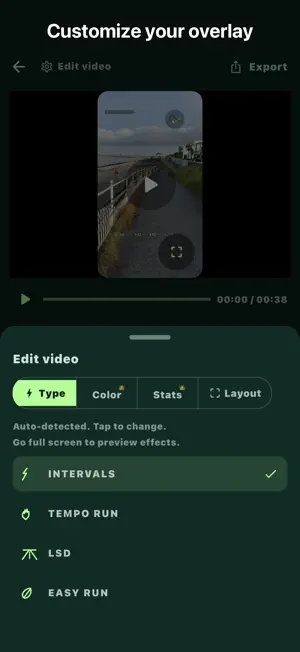
Turn your everyday running clips into engaging workout edits. BurnClips overlays your real run data (pace, heart rate, cadence and an animated GPS route map) onto your running videos, synced to the footage. Whether you're sharing a seaside jog, a race finish or a trail adventure on social media, BurnClips makes your effort visible. KEY FEATURES • Data overlay: pace, heart rate, cadence, stride, running power, ground contact time and vertical oscillation, synced to your video. • Animated route map: your GPS route traced as the video plays. • Auto-match: BurnClips finds the run that matches your video's timestamp. • Easy alignment: fine-tune timing by split with pace and heart rate charts. • Customize: run type badge, colors, stats and layout, with safe-margin presets for popular vertical video platforms. • Export at your video's original resolution (up to 4K), rendered entirely on your iPhone. HOW IT WORKS 1. Connect with Strava (read-only access to your activities). 2. Pick a running video from your Photos. 3. Confirm the matched run, align the timing, style your overlay and export. PRIVATE BY DESIGN • All video rendering happens on your iPhone. Your videos are never uploaded. • No BurnClips account required. • Disconnect anytime to revoke access and delete cached activity data from your device. FREE AND PRO Free: export up to 30 seconds with 4 fixed stats and a BurnClips watermark. BurnClips Pro: videos up to 5 minutes, no BurnClips watermark, and any 4 stats with custom colors. Pro is available as a monthly or yearly auto-renewing subscription, or as a one-time purchase. Payment is charged to your Apple ID at confirmation of purchase. Subscriptions renew automatically unless cancelled at least 24 hours before the end of the current period. Manage or cancel your subscription in your App Store account settings. Privacy Policy: https://www.burnclips.com/privacy Terms of Use:https://www.burnclips.com/terms COMPATIBILITY & LEGAL: Works with Strava®. Strava is a registered trademark of Strava, Inc. BurnClips is an independent utility developed for runners and athletes, and is not affiliated with, sponsored by, or endorsed by Strava, Inc.
What’s new
Version 1.0.2 · Updated October 31, 2026
Fixed an export error with videos recorded on iPhone 16 and later.
App privacy
The developer, TIANHUA LI, reported these privacy practices to Apple.
Data Not Linked to You
The following data, which may be collected but is not linked to your identity, may be used for the following purposes:
- Purchases: Purchase History
- Identifiers: Device ID
Used for: Analytics, App Functionality
Alternatives to BurnClips: Run Video Overlay
Looking for apps like BurnClips: Run Video Overlay? Here are 6 similar apps on the App Store. The highest rated is MemoryFy: Parent Care Helper (5.0/5), and all 6 are free to download.
-
 MemoryFy: Parent Care Helper
5.0
-
 Run With Me: Pacers & Runners
-
 Calorie Deficit & Food Diary
-
 MYBARRECLASS
-
 WorkoutGPX
5.0
-
 Bodia: Gym Fitness Routines
5.0
| App | Rating | Price | Last updated | Compare |
|---|---|---|---|---|
| BurnClips: Run Video Overlay | – | Free | October 31, 2026 | |
| MemoryFy: Parent Care Helper | 5.0 / 5 (5) | Free | Nov 3, 2026 | Compare |
| Run With Me: Pacers & Runners | – | Free | Jun 7, 2026 | Compare |
| Calorie Deficit & Food Diary | – | Free | Oct 9, 2026 | Compare |
| MYBARRECLASS | – | Free | Jan 30, 2026 | Compare |
| WorkoutGPX | 5.0 / 5 (1) | Free | Oct 18, 2026 | Compare |
| Bodia: Gym Fitness Routines | 5.0 / 5 (1) | Free | Nov 13, 2026 | Compare |