

Sumibi - AI Japanese Keyboard
kiyoka nishiyama Utilities iPhoneiPadiPod touch
Sumibi - AI Japanese Keyboard is a free Utilities app for iPhone and iPad by kiyoka nishiyama. Requires iOS 17.0. Updated October 19, 2026.
- Price
- Free
- on the App Store
- Size
- 13 MB
- Age 4+
- Updated
- Oct 19
- 2026 · v1.3.0
Screenshots

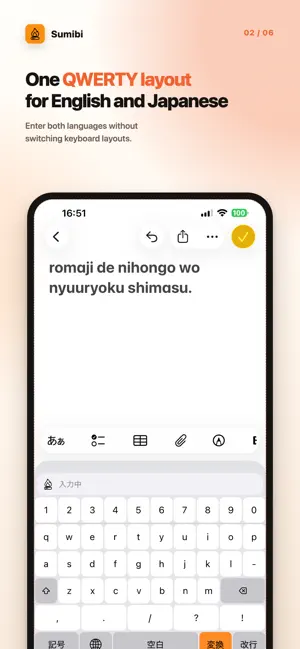


About Sumibi - AI Japanese Keyboard
Sumibi is a custom iPhone keyboard that uses AI to convert sentences typed in romaji into natural Japanese. Type with a single English QWERTY layout and tap Convert. You can enter Japanese without switching to a kana keyboard, while ordinary English typing remains available on the same keyboard. KEY FEATURES • Convert romaji sentences into natural Japanese • Use one QWERTY layout without switching to a kana keyboard • Convert only a selected range while leaving surrounding text unchanged • Request additional candidates, including different kanji and expressions with the same reading • Browse dictionary-supplemented candidates, stars, circled numbers, and other symbols • Restore the original text with Undo • Register preferred product names and proper nouns in a user dictionary • Save up to three writing-style presets for language, tone, punctuation, or formatting • Compare results with and without a writing-style prompt before saving it • Review conversion counts, token usage, and estimated API cost by model • Chat with the configured AI about Sumibi, usage, and estimated future API costs • Choose GPT-6 Sol or GPT-6 Luna, or enter a custom model name • Optionally enable four game-inspired typing and conversion effects; these are off by default • Enter numbers and symbols without leaving the Sumibi keyboard • Configure haptic feedback and key-click sounds that vary by key type REQUIREMENTS AI conversion requires an OpenAI-compatible API endpoint, model name, and API key supplied by the user. API charges and terms are determined by the selected API provider and are not included with the Sumibi download. To use network conversion, add Sumibi in iOS keyboard settings and enable Allow Full Access. Without Full Access, ordinary QWERTY typing, delete, space, return, symbols, and keyboard switching remain available, but AI conversion is disabled. PRIVACY AI conversion occurs only after the user reviews the destination and explicitly consents to sending data to the selected third-party AI service. When Convert is tapped, the selected text, the minimum surrounding context needed for conversion, the registered user dictionary, and the active writing-style prompt are sent to the displayed API endpoint. The AI chat also sends the conversation, supported settings, and on-device usage statistics. Chat responses come from AI, not a human support agent. Data does not pass through a server operated by the Sumibi developer. Sumibi does not store keystrokes, source text, the user dictionary, or API keys on a developer-operated server. The API key is stored in the device Keychain and is not synchronized through iCloud. Processing and retention by the destination service are governed by the selected API provider's terms. The app's settings interface and help text are currently in Japanese. Sumibi is open-source software.
What’s new
Version 1.3.0 · Updated October 19, 2026
• Added four optional game-inspired effects: a dragon, spaceship, cat, and wizard. Build energy as you type and release it when converting text. The effects are off by default. • Added an AI chat for help with Sumibi, usage statistics, and estimated future API costs. You can also review proposed changes to model, sound, and haptic settings. • Added model selection for GPT-6 Sol and GPT-6 Luna while preserving custom model names. • Added dictionary-supplemented homophone and symbol candidates with source labels, including “・” for “ten”, “nakaguro”, and “.”, stars for “hoshi”, and circled numbers for “maru1”. • Added original key-click sounds that vary by key type. • Fixed blurry text in the candidate bar on iOS 27 and made other usability improvements.
App privacy
The developer, kiyoka nishiyama, reported these privacy practices to Apple.
Data Linked to You
The following data, which may be collected and linked to your identity, may be used for the following purposes:
- User Content: Other User Content
- Usage Data: Product Interaction, Other Usage Data
Used for: App Functionality
Alternatives to Sumibi - AI Japanese Keyboard
Looking for apps like Sumibi - AI Japanese Keyboard? Here are 6 similar apps on the App Store.
-
 Bikey - Bilingual Typing
-
 ラク打ち 日本語入力キーボードアプリ
-
 Hype Diary
-
 MozcCo - サイズ調整できる日本語キーボード
-
 UnimeType AI Keyboard
-
 Arrowkees - アローキーズ
| App | Rating | Price | Last updated | Compare |
|---|---|---|---|---|
| Sumibi - AI Japanese Keyboard | – | Free | October 19, 2026 | |
| Bikey - Bilingual Typing | – | Free | Jun 3, 2026 | Compare |
| ラク打ち 日本語入力キーボードアプリ | – | 2.99 USD | Oct 19, 2026 | Compare |
| Hype Diary | – | Free | Jul 10, 2026 | Compare |
| MozcCo - サイズ調整できる日本語キーボード | – | Free | Oct 25, 2026 | Compare |
| UnimeType AI Keyboard | – | Free | Oct 19, 2026 | Compare |
| Arrowkees - アローキーズ | – | Free | Oct 11, 2026 | Compare |