

Cadence - Audio Transcription
Magenta Creations Productivity iPhoneiPadiPod touchMac
Cadence - Audio Transcription is a free Productivity app for iPhone and iPad by Magenta Creations. Rated 3.0/5 from 1 ratings. Requires iOS 26.0.
- Rating
- 3.0
- 1 ratings
- Price
- Free
- on the App Store
- Size
- 24 MB
- Age 4+
- Updated
- Oct 14
- 2026 · v1.7.1
Screenshots

About Cadence - Audio Transcription
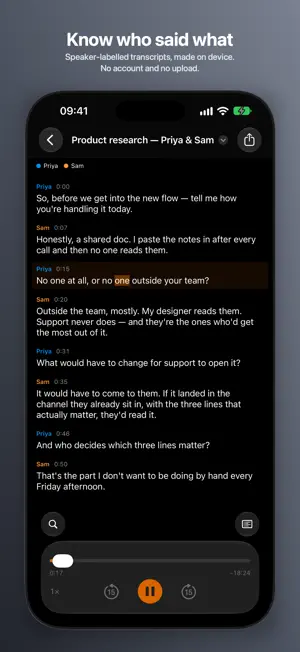
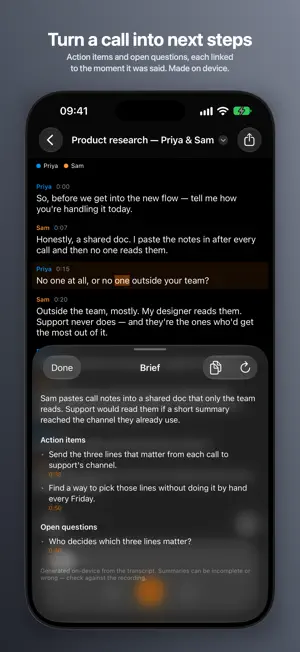
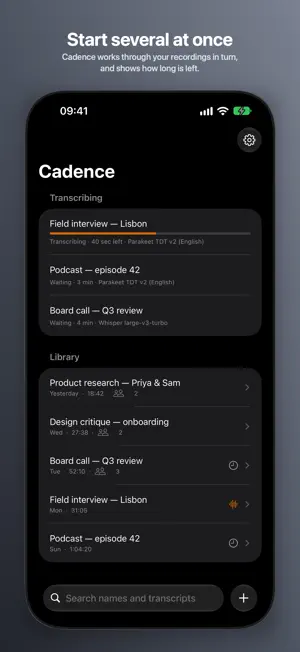
Cadence turns an audio or video recording into a timestamped transcript that knows who was speaking. It transcribes on your iPhone or iPad: no account, no upload, and no per-minute billing. Import an interview, a podcast or a meeting recording from Files, and read it back as speaker-labelled turns instead of a wall of text. WHY CADENCE • Transcribes on device, so a recording you are not allowed to upload stays with you • Two engines are free and unlimited: no trial, no watermark, no sign-up, no cap • Speaker diarization included, not a separate paid add-on • Works offline once a model is downloaded KEY FEATURES Import from Files or any app • Pick one recording or several at once, from Files or iCloud Drive • Share a recording from Voice Memos or another app, and it can start transcribing on its own • Video is transcribed from its audio track, so screen and meeting recordings work directly • Cadence keeps its own copy, so a recording still plays after the original file moves Choose your engine • Apple Speech is built into iOS, and it is the free default • Parakeet TDT v3 compact covers 25 European languages, free; full v3, Parakeet Ultra and the English-tuned v2 are Pro • Whisper large-v3-turbo for 100 languages, detected automatically (Pro) • Download a model once, and delete it in Settings when you want the space back Know who said what • Speaker diarization via pyannote Community-1, a 22 MB download • Speaker-attributed turns with timecodes, in colors shared by legend and transcript • Rename a speaker once and every turn follows • Name someone once and Cadence offers to recognize their voice in other recordings (Pro) • Tell Cadence how many speakers to expect, for the recordings that need the help Play it back and read along • Play the source from 0.75x to 2x, with each word marked as it is said • Skip back or ahead 15 seconds, and let the transcript follow playback • Tap a turn to play from there Find anything you said • Search recording names and transcript text together, accents and case folded, so "jose" finds "José" • Open a result and its matches are highlighted in the transcript • Select and copy any passage • Export to plain text and SRT, free, and save it anywhere Files can reach More room on iPad • The library and the transcript side by side, in any orientation and in Split View • Drag recordings in from Files, Voice Memos or Mail • Keyboard shortcuts for playback and find CADENCE PRO Free covers the core on two engines: Apple Speech, and Parakeet TDT v3 compact for 25 European languages. Unlimited transcription, diarization, playback and search. One purchase, with no subscription, adds: • The full-size speech models: Parakeet TDT v3 at full precision, Parakeet Ultra, the English-tuned v2, and Whisper for 100 languages • A queue, so you can start several recordings and Cadence works through them in turn • Briefs: decisions, action items and open questions, or a summary of one turn, made on device • On iPad, two models compared side by side, with the differences marked • Export to WebVTT, Markdown, JSON and CSV • The speaker library, which recognizes the people you have named in other recordings Pro is one purchase for your iPhone, your iPad and your Mac. Cadence for Mac also adds Transcribe All. WHO IT'S FOR • Researchers and journalists working through interview recordings • Podcasters checking what was said in an episode • Anyone with meeting or lecture recordings, only useful once you can tell the speakers apart PRIVACY • Cadence never uploads your audio or your transcripts • No account, no analytics, and no third-party data collection • The only network traffic is downloading models once: the speech models you choose, and the 22 MB speaker model REQUIREMENTS iPhone or iPad with iOS 26 or later. Briefs need Apple Intelligence. Keep Cadence open while a long recording transcribes.
What’s new
Version 1.7.1 · Updated October 14, 2026
Transcribing now works offline from the first recording. Speaker labels need a one-time 22 MB download; without a connection, Cadence transcribes the recording without speakers and says why, instead of failing. Transcribe again once you are online to add them. Also in this version: • A failed transcription says why, rather than "Not transcribed yet". • A recording in which the model heard no words says "No speech found", naming the model. • Cancel on a transcript stops that recording only, not the whole queue. Cancel All is in the library when several are waiting. • Deleting a recording stops its transcription. • On iPad, a recording shared from the app beside Cadence appears straight away. • A shared recording is no longer lost when the library cannot save it, for example on a full disk. It is added the next time Cadence opens. • Deleting one Parakeet TDT v3 build asks first, since it removes the other build too. • Switching recordings no longer flashes the previous transcript. • A brief being written stays with its own transcript, and Retry generates for the right one. • On iPad, the model menu ticks the model on screen. • Settings credits the speech models, as their licences ask.
App privacy
The developer, Magenta Creations, reported these privacy practices to Apple.
Data Not Collected
The developer does not collect any data from this app.
Alternatives to Cadence - Audio Transcription
Looking for apps like Cadence - Audio Transcription? Here are 6 similar apps on the App Store. The highest rated is Cadence: AI Transcription (5.0/5), and all 6 are free to download.
-
 Transcribe Here: Audio to Text
-
 Cadence: AI Transcription
5.0
Cadence: AI Transcription
5.0
-
 Karl: Voice Meeting Notes Pro
-
 Find Clarity
-
 Transcribe Private Voice Notes
3.7
Transcribe Private Voice Notes
3.7
-
 AudioScripter
| App | Rating | Price | Last updated | Compare |
|---|---|---|---|---|
| Cadence - Audio Transcription | 3.0 / 5 (1 rating) | Free | October 14, 2026 | |
| Transcribe Here: Audio to Text | – | Free | Oct 17, 2026 | Compare |
| Cadence: AI Transcription | 5.0 / 5 (1) | Free | Sep 16, 2026 | Compare |
| Karl: Voice Meeting Notes Pro | – | Free | Oct 15, 2026 | Compare |
| Find Clarity | – | Free | Sep 18, 2026 | Compare |
| Transcribe Private Voice Notes | 3.7 / 5 (3) | Free | Oct 15, 2026 | Compare |
| AudioScripter | – | Free | Oct 15, 2026 | Compare |