

Custos – Subscription Tracker
Henri Dominique Rapin Lifestyle iPhoneiPadiPod touchMacApple Watch
Custos – Subscription Tracker is a free Lifestyle app for iPhone and iPad by Henri Dominique Rapin. Requires iOS 26.0. Updated October 22, 2026.
- Price
- Free
- on the App Store
- Size
- 28 MB
- Age 4+
- Updated
- Oct 22
- 2026 · v2.2.0
Screenshots


About Custos – Subscription Tracker
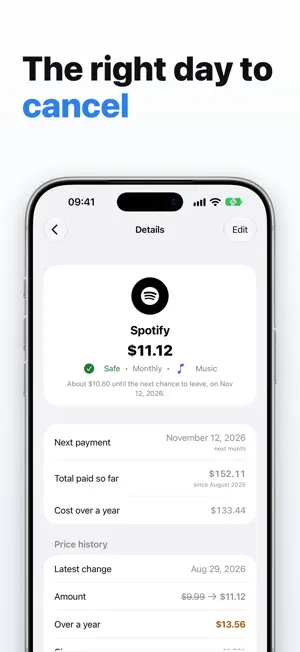
One forgotten subscription at $12 a month is $144 a year that nobody decided to spend. It is almost never the price that catches you out — it is the date. Contracts renew on their own, and the notice period expires weeks before the charge. By the time the line shows up on your statement, it is already too late. Custos watches that date. Not the payment date — the one before it, the only one you can still act on. Free, no account, no ads. YOUR SUBSCRIPTIONS ARE NOBODY ELSE'S BUSINESS Custos has no server. Your data stays on your devices and, if you turn syncing on, in your private iCloud space — which we cannot access. The app's only network traffic goes to Apple's own services. WHAT CUSTOS DOES • Warns you on the right day — The cancellation deadline, worked out from the notice period and the next payment. A notification on the exact day, plus calendar reminders at 1 month, 15 days, 7 days, 1 day and the day itself. • Tells you what it all costs — Adjusted monthly and yearly cost, whatever the billing cycle, and a breakdown by category. • Spots free trials — "Free until…" while the first payment is still ahead. A trial never inflates your monthly cost, but it does trigger the alert: that is where it has to stop you. • Writes the letter for you — Email or registered letter, ready to copy, with your details already filled in. • Keeps the proof — Date sent, channel, reference, acknowledgement. Something to point to if you get charged anyway. • Catches silent price rises — Three dollars more goes unnoticed; Custos works out what it costs over a year. • Reads your bank statement — Drop in a CSV or OFX file: Custos spots the recurring debits and suggests the subscriptions behind them. The file is read on your device, with no connection to your bank, and nothing is saved until you confirm. • Reads a screenshot of your App Store subscriptions — Photograph the Subscriptions screen in iOS Settings: Custos pulls out the names, amounts and dates. No API gives those subscriptions to a third-party app; a screenshot is the only bridge, and everything is read on the device. • Shows what is about to leave your account — This month's outgoings, split by account, and a day-by-day schedule. • Knows who pays for what — Bank accounts and subscribers, for a household or a small team. • Explains it all — Twelve illustrated chapters inside the app, on Custos and on cancellation notice periods. • Lets you leave — CSV export and a full backup, whenever you want. ON IPHONE, IPAD AND APPLE WATCH • Home Screen widgets in three sizes, and Lock Screen widgets. • Live Activity — The countdown to your next deadline on the Lock Screen and in the Dynamic Island. • Apple Watch — The watch app and its "Cancellation deadline" complication. • Siri and Shortcuts — Ask out loud for your deadlines over the next 30 days. • On iPad — The list and the details side by side, with the handbook in the left column. • Full Dark Mode, Dynamic Type and VoiceOver. • Optional iCloud sync with the Mac. Install Custos, enter your subscriptions once, and let it watch the dates for you.
What’s new
Version 2.2.0 · Updated October 22, 2026
A dashboard that gets to the point Four tiles first: this month's spending, the projection for the year, active subscriptions, possible savings. Then how your spending evolves over six months or a year, and the findings that matter: the steepest price increase, what to decide this month, what doing nothing would cost, subscriptions untouched for eighteen months. Where your money goes Your spending over a year, by category, in a ring, each share with its amount. Cash flow with its calendar This month's outgoings and what is still to be debited, then a calendar where each due date shows its subscription. Monthly and yearly, apart The list sorts your subscriptions into two sections, and filters at the top show all subscriptions, monthly ones, yearly ones or those to watch. Your subscriptions' logos Custos suggests the service's logo from its name; you accept or remove it. Without a logo, the subscription shows its initial in a black circle. A more telling detail view The total paid since the first payment and the cost over a year, right below the next payment. Categories no longer split in two After an iCloud sync, a category created on two devices keeps a single copy. A safety backup is made first. Easier to read Stronger contrast, and text that follows the size chosen in the system settings.
App privacy
The developer, Henri Dominique Rapin, reported these privacy practices to Apple.
Data Not Collected
The developer does not collect any data from this app.
Alternatives to Custos – Subscription Tracker
Looking for apps like Custos – Subscription Tracker? Here are 6 similar apps on the App Store. The highest rated is HomeCare for HomeKit (4.8/5), and 5 of the 6 are free to download.
-
 HomeCare for HomeKit
4.8
HomeCare for HomeKit
4.8
-
 HomeLights for HomeKit
4.8
HomeLights for HomeKit
4.8
-
 Hue Lights
4.1
Hue Lights
4.1
-
 Bollinger 1829
2.3
Bollinger 1829
2.3
-
 Lotus Connected
4.7
Lotus Connected
4.7
-
 Day Counter — Countdown Timer
4.7
Day Counter — Countdown Timer
4.7
| App | Rating | Price | Last updated | Compare |
|---|---|---|---|---|
| Custos – Subscription Tracker | – | Free | October 22, 2026 | |
| HomeCare for HomeKit | 4.8 / 5 (123) | 9.99 USD | Oct 23, 2026 | Compare |
| HomeLights for HomeKit | 4.8 / 5 (75) | Free | Aug 19, 2025 | Compare |
| Hue Lights | 4.1 / 5 (462) | Free | Dec 5, 2025 | Compare |
| Bollinger 1829 | 2.3 / 5 (6) | Free | Jun 30, 2026 | Compare |
| Lotus Connected | 4.7 / 5 (16) | Free | Sep 30, 2026 | Compare |
| Day Counter — Countdown Timer | 4.7 / 5 (459) | Free | Sep 25, 2026 | Compare |