

How to Say Chinese
Tomihiro Fushino Education iPhoneiPadiPod touch
How to Say Chinese is a free Education app for iPhone and iPad by Tomihiro Fushino. Requires iOS 17.0. Updated August 25, 2026.
- Price
- Free
- on the App Store
- Size
- 4 MB
- Age 4+
- Updated
- Aug 25
- 2026 · v1.0
Screenshots


About How to Say Chinese
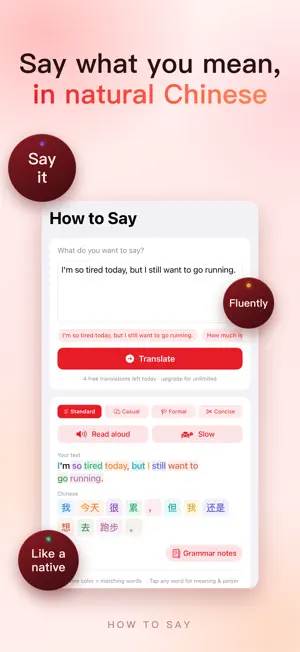
If you only want to know how to say something in Chinese, AI is enough. If you want to actually make it yours — you need How to Say. AI hands you one answer and you have forgotten it by the next sentence. How to Say turns every translation into something you really learn and keep. ▸ Say what you mean, in natural Chinese Type it in your own language and get Chinese that sounds like a person, not a textbook — in four registers at once: Standard, Casual, Formal and Concise. Pick the one that fits the moment. ▸ See exactly which word is which Your sentence and the Chinese line up word by word, color-matched, so nothing is a black box. Tap any Chinese word for its pinyin, part of speech, meaning and an example sentence. The pinyin applies real tone sandhi — the 不 / 一 and third-tone rules — so you read it the way it is actually said. Simplified or Traditional, one tap. ▸ Understand the grammar, not just the sentence One tap explains the patterns inside your own sentence: structure, meaning, examples, all in your language. The built-in grammar library covers measure words, 了 / 过 / 着, 把 and 被 sentences, 是…的, 的 / 地 / 得, complements, comparison, questions, modal verbs, word order, reduplication, tone sandhi and more. ▸ Save it, hear it, drill it until it sticks Add any word to your wordbook and review it with multiple-choice and fill-in-the-blank quizzes, with mastery tracked as you go. Listen with built-in speech and slow it down for shadowing — at the slowest setting, one character at a time. Every translation is kept in your history, with favorites for the lines you want back. Translate → see it → understand it → remember it. That loop is the part AI never gives you. 【Who it's for】 · Anyone who wants to speak natural Chinese, not just look up a translation · Beginners who need pinyin, tones and characters to finally click · Travelers, students and professionals who have to get it right · Anyone who learns best from the words they actually want to say How to Say is free to use with 5 translations a day. An optional subscription (monthly or yearly) lifts the daily limit and unlocks word practice and grammar practice. The app is available in English, Japanese, Korean, Spanish, Vietnamese, Thai and Indonesian. Start with the one thing you want to say today. Terms of Use (EULA): https://www.apple.com/legal/internet-services/itunes/dev/stdeula/ Privacy Policy: https://liaoyuchen729.github.io/howtosay-proxy/zh/privacy.html
App privacy
The developer, Tomihiro Fushino, reported these privacy practices to Apple.
Data Not Linked to You
The following data, which may be collected but is not linked to your identity, may be used for the following purposes:
- User Content: Other User Content
Used for: App Functionality
Alternatives to How to Say Chinese
Looking for apps like How to Say Chinese? Here are 6 similar apps on the App Store.
-
 Quote Feed: Facts & Trivia
-
 Tahutu - Speak Fluent with AI
-
 Sách Sao Sáng
-
 Vochi: Learn English, Feed Pet
-
 AI4IELTS: IELTS Prep with AI
-
 Cao Đài Hội
| App | Rating | Price | Last updated | Compare |
|---|---|---|---|---|
| How to Say Chinese | – | Free | August 25, 2026 | |
| Quote Feed: Facts & Trivia | – | Free | Aug 24, 2026 | Compare |
| Tahutu - Speak Fluent with AI | – | Free | May 21, 2026 | Compare |
| Sách Sao Sáng | – | Free | Aug 24, 2026 | Compare |
| Vochi: Learn English, Feed Pet | – | Free | Sep 11, 2026 | Compare |
| AI4IELTS: IELTS Prep with AI | – | Free | Oct 20, 2026 | Compare |
| Cao Đài Hội | – | Free | Feb 5, 2026 | Compare |
Compare How to Say Chinese with the top alternatives: ratings, updates, ASO score and keyword gaps →