

Kid Watch Time
Three Stars Innovations LLC Utilities iPhoneiPadiPod touch
Kid Watch Time is a free Utilities app for iPhone and iPad by Three Stars Innovations LLC. Requires iOS 16.0. Updated October 30, 2026.
- Price
- Free
- on the App Store
- Size
- 3 MB
- Age 4+
- Updated
- Oct 30
- 2026 · v1.2
Screenshots



About Kid Watch Time
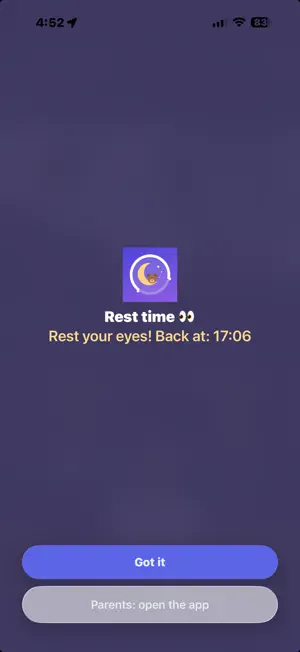
Kid Watch Time helps your child play in healthy sessions, with real breaks in between. Screen Time on iPhone and iPad can cap total daily use, but it has no idea of a "session". A child can still play for three hours straight as long as the daily allowance is not used up. Kid Watch Time adds the missing piece: play for a set time, rest for a set time, then play again. SET FOUR THINGS, THEN PRESS START • Daily limit: total play time for the day • Session length: how long one session lasts • Rest time: how long the break between sessions lasts • Bedtime and wake-up time: no managed apps in between The app then runs on its own. When a session ends, the apps you chose are locked until the rest time is over, then unlock automatically. If the device has been put aside for longer than the rest time, the next session starts fresh. BUILT FOR REAL FAMILIES • Optional lock while charging • A simple screen for your child showing the time left today and in this session • A 2-minute warning before a session ends • A parent PIN, plus a one-time recovery code • While running, apps cannot be deleted; optional locks for date & time and for device passcode changes • English and Vietnamese PRIVATE BY DESIGN No account. No pairing. No servers. Kid Watch Time does not collect any personal data. All settings stay on your child's device and work through Apple's Screen Time framework. HOW TO SET IT UP It takes two devices: yours, and the one your child plays on. 1. On your device — create a child Apple Account for your child in Family Sharing, install Kid Watch Time, and choose a plan. Turn on Purchase Sharing in your Family settings. 2. On your child's device — sign in with that child account and install Kid Watch Time. Your plan is already there. Do not buy again. 3. Tap APPS TO MANAGE. iOS will ask for a parent's Apple Account and password. This step is what keeps your child from turning the app off later. 4. Set the times, create a parent PIN, and press START. If you don't use Apple devices yourself, install Kid Watch Time straight onto your child's device and buy there. That is quicker, but on a regular Apple Account an older child can still switch the app off in Settings. The app carries the full guide, and it adapts to the device you are reading it on. PLANS Kid Watch Time offers a yearly subscription with a free trial, or a one-time Lifetime purchase. Both support Family Sharing. Payment is charged to your Apple Account when you confirm the purchase. The subscription renews automatically unless it is cancelled at least 24 hours before the end of the current period. You can manage or cancel it in your Apple Account settings. If a plan ends, the app stops monitoring and removes all limits. Terms of Use: https://www.apple.com/legal/internet-services/itunes/dev/stdeula/ Privacy Policy: https://www.threestarsinnovations.com/privacy-policy
What’s new
Version 1.2 · Updated October 30, 2026
• Stronger blocking. Some apps could still be opened after lock time — a gap in the way iOS blocks by app category. Kid Watch Time now finds those apps on its own and blocks them for good. Nothing for you to do. • No more false reminders. The "2 minutes until bedtime" alert used to appear every evening, even when the device was sitting idle with the screen off. It now appears only when your child is actually using the device. • Settings now shows how many extra apps were blocked automatically.
App privacy
The developer, Three Stars Innovations LLC, reported these privacy practices to Apple.
Data Not Collected
The developer does not collect any data from this app.
Alternatives to Kid Watch Time
Looking for apps like Kid Watch Time? Here are 6 similar apps on the App Store. The highest rated is Translator Keyboard - Language (4.7/5), and all 6 are free to download.
-
 BoltStar
-
 Hardwise: Phone Test & Checker
-
 RixorGuard: Online Privacy
4.0
-
 Weblock Browser
4.4
-
 Maps for Minecraft & Addons
4.4
-
 Translator Keyboard - Language
4.7
| App | Rating | Price | Last updated | Compare |
|---|---|---|---|---|
| Kid Watch Time | – | Free | October 30, 2026 | |
| BoltStar | – | Free | Oct 8, 2026 | Compare |
| Hardwise: Phone Test & Checker | – | Free | Nov 4, 2026 | Compare |
| RixorGuard: Online Privacy | 4.0 / 5 (4) | Free | Oct 30, 2026 | Compare |
| Weblock Browser | 4.4 / 5 (12) | Free | Oct 3, 2026 | Compare |
| Maps for Minecraft & Addons | 4.4 / 5 (18) | Free | Aug 4, 2026 | Compare |
| Translator Keyboard - Language | 4.7 / 5 (21,261) | Free | Nov 2, 2026 | Compare |
Compare Kid Watch Time with the top alternatives: ratings, updates, ASO score and keyword gaps →