

Hearthwick: Family Care Circle
Raymer Software Inc Medical iPhoneiPadiPod touch
Hearthwick: Family Care Circle is a free Medical app for iPhone and iPad by Raymer Software Inc. Requires iOS 15.0. Updated September 22, 2026.
- Price
- Free
- on the App Store
- Size
- 21 MB
- Age 12+
- Updated
- Sep 22
- 2026 · v1.6
Screenshots


About Hearthwick: Family Care Circle
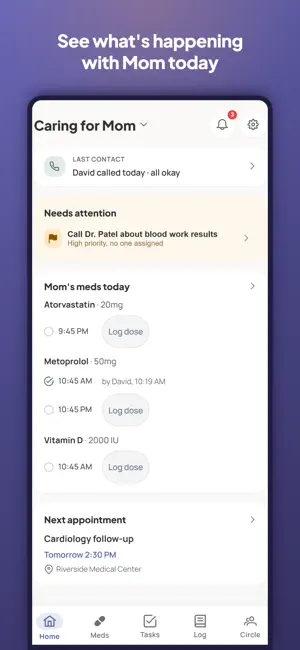
Caring for an aging parent shouldn't live in six group chats. Hearthwick gives your family one reliable place to see what needs doing, whether medications were given, who's checked in on Mom, and how the week actually went. Built for adult siblings coordinating care for Mom or Dad — including the ones who live far away. One short brief a day — only when there's news Each morning, a concise brief tells you what needs someone and what your family did: a dose that wasn't logged, a task nobody's taken, "Kevin called Mom." Nothing happened? No brief. Pick your time in Settings, or turn it off. "I called Mom" counts The sibling who phones every evening is contributing, too. Log a call, a visit, or a check-in in two taps — "all okay" or "needs a follow-up" — and the whole circle knows Mom's been talked to today. A follow-up becomes a task for the family, automatically. One circle for the whole family Create a care circle for your parent and invite your siblings and helpers by email, share link, or QR code — joining takes under a minute. Everyone sees the same tasks, medications, appointments, and notes — updated in real time on every phone. Know the meds were given Set up each medication's schedule — or mark it as-needed — and get reminders at dose time. One tap logs the dose — with who gave it and when — so nobody double-doses and nobody wonders. The dose history answers "did Mom get her evening pills on Tuesday?" in seconds, and you can export it to share with her doctor (premium). If nobody's logging for a while, reminders pause themselves instead of nagging, and one logged dose brings them back. Tasks that don't fall through the cracks Assign tasks, set due dates, and make chores like "pick up prescriptions" repeat automatically. Unassigned tasks show "help needed" so a sibling can claim them with one tap — and everyone sees who did what, which quietly keeps things fair. Ask a relative for help, not just to "join an app" Send a task as the invitation: "Can you take Mom to cardiology on Tuesday?" Your sibling opens the link, taps yes, and the task is theirs — joining the circle is the same tap. Never miss an appointment Keep every appointment — provider, location, notes — in one calendar the whole circle can see, with reminders the day before. A care log the distant sibling will love Jot quick notes about meals, mood, health, and visits. The family's shared journal becomes a weekly summary (premium) so the sibling three states away knows how the week really went — without asking anyone to repeat it. The family binder, digitized An "About Mom" page keeps her preferred name, practical notes (the door that sticks, her good ear), and the contacts every sibling ends up needing — the cardiologist, the pharmacy, the neighbor with a spare key — in one place everyone can find. Why families pick Hearthwick • Simple enough for the least-technical sibling • Real-time sync — a dose logged in one kitchen shows up in another • Attribution everywhere: who gave the dose, who finished the task, who wrote the note • Warm, calm design — this is family, not a hospital chart Hearthwick is free for your circle's core coordination: tasks, medications with reminders, appointments, check-ins, the daily brief, and the care log. Premium adds the weekly summary, med-history and care-log exports, and more. Hearthwick is a family-coordination tool, not a medical device. It does not provide medical advice and does not diagnose, treat, cure, or prevent any disease or condition. Always consult a qualified healthcare professional for medical advice, and confirm medication instructions with a doctor or pharmacist. If you enable the weekly summary, the text of your circle's care-log entries is processed by an AI service to generate it. See our Privacy Policy for details on data use, retention, and deletion. Terms of Use: https://my.hearthwick.app/terms Privacy Policy: https://my.hearthwick.app/privacy-policy
What’s new
Version 1.6 · Updated September 22, 2026
• Photos on check-ins. When you log "I called," "I visited," or "I checked in," you can attach a photo right there, like Mom's lunch or the new bird feeder, so you don't have to save first and edit. • Check-ins in your exports. The Care Log export can now be filtered to just check-ins, which gives you a clean record of who's been in touch. • Small fixes and polish. Thanks for caring together. If Hearthwick helps your family, a review helps another family find it.
App privacy
The developer, Raymer Software Inc, reported these privacy practices to Apple.
Data Linked to You
The following data, which may be collected and linked to your identity, may be used for the following purposes:
- Usage Data: Product Interaction
- Health & Fitness: Health
- Purchases: Purchase History
- Contact Info: Email Address, Name
- User Content: Photos or Videos, Other User Content
- Identifiers: User ID
Used for: Analytics, App Functionality
Alternatives to Hearthwick: Family Care Circle
Looking for apps like Hearthwick: Family Care Circle? Here are 6 similar apps on the App Store. The highest rated is Quit2Heal (5.0/5), and all 6 are free to download.
-
 Quit2Heal
5.0
-
 Private Care Pro
3.2
-
 CareCircle: Family Care App
5.0
-
 CareLedger
-
 Stress Test - Quick Test
5.0
-
 Solara: Pain Forecast
3.7
| App | Rating | Price | Last updated | Compare |
|---|---|---|---|---|
| Hearthwick: Family Care Circle | – | Free | September 22, 2026 | |
| Quit2Heal | 5.0 / 5 (1) | Free | May 29, 2026 | Compare |
| Private Care Pro | 3.2 / 5 (6) | Free | Aug 29, 2026 | Compare |
| CareCircle: Family Care App | 5.0 / 5 (1) | Free | Oct 1, 2026 | Compare |
| CareLedger | – | Free | Oct 11, 2026 | Compare |
| Stress Test - Quick Test | 5.0 / 5 (1) | Free | Aug 25, 2026 | Compare |
| Solara: Pain Forecast | 3.7 / 5 (3) | Free | Oct 21, 2026 | Compare |