

Wallet Coach: Monthly Budget
Ali Berk Alparslan Finance iPhoneiPadiPod touch
Wallet Coach: Monthly Budget is a free Finance app for iPhone and iPad by Ali Berk Alparslan. Requires iOS 17.0. Updated September 8, 2026.
- Price
- Free
- on the App Store
- Size
- 18 MB
- Age 4+
- Updated
- Sep 8
- 2026 · v2.3
Screenshots


About Wallet Coach: Monthly Budget
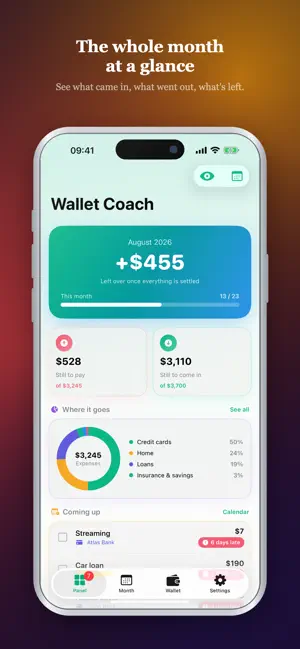
Keep your household money the way you'd keep it in a spreadsheet — on your phone, with reminders. Wallet Coach opens a page for every month. You list your credit cards, loans, household bills, insurance, subscriptions and income, then tick each line as it is paid or arrives. When the month ends, the next one copies itself in a single tap, with every tick cleared. AN EASY START The app sets up your first month with you — one income, one fixed cost, one subscription. After that every screen introduces itself the first time you open it. THE MONTHLY SHEET • The blocks are yours: credit cards, loans, home, insurance and savings, subscriptions, other spending, income. Reorder them, add your own, switch off the ones you don't keep. • Every line carries an amount, a credit-card minimum, the day of the month it falls due, and a tick box. • Enter a loan's last instalment or the month a commitment expires and the line shows how long it has left — then stops copying itself once it's done. • Paying a subscription with a card? Link the line to that card. The amount stays visible but is never counted twice. • Every block shows how it moved against last month. THE PANEL • What's left at the end of the month, what's paid, what hasn't arrived. • A ring chart showing where the money goes. • Six months of income against spending, side by side. • "Has the income landed?", what's coming due and what's about to end — tick without leaving the screen. DUE-DATE CALENDAR What falls due on which day. Marked days are ringed; late ones turn red. OWED & OWING Who owes you and who you owe. Brand and personal accounts, VAT inclusive or exclusive, whether you've invoiced yet, and partial payments. One tap closes a line when the money lands. ASSETS A flat, a car, gold, currency, funds — you value them yourself. Add what you paid and see the return four ways: nominal, adjusted for inflation, against holding dollars, against buying gold. Watching something gain on paper and lose in real terms is the whole reason the distinction exists. BACKUP Automatic to iCloud. Or keep it as a single file and restore it on a new phone. EXPORT Take any period out as a PDF report or a spreadsheet. PRIVATE MODE Tap the eye and every figure disappears. TOOLS Turn a price into working hours, keep a wish list, bring an old amount to today's money, work out net salary, check a raise, and read up on money. PRIVACY No account. Your income, spending and holdings never leave your phone; a backup goes only to your own iCloud. WALLET COACH PRO The first two months are free. Further months, PDF and spreadsheet export, unlimited assets and accounts, your own blocks and an ad-free app come with Pro. Reminders, the calendar, backup and private mode are free for everyone. Terms of Use (EULA): https://www.apple.com/legal/internet-services/itunes/dev/stdeula/ Privacy Policy: https://berkalparslan.github.io/privacy.html Available in English, Turkish, German, Spanish, French, Portuguese and Russian.
What’s new
Version 2.3 · Updated September 8, 2026
A guided start — Right after setup the app helps you put in your first three lines: one income, one fixed cost, one subscription. Skip any of them. Tours that wait for the right moment — Every screen still introduces itself the first time you open it, but a tour no longer opens over an empty screen, or behind a screen you have already moved past. Each one ends by offering to start the thing it just described. The price log explains itself — It only means something from the second entry on, so the tour now offers a worked example: one product, three dates, two shops. The hourly tool asks first — Typing a price before your income is set now says what is missing instead of answering with a meaningless number. Today's money, both ways — Bring an old amount to today, or take today's amount back to any month. Charts fold away — The breakdown and trend cards, on the panel and inside a plan, can be closed. Sorting fixed — Holding a row while a block is being sorted no longer opens a menu that fought the drag. Clearer wording from the first screen to the settings.
App privacy
The developer, Ali Berk Alparslan, reported these privacy practices to Apple.
Data Used to Track You
The following data may be used to track you across apps and websites owned by other companies:
- Identifiers: Device ID
Data Not Linked to You
The following data, which may be collected but is not linked to your identity, may be used for the following purposes:
- Identifiers: Device ID
- Usage Data: Product Interaction
Used for: Third-Party Advertising, Analytics
Alternatives to Wallet Coach: Monthly Budget
Looking for apps like Wallet Coach: Monthly Budget? Here are 6 similar apps on the App Store. The highest rated is Tarsave: Peace of Mind Budget (5.0/5), and 5 of the 6 are free to download.
-
 Envelope Budget - Fundwise
-
 BudgetBox Envelopes
-
 Tarsave: Peace of Mind Budget
5.0
Tarsave: Peace of Mind Budget
5.0
-
 Saldora: Budget & Expenses
-
 MonthBox
-
 Lifely: Envelope Budgeting
| App | Rating | Price | Last updated | Compare |
|---|---|---|---|---|
| Wallet Coach: Monthly Budget | – | Free | September 8, 2026 | |
| Envelope Budget - Fundwise | – | Free | Sep 13, 2026 | Compare |
| BudgetBox Envelopes | – | Free | Jun 20, 2026 | Compare |
| Tarsave: Peace of Mind Budget | 5.0 / 5 (1) | Free | Aug 7, 2026 | Compare |
| Saldora: Budget & Expenses | – | 9.99 USD | Aug 18, 2026 | Compare |
| MonthBox | – | Free | Feb 10, 2026 | Compare |
| Lifely: Envelope Budgeting | – | Free | Aug 26, 2026 | Compare |