

Room planner 5d - Rooma AI
Ognyan Vodenicharov Photo & Video iPhoneiPadiPod touch
Room planner 5d - Rooma AI is a free Photo & Video app for iPhone and iPad by Ognyan Vodenicharov. Requires iOS 15.1. Updated September 26, 2026.
- Price
- Free
- on the App Store
- Size
- 48 MB
- Age 4+
- Updated
- Sep 26
- 2026 · v1.0.2
Screenshots

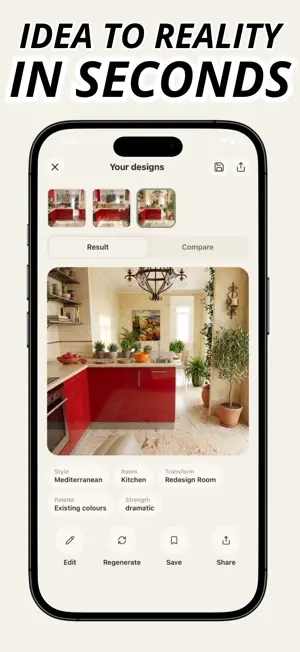


About Room planner 5d - Rooma AI
HOW TO USE ROOMA AI: 1. Select your preferences 2. Let Rooma AI customize your profile 3. Upload an image from your gallery or take a picture with your camera 4. Select your design request 5. Get instant results Design your dream home, whether its a singular room, garden, or your entire house! Rooma AI requires an active, paid subscription to generate interior design. Privacy policy: https://rooma-ai-homebase.lovable.app/privacy Terms: https://rooma-ai-homebase.lovable.app/terms Support: https://rooma-ai-homebase.lovable.app/support
What’s new
Version 1.0.2 · Updated September 26, 2026
v1.0.2 brings slight UI changes and clearer offers
App privacy
The developer, Ognyan Vodenicharov, reported these privacy practices to Apple.
Data Not Collected
The developer does not collect any data from this app.
Alternatives to Room planner 5d - Rooma AI
Looking for apps like Room planner 5d - Rooma AI? Here are 6 similar apps on the App Store. The highest rated is Remodel AI (5.0/5), and all 6 are free to download.
-
 Remodel AI
5.0
-
 Reimagine: AI Home Design
5.0
-
 PhotoLotus: AI Product Photos
-
 Best Roll – Photo Cleaner
-
 Alpen Thermal Scope
-
 Photo to Video Montage Maker
5.0
| App | Rating | Price | Last updated | Compare |
|---|---|---|---|---|
| Room planner 5d - Rooma AI | – | Free | September 26, 2026 | |
| Remodel AI | 5.0 / 5 (2) | Free | May 6, 2025 | Compare |
| Reimagine: AI Home Design | 5.0 / 5 (5) | Free | Oct 29, 2026 | Compare |
| PhotoLotus: AI Product Photos | – | Free | Jul 2, 2026 | Compare |
| Best Roll – Photo Cleaner | – | Free | Oct 13, 2026 | Compare |
| Alpen Thermal Scope | – | Free | Nov 4, 2024 | Compare |
| Photo to Video Montage Maker | 5.0 / 5 (1) | Free | Oct 12, 2026 | Compare |