

Cora — Content Planner
DANIIL POPOV Photo & Video iPhoneiPadiPod touch
Cora — Content Planner is a free Photo & Video app for iPhone and iPad by DANIIL POPOV. Requires iOS 15.0. Updated October 7, 2026.
- Price
- Free
- on the App Store
- Size
- 87 MB
- Age 4+
- Updated
- Oct 7
- 2026 · v1.0.8
Screenshots


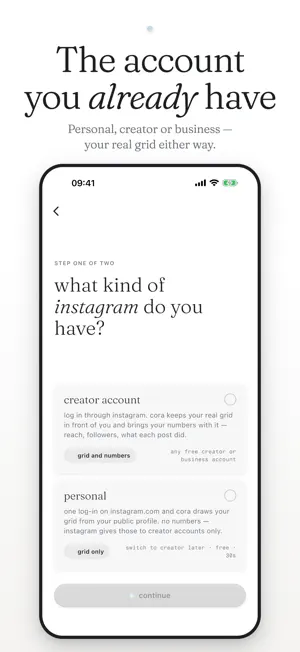
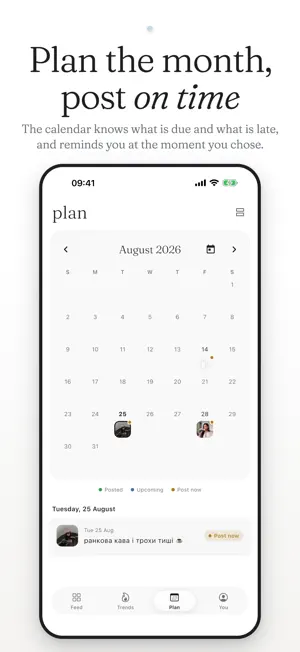
About Cora — Content Planner
Cora is where your feed gets decided before it gets posted. Build the grid, try more than one version of it, and carry each post through to the moment you publish — on the account you already have. TRY MORE THAN ONE FEED Not sure which post goes where? Save the layout and try another. Keep several versions and switch between them in a tap, pull a post out of one without touching the others, and when one of them is clearly right, apply it to your grid in a tap. Change your mind again and undo it. SEE YOUR REAL GRID, THEN CHANGE IT Your planned posts sit next to your real ones, in a profile preview that matches what visitors actually see. Drag to reorder. Hold a slot with an empty card. Try a cover. Change your mind. Nothing moves on Instagram until you say so. WORKS WITH THE ACCOUNT YOU ALREADY HAVE Personal, Creator or Business — Cora shows your real grid either way. A Creator or Business account connects in a couple of taps. A personal account needs no switching: type your handle, sign in to Instagram once, and your grid appears. Disconnect at any time. A PLAN THAT SURVIVES THE WEEK A month at a glance, or a list of what is next. Give a post a day and a time and Cora holds it — layout, caption, media, all ready. When the moment comes it tells you, copies the caption, and opens Instagram. Posting is a paste and a tap. Miss one and it waits for you instead of quietly disappearing. PLAN STORIES THAT DON'T EXPIRE Build a story as a sequence of frames — photos, text, stickers, and a private note to yourself on each one that nobody else ever sees. Reorder them. Play the whole thing through to feel the pacing. Unlike drafts inside Instagram, a Cora storyboard is still there next week. When it is time, Cora saves every frame to your camera roll and hands you the captions one at a time. TRENDS FROM REAL CREATORS Real posts by real creators: the photos or video they made, who made them, and a button that opens their Instagram. Small on purpose — it grows as we find work worth showing. CORA FREE AND CORA PRO Cora Free includes everything above, with limits: 12 dated posts at a time, two grid versions, two storyboards in progress and one Instagram account. Cora Pro lifts the limits: every post dated as far ahead as you plan, every version of your grid, every account in one place, as many storyboards as you need, and more AI help with captions. Pro is a monthly or yearly subscription, paid through your Apple ID. The yearly plan starts with a 7-day free trial for new subscribers. It renews automatically unless you cancel at least 24 hours before the current period ends; manage or cancel it in your App Store account settings. Terms of Use: https://coraplanner.com/terms Privacy Policy: https://coraplanner.com/privacy MADE FOR Anyone growing a personal account, creators shooting for brands, and small businesses that would rather plan a week in one sitting than improvise every morning. Tell us what's missing: [email protected]
What’s new
Version 1.0.8 · Updated October 7, 2026
A new start, a fuller carousel editor, and Cora Pro. • A new first run: answer three quick questions, lay out a few posts, see them on your own grid and pick the days they go out. It takes about a minute, and you can sign in at the end or later. • Carousels: every slide keeps its own text, a photo can sit on a slide as a layer, slides take the cover's shape, and each one can be re-framed and reordered. • "Save to phone" puts a planned post on your phone, ready to post. • "Share my week" on the Plan tab makes a Story-sized card of your week. • Cora Pro: every post dated as far ahead as you plan, every version of your grid, every account in one place, as many storyboards as you need and more AI captions. • Cora Free stays free, with limits: 12 dated posts at a time, two grid versions, two storyboards and two Instagram accounts. Fixed • After a second wrong password, Cora offers a sign-in code by email. • If the Instagram sign-in window closes early, Cora says so and offers a one-tap retry. • A handle whose grid could not be read now says why. • Going back from a screen opened from a notification or a link no longer closes the app. • A photo your phone cannot open is explained instead of crashing the editor.
App privacy
The developer, DANIIL POPOV, reported these privacy practices to Apple.
Data Linked to You
The following data, which may be collected and linked to your identity, may be used for the following purposes:
- Purchases: Purchase History
- Identifiers: User ID
- Usage Data: Product Interaction, Other Usage Data
- Contact Info: Email Address, Name
- User Content: Photos or Videos, Other User Content
- Diagnostics: Crash Data, Performance Data
Used for: Analytics, App Functionality
Alternatives to Cora — Content Planner
Looking for apps like Cora — Content Planner? Here are 6 similar apps on the App Store. The highest rated is Gridder: Planner for Instagram (4.5/5), and all 6 are free to download.
-
 Griddify: Grids & Carousels
-
 Feed Master for Instagram
1.0
Feed Master for Instagram
1.0
-
 sthetic
-
 Gridder: Planner for Instagram
4.5
Gridder: Planner for Instagram
4.5
-
 Creava: Content Planner
1.0
Creava: Content Planner
1.0
-
 Bank of Memories
3.0
Bank of Memories
3.0
| App | Rating | Price | Last updated | Compare |
|---|---|---|---|---|
| Cora — Content Planner | – | Free | October 7, 2026 | |
| Griddify: Grids & Carousels | – | Free | Jul 23, 2026 | Compare |
| Feed Master for Instagram | 1.0 / 5 (11) | Free | Oct 29, 2016 | Compare |
| sthetic | – | Free | Jul 11, 2026 | Compare |
| Gridder: Planner for Instagram | 4.5 / 5 (2) | Free | Oct 8, 2026 | Compare |
| Creava: Content Planner | 1.0 / 5 (1) | Free | Aug 8, 2026 | Compare |
| Bank of Memories | 3.0 / 5 (2) | Free | Aug 21, 2024 | Compare |