

RoadMetric
Jose Santos Travel iPhoneiPadiPod touch
RoadMetric is a free Travel app for iPhone and iPad by Jose Santos. Requires iOS 17.0. Updated September 30, 2026.
- Price
- Free
- on the App Store
- Size
- 9 MB
- Age 4+
- Updated
- Sep 30
- 2026 · v2.3
Screenshots


About RoadMetric
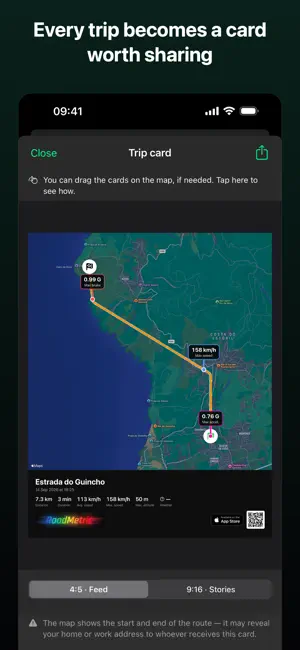
A speed reading that doesn't jump around — RoadMetric fuses GPS with your iPhone's motion sensors, so the speedometer stays smooth even between GPS fixes, in a tunnel, or under trees. Every trip is saved with its full route, G-force, altitude and stats — ready to relive point by point, export, or share as a card. LIVE DASHBOARD • Circular speed gauge with color-coded zones • Longitudinal G-force (acceleration/braking) on its own gauge • Speed, G-force and altitude charts — drag your finger to relive any point of the trip • Map with your route growing live • Configurable widgets — choose what shows and in what order TRIP HISTORY • Full route map, with point-by-point playback • Stats: distance, duration, average and maximum speed • Export to GPX or KML • Create a shareable trip card with your highlights (top speed, acceleration, braking) • 30-day recycle bin for accidentally deleted trips HANDS ON THE WHEEL • CarPlay: speed, G-force, distance, altitude and trip time on your car's screen • Start, pause and end a trip from CarPlay, Siri, or a Shortcut • HUD mode — large mirrored speed, to read off your windscreen at night CUSTOMIZATION • km/h or mph • Light, dark, or system appearance • Available in Portuguese, English (US/UK), Spanish, French, Italian, German, Japanese, Simplified Chinese, Brazilian Portuguese, Dutch, Korean, Traditional Chinese, Polish, Turkish, Romanian, Hungarian, Ukrainian, and Greek • 8 visual themes — seven of them with completely redesigned speed and G-force gauges • Home Screen and Lock Screen widgets — your last trip, or the one in progress, without opening the app RoadMetric Premium (monthly or annual subscription; annual includes a 14-day free trial) unlocks: • Record and save your trips • Automatic trip-start detection, without touching your phone (preview) • Assisted GPS — sensor fusion for smoother speed and route • Barometric altitude — steadier readings between GPS fixes • Live Activity — distance and trip time on the Lock Screen, with pause/end controls (preview) • Automatic trip sync across all your devices • Encrypted iCloud backups • Restore backups from iCloud • Picture in Picture — your speed in a floating window over another app (preview) Read our privacy policy for full details on how we handle your location. Terms of Use (EULA): https://www.apple.com/legal/internet-services/itunes/dev/stdeula/
What’s new
Version 2.3 · Updated September 30, 2026
• Launch price only until November 30: subscribe and keep it as long as your subscription stays active. • New monthly plan, alongside the annual one. • Starting December 1, the annual subscription moves to its regular price, and you'll need an active subscription to record any trip.
App privacy
The developer, Jose Santos, reported these privacy practices to Apple.
Data Not Collected
The developer does not collect any data from this app.
Alternatives to RoadMetric
Looking for apps like RoadMetric? Here are 6 similar apps on the App Store.




| App | Rating | Price | Last updated | Compare |
|---|---|---|---|---|
| RoadMetric | – | Free | September 30, 2026 | |
| Altimeter Dashboard | – | Free | Jun 26, 2026 | Compare |
| RV-Pilot | – | Free | Aug 12, 2026 | Compare |
| DriveDome | – | Free | Jul 22, 2026 | Compare |
| GPS Trace - Track & Record | – | 3.99 USD | Sep 30, 2026 | Compare |
| Fillz | – | Free | Sep 24, 2026 | Compare |
| Velocity: Speedometer | – | Free | Sep 1, 2026 | Compare |
Compare RoadMetric with the top alternatives: ratings, updates, ASO score and keyword gaps →