

AIMeter: Usage Tracker
Miguel Angel Alvarado Lopez Utilities iPhoneiPadiPod touchApple Watch
AIMeter: Usage Tracker is a free Utilities app for iPhone and iPad by Miguel Angel Alvarado Lopez. Requires iOS 17.0. Updated October 27, 2026.
- Price
- Free
- on the App Store
- Size
- 32 MB
- Age 4+
- Updated
- Oct 27
- 2026 · v4.3.4
Screenshots



About AIMeter: Usage Tracker
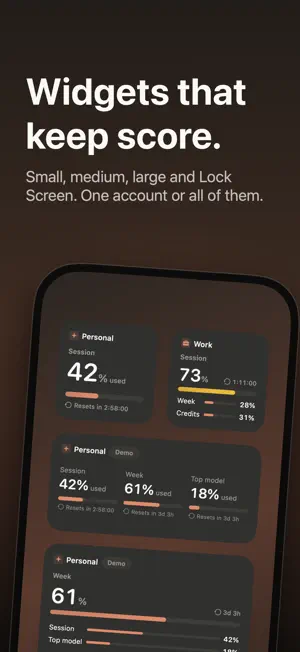
AIMeter is an open-source iOS and macOS app that shows your AI subscription usage and remaining limits right in widgets, home screen, Lock Screen, Notification Center, and the macOS menu bar. It covers the session, weekly, and top-model weekly usage windows of your subscription, and lets you connect more than one account. The architecture is provider-agnostic, so more AI providers can be added over time. FEATURES - Home screen and Lock Screen widgets showing all your usage windows with grouped reset countdowns, refreshed automatically in the background. - A History chart for every account: the percent of each limit used over the last day, week, or month, with every reset marked, plus a small 24-hour trace on each dashboard row. - A macOS menu bar gauge and matching Notification Center widgets, fed continuously by the menu bar app. Pick the style: gauge, number, bar, battery, or two or three windows side by side, with an optional reset countdown. - A "Single Limit" widget for tracking just one number: session, weekly, a specific model limit, or usage credits. - An all-accounts widget, and account nicknames that follow through to widgets and notifications. - Dashboard with your plan badge, per-window reset countdowns, and a fullscreen landscape mode on iPhone. - Detail screen with raw provider data and usage credits, plus a forecast card that projects which windows may run out early. - Optional smart notifications: reset reminders, near-limit warnings, limit-reached alerts, early pace warnings, and early-reset alerts, all off by default and toggled individually. - Service status: when the provider reports an incident, you see it on the dashboard instead of a confusing error. - Keyboard shortcuts on the Mac, and "Refresh Usage" and "Show Usage" actions for the Shortcuts app on both platforms. - On the Mac, optional and off by default: see how many tokens your local coding sessions used. Only token counts are read from the local logs, never your conversations. - Configurable background refresh cadence, with widgets keeping the last known data when a fetch fails. - In English, Spanish, German, French, Japanese, Korean, Brazilian Portuguese and Simplified Chinese, following your device language. PRIVACY BY DESIGN AIMeter is pure SwiftUI with no dependencies, no server, and no analytics. The only network traffic is HTTPS to your provider's own API for your usage data, one anonymous check of its public status page, the standard OAuth sign-in flow on iOS, and a daily check for a new version on the Mac. Your credentials stay in the device Keychain and are never sent anywhere else. The full source code is available for anyone to review. REQUIREMENTS iOS 17+ or macOS 14+, and an eligible AI subscription. On macOS, AIMeter can reuse the login the provider's command-line tool already keeps on your Mac. On iOS, you sign in once directly in the app. Disclaimer: AIMeter is an independent, open-source project and is not affiliated with, endorsed by, or sponsored by any AI provider. It relies on an undocumented usage endpoint that may change or disappear at any time.
What’s new
Version 4.3.4 · Updated October 27, 2026
May today feel a little lighter. AIMeter 4.3.4 makes room for everyone. With a larger text size, or in German or French, the cards rearrange themselves instead of running off the screen, and turning your iPhone sideways keeps Settings and Refresh at hand. In each account's settings every alert now says what sets it off, the sign-in alert names the service that needs you, and VoiceOver gets larger touch targets, section headings and the history chart as an audio graph.
App privacy
The developer, Miguel Angel Alvarado Lopez, reported these privacy practices to Apple.
Data Not Collected
The developer does not collect any data from this app.
Alternatives to AIMeter: Usage Tracker
Looking for apps like AIMeter: Usage Tracker? Here are 6 similar apps on the App Store. The highest rated is AppHunt - Global pricing (5.0/5), and 5 of the 6 are free to download.
-
 DropRoost: App & In-App Prices
-
 Odysseus AI - Automation Agent
2.0
Odysseus AI - Automation Agent
2.0
-
 WCHBleUart
-
 TuneWave - FM
4.8
TuneWave - FM
4.8
-
 GPT Box - Pure
3.7
GPT Box - Pure
3.7
-
 AppHunt - Global pricing
5.0
AppHunt - Global pricing
5.0
| App | Rating | Price | Last updated | Compare |
|---|---|---|---|---|
| AIMeter: Usage Tracker | – | Free | October 27, 2026 | |
| DropRoost: App & In-App Prices | – | Free | Oct 20, 2026 | Compare |
| Odysseus AI - Automation Agent | 2.0 / 5 (1) | Free | Oct 2, 2026 | Compare |
| WCHBleUart | – | Free | Jul 22, 2024 | Compare |
| TuneWave - FM | 4.8 / 5 (32) | Free | Jul 19, 2024 | Compare |
| GPT Box - Pure | 3.7 / 5 (9) | Free | Feb 26, 2025 | Compare |
| AppHunt - Global pricing | 5.0 / 5 (3) | 0.99 USD | Aug 9, 2026 | Compare |