

wmux - Workspace for AI agents
Wooyoung Kim Developer Tools iPhoneiPadiPod touch
wmux - Workspace for AI agents is a free Developer Tools app for iPhone and iPad by Wooyoung Kim. Requires iOS 18.0. Updated October 25, 2026.
- Price
- Free
- on the App Store
- Size
- 29 MB
- Age 4+
- Updated
- Oct 25
- 2026 · v1.12.1
Screenshots


About wmux - Workspace for AI agents
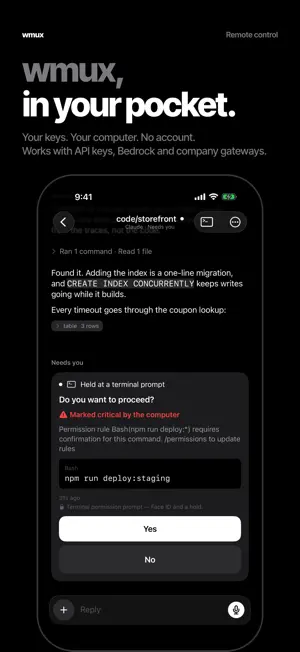
The remote app for wmux desktop. Pair with a QR code and every workspace and session on your computer is on your phone — pick up where you left off, read along, type, and answer. The free wmux desktop app (wmux.app) must be installed on your computer. It works with Windows 10/11 and macOS. Your code, shells and agents stay on your computer, not in the cloud, and there is no account. wmux never calls a model. It only mirrors the terminal on your own computer, so it works however your agents are set up there — with a personal API key, Amazon Bedrock, Google Vertex AI, a company gateway or a local model. WHAT YOU CAN DO • Watch a live terminal and type into it with a full keyboard — Esc, Tab, Ctrl and the arrows included • Read the same session as a native chat for Claude Code, Codex and OpenCode: prose, code, diffs, tables, tool calls and the images the agent worked with • Fleet shows what needs you now — permission prompts, questions and finished work to review — and Workspaces mirrors the desktop sidebar, workspace › pane › tasks • Bots lists the bots and groups wmux runs on your computer: read their conversations, send them a message, and answer their questions and approvals • Search wmux's conversations, sessions and scrollback on a computer, all at once • Answer an agent's permission prompt from the lock screen or its card — Yes takes Face ID and a hold — so a run doesn't sit idle until you are back • Answer with no signal — replies wait in a queue and go out when you are back, and a recovery center gathers anything uncertain • Send a photo or a dictated line straight into a pane • Open a pull request, squash-merge it or push from a pane's Source control • Use it on iPad too, with a readable column and a hardware keyboard • Keep the count in front of you with a Home Screen widget or a lock screen Live Activity Some features need the latest wmux on your computer. BUILT FOR A PHONE, NOT SHRUNK ONTO ONE Tables wrap to the column instead of scrolling off the edge. Code blocks stay chips until you open them. The conversation groups by speaker so one turn reads as one turn. Everything is legible at arm's length in a dark room, which is where the notification usually finds you. WHAT YOU NEED wmux running on your own Windows or Mac computer — that is where your agents live, and this app is its remote. Get it at wmux.app. Your phone pairs by scanning a QR code and reaches that computer over your Tailscale tailnet, so it works away from home too. NO COMPUTER HANDY? TRY THE DEMO Open the app and tap "Try the demo" at the bottom of the pairing screen. It opens a sample workspace — an approval waiting, three sessions, a full transcript — with nothing connected and nothing sent anywhere. PRIVACY No account. No analytics. No advertising. Your pairing credential lives in this device's Keychain and is sent only to the computer you paired with. Notification contents are sealed on that computer and opened on your phone; the relay in between cannot read them. The lock screen Live Activity carries counts only — numbers, no text — and nothing is stored anywhere along the way.
What’s new
Version 1.12.1 · Updated October 25, 2026
Fixes for conversations that froze or wouldn't scroll up, and Bypass or YOLO wherever you start an agent. • Fixed: opening some panes froze the app, and scrolling up in a conversation kept pulling you back to the bottom. • While an agent or bot works on your message, "•••" shows at the end of the conversation. • The input floats over the conversation with a clear background. • Bypass or YOLO: start without approvals from Resume on an exited agent and from New pane. It asks you to confirm, and your computer must allow it (the phone icon in wmux's status bar › Advanced › Dangerous launch). • When Claude or Codex is already running in a pane, the conversation says so instead of saying it didn't start. • Clearer messages when an agent can't start: it is signed out, or the computer doesn't allow that mode. • The Bots title sits at the top, with no empty band above the list. Choosing a mode for a new pane needs the latest wmux on your computer.
App privacy
The developer, Wooyoung Kim, reported these privacy practices to Apple.
Data Not Collected
The developer does not collect any data from this app.
Alternatives to wmux - Workspace for AI agents
Looking for apps like wmux - Workspace for AI agents? Here are 6 similar apps on the App Store. The highest rated is Tailscode: Coding Agent Remote (5.0/5), and all 6 are free to download.
-
 dev-mux: AI coding fleet mgmt
-
 Cmdora: Remote Mac Dev
-
 RootDeck
-
 Harness: Like a Boss
4.0
Harness: Like a Boss
4.0
-
 MuxAgent: Remote Coding
-
 Tailscode: Coding Agent Remote
5.0
Tailscode: Coding Agent Remote
5.0
| App | Rating | Price | Last updated | Compare |
|---|---|---|---|---|
| wmux - Workspace for AI agents | – | Free | October 25, 2026 | |
| dev-mux: AI coding fleet mgmt | – | Free | Oct 1, 2026 | Compare |
| Cmdora: Remote Mac Dev | – | Free | Jul 29, 2026 | Compare |
| RootDeck | – | Free | Oct 24, 2026 | Compare |
| Harness: Like a Boss | 4.0 / 5 (2) | Free | Oct 26, 2026 | Compare |
| MuxAgent: Remote Coding | – | Free | Apr 20, 2026 | Compare |
| Tailscode: Coding Agent Remote | 5.0 / 5 (2) | Free | Oct 17, 2026 | Compare |