

Visio Companion
极智动量(苏州)科技有限公司 Utilities iPhoneiPadiPod touch
Visio Companion is a free Utilities app for iPhone and iPad by 极智动量(苏州)科技有限公司. Rated 5.0/5 from 1 ratings. Requires iOS 15.1. Updated October 12, 2026.
- Rating
- 5.0
- 1 ratings
- Price
- Free
- on the App Store
- Size
- 41 MB
- Age 4+
- Updated
- Oct 12
- 2026 · v1.1.7
Screenshots
About Visio Companion
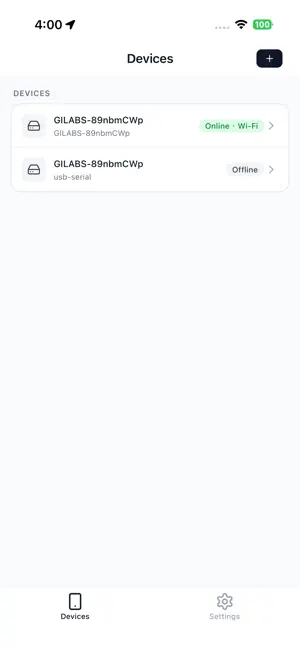
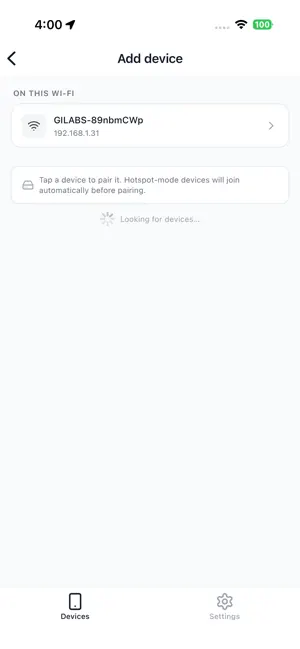
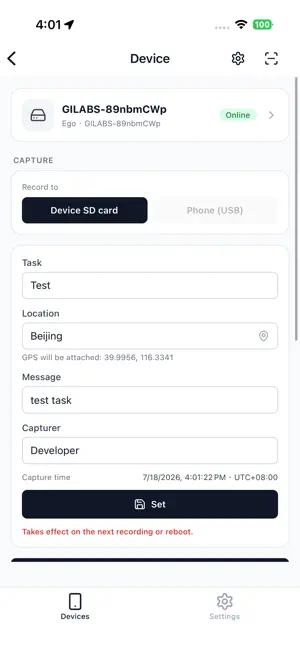
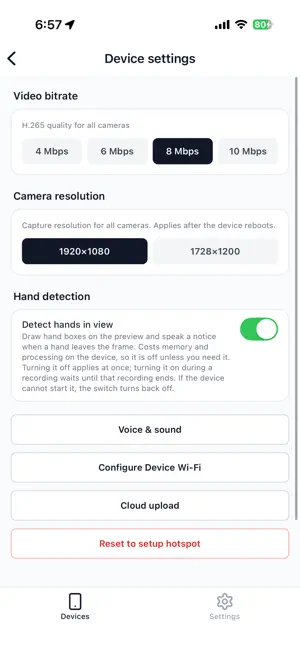
Visio Companion sets up and monitors Visio data‑capture rigs — egocentric, gripper, and glove devices. • Guided setup — connect over USB, Wi‑Fi or the device's own hotspot (Ego 1 GS can also be controlled over Bluetooth); configure storage, Wi‑Fi, and capture settings, or scan a settings QR — live or from your photo album — to provision in seconds. Uploads go to your own AWS S3, Aliyun OSS, Tencent COS, Google Cloud Storage, or Azure Blob. • Live preview — watch every camera plus live IMU orientation streamed from the device, with optional on-device hand detection drawing hand boxes and speaking a notice when a hand leaves the frame. • Recordings — browse on‑device recordings and their upload status, copy them to your phone, or record directly to your phone. Location tagging can be switched off in Settings. • Firmware updates — check for and install the latest device firmware over the air. • Support — report a problem with a device in one tap, or request a repair and follow its status in the app. Visio Companion talks to your device over a local link (USB, Wi‑Fi or Bluetooth). No account required.
What’s new
Version 1.1.7 · Updated October 12, 2026
New • Correct stereo calibration — Device settings → Correct stereo calibration: hold the device and look slowly around a richly textured room. The app measures the rotation between the two cameras, checks that the correction is an improvement, then applies and saves it to the device in one tap. The page shows when the calibration was last updated (firmware 1.1.7). • Attach a recording to a problem report or repair request — pick it from the device in the app; it is copied to the phone first, then uploaded (optional, up to 512 MiB per file). • Repair follow-up — after submitting a repair request, add notes, photos or self-test results, update your contact details and address, and see the full history. • Report a problem is now also in Settings → Support, where you can pick a device or type the number on its label. Improved • Live preview now starts closed — tap "Show live preview" to open it. Preview and cloud upload share the device's wireless bandwidth, so uploads are faster with preview closed (firmware 1.1.7). • While the phone is on the device's hotspot, problem reports and repair requests also try to go out over mobile data; if sending fails they are kept on the phone and retried when the app opens. Required logs go first, optional recordings follow. • A repair request can continue even when the scanned device's details cannot be looked up yet. • The self-test no longer records video or audio; it only reads each stream's counters and the device log. • When the SD card is nearly full and the device refuses to start recording, the app explains why and suggests waiting for uploads to finish or deleting some recordings (firmware 1.1.7). • A recording interrupted by power loss now shows as "Saving…" in the list instead of "Repairing…". • The "Describe" step of a repair request is now optional (a short note is still needed when you choose "Something else"). • Scan settings now changes only the settings contained in the code and leaves the rest as they are (firmware 1.1.7). • When recording to the phone, a failure to write to the phone is reported clearly when you stop.
App privacy
The developer, 极智动量(苏州)科技有限公司, reported these privacy practices to Apple.
Data Linked to You
The following data, which may be collected and linked to your identity, may be used for the following purposes:
- Contact Info: Physical Address, Email Address, Phone Number
- User Content: Photos or Videos, Audio Data, Customer Support, Other User Content
Used for: App Functionality
Data Not Linked to You
The following data, which may be collected but is not linked to your identity, may be used for the following purposes:
- Diagnostics: Crash Data, Other Diagnostic Data
- Location: Precise Location, Coarse Location
Used for: App Functionality, Other Purposes
Alternatives to Visio Companion
Looking for apps like Visio Companion? Here are 6 similar apps on the App Store. The highest rated is Conditions Data Collection (5.0/5), and all 6 are free to download.


| App | Rating | Price | Last updated | Compare |
|---|---|---|---|---|
| Visio Companion | 5.0 / 5 (1 rating) | Free | October 12, 2026 | |
| XpJobs | – | Free | Aug 4, 2026 | Compare |
| Sensor Recorder Pro | – | Free | Sep 13, 2026 | Compare |
| Mecka | – | Free | Jul 18, 2026 | Compare |
| 宠Ai | – | Free | Sep 10, 2026 | Compare |
| Taskora by Obsora | – | Free | Jul 10, 2026 | Compare |
| Conditions Data Collection | 5.0 / 5 (3) | Free | Oct 7, 2026 | Compare |
Compare Visio Companion with the top alternatives: ratings, updates, ASO score and keyword gaps →