

CrispTone
Bernd Weber Music iPhoneiPadiPod touch
CrispTone is a free Music app for iPhone and iPad by Bernd Weber. Requires iOS 17.0. Updated September 5, 2026.
- Price
- Free
- on the App Store
- Size
- 6 MB
- Age 4+
- Updated
- Sep 5
- 2026 · v1.1
Screenshots
About CrispTone
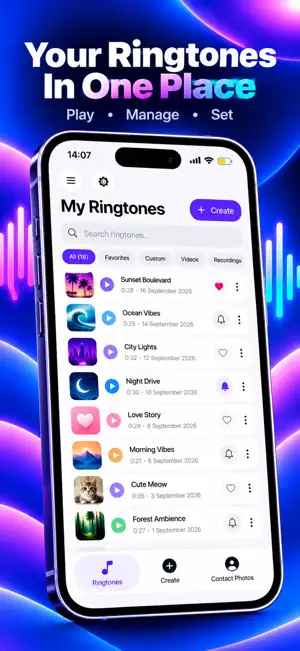
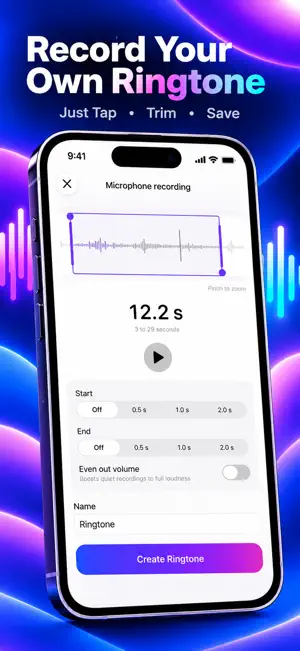
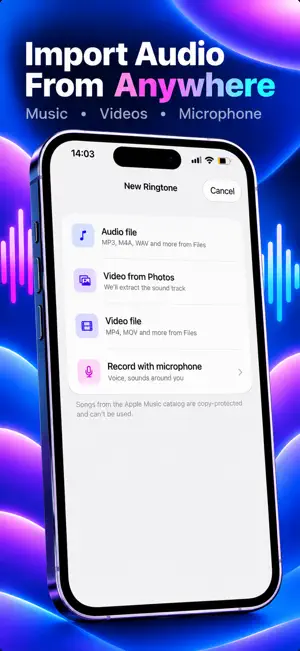
Make your iPhone sound like you. CrispTone turns your own music, videos and recordings into ringtones — right on your phone, no computer needed. HOW IT WORKS 1. Pick a source: an audio file from Files (MP3, M4A, WAV, FLAC and more), a video from your Photos library or Files (we extract the sound), or record something with the microphone. 2. Trim the best part on a real waveform: drag the markers, pinch to zoom, fine-tune with 0.1-second precision. Preview your fragment on loop while you edit. 3. Add polish: smooth fade in and fade out, one-tap volume boost for quiet recordings. 4. Install: on iOS 26 tap “Set as Ringtone” and choose “Use as Ringtone” in the standard share menu — that's it. On older iOS versions the app guides you step by step through the free GarageBand flow. WHY CRISPTONE • Works fully offline. Your files never leave your iPhone — no accounts, no analytics, no tracking. • Honest about the process: iOS doesn't let apps set ringtones silently, so we make the official way as fast as possible and never promise magic. • Precise editor with waveform, zoom and 0.1 s accuracy. • Ringtone library: rename, search, sort, favorites, share. • Bonus: bright contact avatars you can download and set for your favorite people. • Localized in 10 languages. Full dark mode and VoiceOver support. CRISPTONE PRO The core app is free: make ringtones from audio files and microphone recordings. CrispTone Pro unlocks video import — extract the soundtrack from videos in your Photos library or Files. • Weekly: 3-day free trial, then $7.99 per week • Yearly: $29.99 per year Payment is charged to your Apple Account at confirmation of purchase. Subscriptions renew automatically unless canceled at least 24 hours before the end of the current period. You can manage or cancel your subscription anytime in Settings → Apple Account → Subscriptions. Terms of Use (EULA): https://sites.google.com/view/crisptone/terms Privacy Policy: https://sites.google.com/view/crisptone/privacy
What’s new
Version 1.1 · Updated September 5, 2026
- Minor Bug Fix
App privacy
The developer, Bernd Weber, reported these privacy practices to Apple.
Data Used to Track You
The following data may be used to track you across apps and websites owned by other companies:
- Purchases: Purchase History
- Identifiers: Device ID
- Usage Data: Advertising Data
- Diagnostics: Other Diagnostic Data
Data Linked to You
The following data, which may be collected and linked to your identity, may be used for the following purposes:
- Purchases: Purchase History
- Identifiers: Device ID
- Diagnostics: Other Diagnostic Data
Used for: Third-Party Advertising, Developer’s Advertising or Marketing, Other Purposes
Data Not Linked to You
The following data, which may be collected but is not linked to your identity, may be used for the following purposes:
- Usage Data: Advertising Data
Used for: Other Purposes
Alternatives to CrispTone
Looking for apps like CrispTone? Here are 6 similar apps on the App Store. The highest rated is Surreal Machines Crack (5.0/5), and all 6 are free to download.
-
 Epic Ear
-
 Vinyl Music Player - Orbit
4.8
Vinyl Music Player - Orbit
4.8
-
 AI Music ‐ AI Song Generator
4.7
AI Music ‐ AI Song Generator
4.7
-
 Surreal Machines Crack
5.0
Surreal Machines Crack
5.0
-
 Wavepocket
4.5
Wavepocket
4.5
-
 MIDI Piano & Guitar Chords
4.5
MIDI Piano & Guitar Chords
4.5
| App | Rating | Price | Last updated | Compare |
|---|---|---|---|---|
| CrispTone | – | Free | September 5, 2026 | |
| Epic Ear | – | Free | Sep 8, 2026 | Compare |
| Vinyl Music Player - Orbit | 4.8 / 5 (11) | Free | Oct 27, 2026 | Compare |
| AI Music ‐ AI Song Generator | 4.7 / 5 (48) | Free | Sep 29, 2026 | Compare |
| Surreal Machines Crack | 5.0 / 5 (6) | Free | Oct 21, 2026 | Compare |
| Wavepocket | 4.5 / 5 (2) | Free | Aug 18, 2026 | Compare |
| MIDI Piano & Guitar Chords | 4.5 / 5 (2) | Free | Aug 14, 2026 | Compare |
Compare CrispTone with the top alternatives: ratings, updates, ASO score and keyword gaps →