

Scribe AI: Notes & Minutes
Andy Soft Productivity iPhoneiPadiPod touch
Scribe AI: Notes & Minutes is a free Productivity app for iPhone and iPad by Andy Soft. Requires iOS 26.0. Updated October 8, 2026.
- Price
- Free
- on the App Store
- Size
- 13 MB
- Age 9+
- Updated
- Oct 8
- 2026 · v1.2
Screenshots


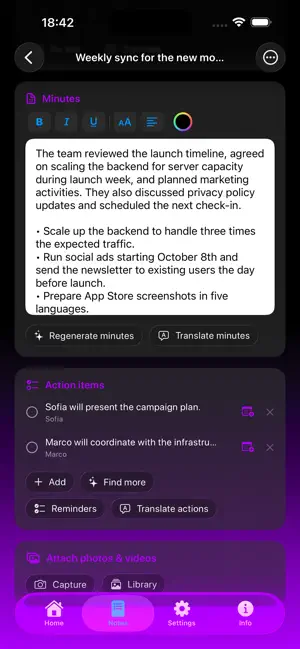
About Scribe AI: Notes & Minutes
Scribe AI is your private AI scribe: it turns voice, photos and documents into professional transcripts and minutes, privacy-first because everything runs on your device. FILL A NOTE ANY WAY YOU LIKE • App and Siri in 10 languages (EN, IT, ES, FR, DE, PT, JA, ZH, RU, HI) - Note: Siri isn't available in Russian or Hindi. • Record from the mic with live transcription • Import audio or video • Scan documents with the camera (multi-page OCR) • Capture text from photos in your library • Import documents: PDF, Word, txt, md and more • Type or paste by hand FROM VOICE TO MINUTES • On-device transcription with WhisperKit • Minutes with Apple Intelligence: summary, decisions and actions • Automatic chapters and important moments • One-tap text correction ASK & AUTOMATE • Ask your notes: on-device AI chat that searches across your notes • Siri & Shortcuts: open, create and find notes by voice TRANSLATE & EXPORT • Translate minutes and transcript into several languages • Export to PDF or Markdown, enriched with photos and videos • Send action items to Reminders, get titles from Calendar • Siri & Shortcuts: open, create and find notes by voice OTHER FUNCTIONS • Ask your notes: the AI chat now searches across all your notes • Text capture: scan documents (OCR), import photos and documents (PDF, Word, txt, md) • Light/dark theme and app language selectable in-app PRIVACY • Transcription and minutes run entirely on your device • No data sent to external servers • Private sync via iCloud FREE & PREMIUM Free: recording, OCR scanning, minutes and transcript, a number of free notes. Premium (one-time): import audio/video, photos and documents, translation, rich formatting, attached photos/videos, minutes templates, correction, unlimited notes and watermark-free export.
What’s new
Version 1.2 · Updated October 8, 2026
Ready for iPhone Duo! This update brings full support for foldable displays. The interface now adapts smartly and responsively, giving you a seamless experience whether your device is closed or you're making the most of the large inner screen. • More accurate transcription: a custom vocabulary for names and terms, plus a full-audio re-pass for recordings up to 30 minutes. • Long imports are far faster and more stable: a new turbo model kicks in automatically for long files — no more freezes on multi-hour files. • Better minutes: richer, smoother summaries for long meetings, action items pulled from the minutes, and automatic transcript cleanup. • Recorded-audio tools: export and share your recording; new copy and clear buttons for the transcript and the minutes. • Download either model from Settings (best quality or turbo), plus a heads-up before very long imports. • More stability: no more processing stuck after you close the app, plus various fixes.
App privacy
The developer, Andy Soft, reported these privacy practices to Apple.
Data Not Collected
The developer does not collect any data from this app.
Alternatives to Scribe AI: Notes & Minutes
Looking for apps like Scribe AI: Notes & Minutes? Here are 6 similar apps on the App Store. The highest rated is AiScriber: Offline Transcriber (5.0/5), and all 6 are free to download.
-
 OwnNotes - Private AI Note
-
 Nine-To-Five - Simple Worktime
-
 Speech to Text: EchoScribe
-
 Segreteria Remota
-
 AiScriber: Offline Transcriber
5.0
-
 Speed2Net
| App | Rating | Price | Last updated | Compare |
|---|---|---|---|---|
| Scribe AI: Notes & Minutes | – | Free | October 8, 2026 | |
| OwnNotes - Private AI Note | – | Free | Sep 17, 2026 | Compare |
| Nine-To-Five - Simple Worktime | – | Free | Sep 11, 2026 | Compare |
| Speech to Text: EchoScribe | – | Free | Jan 13, 2026 | Compare |
| Segreteria Remota | – | Free | Sep 30, 2026 | Compare |
| AiScriber: Offline Transcriber | 5.0 / 5 (1) | Free | Sep 24, 2026 | Compare |
| Speed2Net | – | Free | Feb 23, 2026 | Compare |